 Mineforgian
Command Keys
A powerful command macro mod.
- Загрузки
- 2.6M
- Подписчики
- 403
- Обновлён
- 7 июля 2026 г.
- Лицензия
- Apache-2.0
Опубликован 12 июня 2023 г.

CommandKeys
A powerful command macro mod.








Features
- Multiple commands per macro
- Multiple macros per keybind
- Optional delay timing between commands
- Efficient keybind conflict management with modifier key support
- Five modes:
- Send all commands when the key is pressed
- Cycle through commands, one per keypress
- Repeat on a configurable interval
- Select a random message and send
- Type the command in chat, but don't send it
- Profiles with automatic switching based on server address or world name
- Fully custom GUI for easy configuration
 |
 |
 |
Usage
Profiles
Automatic Switching
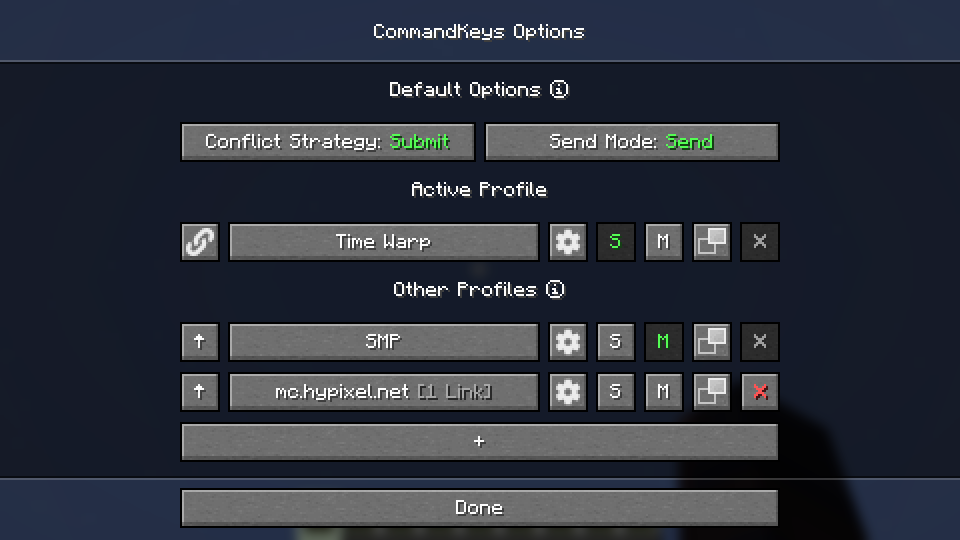
- When you join a world/server, the name/address will be checked against the list of profiles. If there is a profile linked to that world/server, it will be activated. Otherwise, the default profile will be used.
- Use the
SandMbuttons to make a profile the default for singleplayer or multiplayer.
Manual Switching
- To activate a profile manually, click the up-arrow button on the left.
- Click the link button to link the profile to the world/server for future automatic activation.
- Click the settings button to rename the profile or remove links.
Macros
Access
- Edit a profile by clicking the large button on the profile selection screen, or by pressing the
edit key
(default:
K) in-game.
Binding Keys
- You can bind almost any keyboard key or mouse button to a macro, similar to Minecraft's own Controls. However, you can also bind any pair of keys; just press one while holding the other ( e.g. press 'T' while holding 'Shift').
Conflict Strategy
- If a key is already in use by Minecraft, you can choose a conflict strategy;
Submit: The macro will be ignored, the Minecraft keybind will function normally.Assert: The macro and the Minecraft keybind will both function.Veto: The macro will function, the Minecraft keybind will be cancelled (if possible).Avoid: The macro will not work in-game, but you can still activate it by pressing the key while on the edit screen (with nothing selected). For example, if you have a macro bound toW, pressKthenWto activate it.
Send Mode
Send: All commands for the macro will be sent. You can configure delays between commands.Type: The first command will be typed into the chat box, but not sent.Edit: A GUI will be shown to allow you to enter a replacement for the%edit%placeholder, then the first message will be sent.Cycle: The commands will be cycled through, with one command sent each time you press the key.- Note: In
Cyclemode, if you need more than one command to be sent for a single key-press, enter those commands into a single box, separated by pairs of commas (e.g./tick freeze,,/say Stopped). Random: A message will be chosen at random and sent each time the key is pressed.Repeat: LikeSend, but the macro will be repeated (delay is configurable) until you press the key again.
Placeholders
Simple Placeholders
%lastsent%: The most recently-sent message or command in history, if any.%lastcmd%: The most recently-sent command in history, if any.%clipboard%: The contents of the clipboard, if any.%myname%: Minecraft username.%pmsender%: The name of the sender of the most recently-received private message, if any. ( Searches max of 50).%pos%: The integer coordinates of the player (x y z).%x%: The integer X coordinate of the player. Also available for Y and Z.%lpos%: The integer coordinates of the block the player is looking at, if any. Also provides%lx%,%ly%,%lz%.
Regex Placeholders
%#(.*)%: Regex Group 1 from the most recently-received message matching the regex following the#, if any. Note: regex pattern must have at least 1 capturing group.%clipboard#(.*)%: The contents of the clipboard, if any, verified to match a regex pattern following the#. This can be used to prevent unintentional exposure of clipboard contents. E.g. use%clipboard#^-?\d+ -?\d+ -?\d+$%to only send the clipboard contents if it's formatted like a set of coordinates.%pos([FBLR])(\d+)%:%pos%but offset some number of blocks in a direction relative to the cardinal direction that the player is nearest to facing. E.g. use%posL20%to get the coordinates 20 blocks to the player's left.%x([+-]\d+)%:%x%but offset some number of blocks. E.g. use%x-10%to get the X coordinate 10 blocks to the player's West. Also available for Y and Z.%lpos([FBLR])(\d+)%: As perposabove but for the block the player is looking at, if any.%lx([+-]\d+)%: As perxabove but for the block the player is looking at, if any.
Dependencies
Fabric: Fabric API, ModMenu
NeoForge: None
Compatibility
If you encounter issues, please report on Discord or GitHub.
Contact



Ченджлог
3.103.1+26.2Релиз26.2 · 7 июля 2026 г.
- Fixed an invalid mixin configuration on NeoForge
3.103.1+26.2Релиз26.2 · 7 июля 2026 г.
- Fixed an invalid mixin configuration on NeoForge
3.102.4+26.1.2Релиз26.1, 26.1.1, 26.1.2 · 7 июля 2026 г.
- Fixed an invalid mixin configuration on NeoForge
3.102.4+26.1.2Релиз26.1, 26.1.1, 26.1.2 · 7 июля 2026 г.
- Fixed an invalid mixin configuration on NeoForge
3.103.0+26.2Релиз26.2 · 20 июня 2026 г.
- Updated to mc26.2
3.103.0+26.2Релиз26.2 · 20 июня 2026 г.
- Updated to mc26.2
3.102.3+26.1.2Релиз26.1, 26.1.1, 26.1.2 · 20 июня 2026 г.
- Reset
mcversion counter to 1 at mc1.0.0 - Removed duplicate logger names
3.102.3+26.1.2Релиз26.1, 26.1.1, 26.1.2 · 20 июня 2026 г.
- Reset
mcversion counter to 1 at mc1.0.0 - Removed duplicate logger names
Комментарии
Загружаем…