 Mineforgian
ColorfulNames
A lightweight name-color plugin for Minecraft: legacy colors, HEX colors, static gradients, GUI presets, random colors, import/export, permission defaults, economy costs, and PlaceholderAPI support. Compatible with Paper / Folia 1.21+.
Before:

After:

Name color types
| Type | Description |
|---|---|
| Legacy | Classic Minecraft colors such as &a, &b, &c, &f. |
| HEX | Modern colors such as #55F7D4 or 7F7D4. |
| Gradient | Smooth static gradients across the player name. |
| Three-color gradient | Start, middle, and end colors for richer gradients. |
| Styled | Optional bold, italic, and underline styles. |
| Preset | Server-defined colors and gradients shown in the GUI. |
| Random | Players can randomly apply one available preset or gradient. |
Core features
- GUI color menu with presets, gradients, page buttons, reset, and close.
- Direct commands for legacy colors, HEX colors, gradients, presets, random colors, import/export, and reset.
- Static gradients only: no animated color task, designed for stable long-term server use.
- Permission defaults so VIP or special groups can have their own default colors.
- Cooldown and daily limits to control how often players can change colors.
- Economy support through Vault: charge different prices for raw colors, presets, gradients, random, import, and reset.
- PlaceholderAPI support for TAB, chat formats, scoreboards, and other display plugins.
- CMI nickname support: show CMI nicknames with ColorfulNames colors.
- Chinese and English messages included.
- Paper / Folia compatible.
Player commands
| Command | Description |
|---|---|
/namecolor gui |
Open the color selection menu. |
/namecolor <color> |
Set a legacy or HEX color. |
/namecolor gradient <start> <end> [middle] [style] |
Set a static gradient name. |
/namecolor preset <id> |
Apply a server-defined preset. |
/namecolor random |
Apply a random available color or gradient. |
/namecolor export |
Export your current color setup. |
/namecolor import <value> |
Import an exported setup or raw color code. |
/namecolor reset |
Reset to the default name color. |
Aliases:
/nc
/ncolor
Admin commands
| Command | Description |
|---|---|
/namecolor get <player> |
View a player's current color code. |
/namecolor set <player> <color> |
Set a player's color. |
/namecolor reload |
Reload plugin settings, language, colors, and GUI. |
Examples
Set a green name:
/namecolor &a
Set a HEX mint color:
/namecolor 7F7D4
Set a pink-to-purple gradient:
/namecolor gradient #FF8A00 #FF2D95
Set a bold gradient:
/namecolor gradient #FF8A00 #FF2D95 l
Set a three-color gradient:
/namecolor gradient #55F7D4 #2AA9FF #A970FF
Open the GUI:
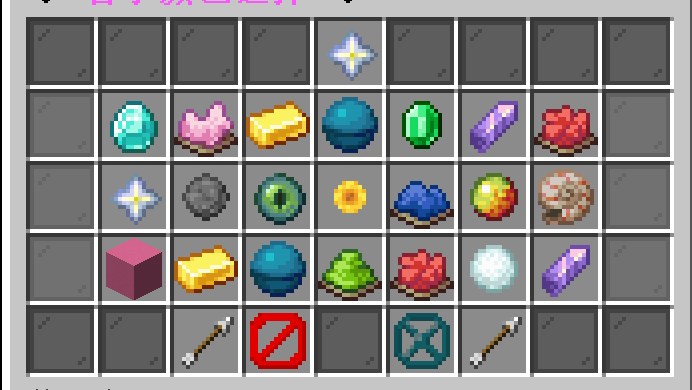
/namecolor gui
Apply a preset:
/namecolor preset aurora
Share a color setup:
/namecolor export
Import a shared setup:
/namecolor import <exported-value>
Styles
| Style | Meaning |
|---|---|
l |
Bold |
o |
Italic |
n |
Underline |
Styles can be combined:
/namecolor gradient #55F7D4 #A970FF lon
GUI
Players can open the color menu with:
/namecolor gui
The GUI can contain:
- legacy color presets
- HEX color presets
- gradient presets
- previous / next page buttons
- reset button
- close button
If the server has many colors, ColorfulNames automatically paginates them.
Permissions
| Permission | Description |
|---|---|
colorfulnames.change |
Allows players to use color-changing features. |
colorfulnames.admin.get |
Allows /namecolor get. |
colorfulnames.admin.set |
Allows /namecolor set. |
colorfulnames.admin.reload |
Allows /namecolor reload. |
Example:
/lp group default permission set colorfulnames.change true
Economy
Color changes can cost money when Vault and an economy plugin are installed.
Supported paid actions:
| Action | Description |
|---|---|
| Raw color | /namecolor <color> |
| Preset | /namecolor preset <id> or GUI preset clicks |
| Gradient | /namecolor gradient ... or GUI gradient clicks |
| Random | /namecolor random |
| Import | /namecolor import ... |
| Reset | /namecolor reset or GUI reset |
You can also give players bypass or discount permissions.
Cooldowns and limits
Servers can limit how often players change their name color.
Examples:
- change color only once every 60 seconds
- change color only 5 times per day
- allow VIP groups to use better default colors
This is useful for survival servers, economy servers, and servers where colors are used as rewards.
PlaceholderAPI
Useful placeholders:
| Placeholder | Description |
|---|---|
%colorfulnames_name% |
Colored player name. |
%colorfulnames_plain_name% |
Plain player name. |
%colorfulnames_console_name% |
Plain name for console/log output. |
%colorfulnames_code% |
Saved raw color code. |
%colorfulnames_legacy_code% |
Legacy color prefix. |
%colorfulnames_display_name% |
Current display name. |
%colorfulnames_cmi_name% |
CMI nickname with ColorfulNames color. |
%colorfulnames_cmi_console_name% |
Plain original name for console/log output. |
Test with:
/papi parse me %colorfulnames_name%
TAB and chat examples
Show a colored original name:
%colorfulnames_name%
Show a CMI nickname with ColorfulNames color:
%colorfulnames_cmi_name%
Use a plain original name for console or log formats:
%colorfulnames_console_name%
or:
%colorfulnames_cmi_console_name%
CMI nickname support
ColorfulNames can use the player's CMI nickname as the visible name while keeping the player's selected ColorfulNames color or gradient.
Example result:
✎ Nickname
The marker before nicknames can be changed or disabled by the server.
Use cases
| Use case | Example |
|---|---|
| VIP perk | VIP players get a default gradient name. |
| Cosmetic shop | Players pay coins to unlock or apply colors. |
| Events | Give limited-time seasonal colors. |
| Ranks | Higher ranks can use more colorful presets. |
| Social servers | Let players personalize chat and TAB names. |
Compatibility
| Plugin / Platform | Support |
|---|---|
| Paper | Supported |
| Folia | Supported |
| PlaceholderAPI | Supported |
| Vault | Supported |
| TAB | Supported through placeholders |
| CMI | Supported through nickname placeholders |
Languages
Included languages:
- English
- Simplified Chinese
Server owners can edit messages freely.
Notes
ColorfulNames does not include animated names. It focuses on static colors and static gradients for better stability and lower overhead.
Ченджлог
v1.1.3Релиз26.1, 26.1.1, 26.1.2 · 14 июня 2026 г.
ColorfulNames Changelog
v1.1.3-Release
CMI nickname sync
- Auto-update CMI nickname after a color change — fixes CMI still showing white names (on by default)
- Setting —
integrations.cmi.sync-nickname-on-color-change(defaulttrue) - With no custom nick, writes the ColorfulNames colored username; with a custom nick, keeps the plain text and applies the current color plus the
nickname-prefixmarker - No effect when CMI is absent or the option is disabled
v1.1.2Релиз26.1, 26.1.1, 26.1.2 · 10 июня 2026 г.
Colorful Names Changelog
v1.1.2-Release
SQLite local storage
- Third storage mode —
storage.typenow supportsyaml,sqlite, andmysql - Use case — single servers that want more reliable local storage than YAML without running MySQL
- Settings —
config.yml→storage.sqlitefile— database file name (defaultcolorfulnames.db, under the plugin data folder)table-prefix— table name prefix (defaultcolorfulnames_)pool-size— connection pool size (default1; keep at 1 for SQLite’s single-writer model)connection-timeout-ms— connection timeout in milliseconds
- Stored data — name color, favorites, color history, cooldown, and daily change limits (same fields as MySQL)
- Failover — if SQLite cannot be opened, the plugin falls back to YAML and logs an error
Data migration
/namecolor storage convert <yaml|sqlite|mysql> [--delete-source] [--switch]— migrate between all three storage types- Conversion uses the currently active storage as the source (no longer limited to yaml ↔ mysql)
- If the target matches the active type, you get a clear “no conversion needed” message
More languages
- Six new built-in language packs (
config.yml→language):zh_TWTraditional Chinesept_BRBrazilian Portugueseko_KRKoreanja_JPJapaneseru_RURussiande_DEGerman
- On upgrade, missing keys are auto-merged into
plugins/ColorfulNames/lang/*.ymlwithout replacing your whole file
v1.1.1Релиз26.1, 26.1.1, 26.1.2 · 8 июня 2026 г.
Colorful Names Changelog
v1.1.1-Release
MySQL storage & network sync
- Dual storage modes —
storage.type:yaml(localplayerdata.ymlfor single servers) ormysql(shared database, recommended for networks) - MySQL settings —
config.yml→storage.mysql: host, port, database, credentials, table prefix, pool size, SSL, and more - Stored data — current name color, favorites, change cooldown, and daily change limits
- Failover — if MySQL is unreachable, the plugin falls back to YAML and logs an error instead of failing to start
Admin commands
/namecolor storage status— show the active storage type and the value in config/namecolor storage convert <yaml|mysql> [--delete-source] [--switch]— migrate player data between YAML and MySQL--delete-source— remove data from the source after migration (use with care)--switch— writestorage.typeto config and reload after migration
- Permission:
colorfulnames.admin.storage
v1.1.0Релиз26.1, 26.1.1, 26.1.2 · 8 июня 2026 г.
Colorful Names Changelog
v1.1.0-Release
Player experience
- Current color highlight in GUI — active presets and gradients are easy to spot in the menu
- Help command —
/namecolor helpwhen players forget commands - Color favorites — save common colors and apply them in one click; dedicated favorites GUI plus commands
- Favorites GUI — customize layout and buttons in
gui/favorites.yml
Events & operations
- Holiday / limited-time event colors — auto-apply colors by date in
special-dates.yml, revert when the event ends (off by default) - Per-world / per-group default colors — different default name colors by world or LuckPerms group (off by default)
- Color change audit log — who changed what and when, for staff on management servers (off by default)
GUI customization
- Fully configurable click actions on main menu, favorites menu, and layout-based GUIs
- Bind player commands, console commands, OP commands, messages, and more
v1.0.0Релиз26.1, 26.1.1, 26.1.2 · 25 мая 2026 г.
Hello World.
Комментарии
Загружаем…