 Mineforgian
Colorful Lighting (Sodium Compat)
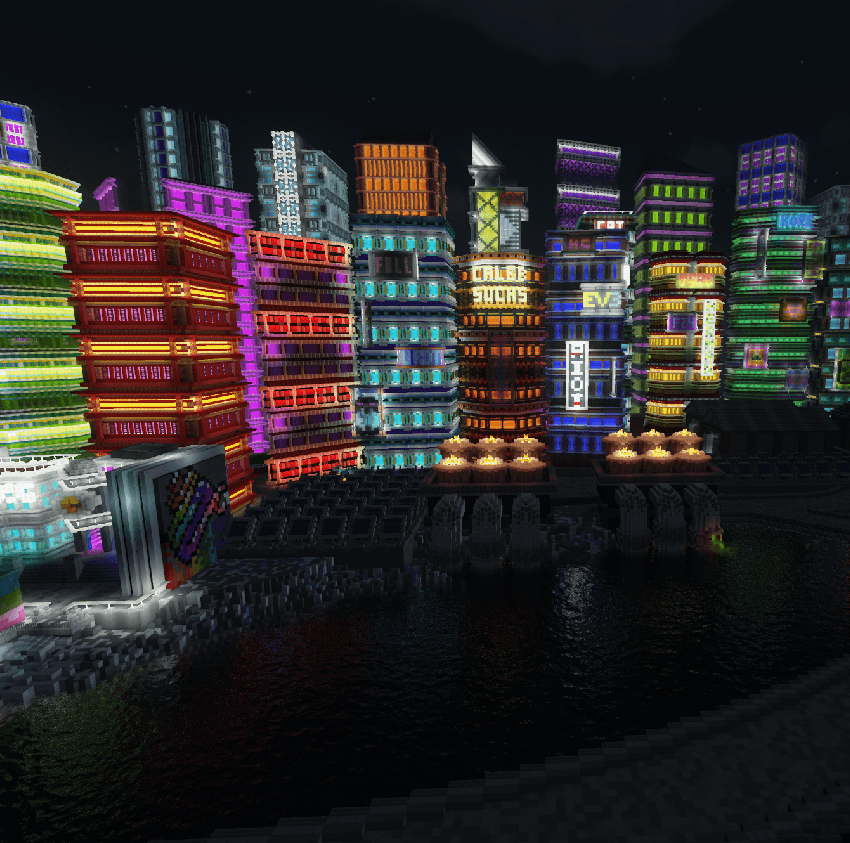
Colored Lighting that works with Embeddium/Sodium, Starlight, & more!
Обновлён 5 июля 2026 г. · опубликован 10 ноября 2025 г.
ℹ️ Fork Information
This mod is a direct fork of erykczy's Colorful Lighting. Our main goal with this fork is to extend mod compatibility for use in larger modpacks. If you find an incompatible mod, please report it on the GitHub Issues page.
❓ How It Works
This mod is built on top of Minecraft's vanilla lighting engine. It works by storing an extra set of data alongside the vanilla light levels, representing the color of the light in that block. When a light-emitting block is placed, the mod checks a list of configurable "emitters" to see if it should have a color. If it does, the color is propagated outwards, block by block, diminishing with distance, just like the vanilla engine.
When light passes through a semi-transparent block, the mod checks a list of "filters". These filters can change the color of the light passing through them. For example, red-stained glass can be configured to filter out all but the red component of light. The amount of light that is blocked can also be configured.
To avoid performance issues, all of this light propagation is handled on a separate thread, which means it won't slow down your game. The mod also uses techniques like trilinear interpolation to smooth out the colors between blocks, which creates a more natural look.
✨ Features
- Different blocks can emit different colors
- Light can change color when passing through certain blocks
- Light can be absorbed by specific blocks
- Emitted colors and filtered colors can be customized in resource packs
- Block states can define different colors
- The mod is client-side - you can play with it on ANY server while still experiencing colorful lighting!
🔗 Mod Compatibility
- Embeddium Support: Embeddium is fully compatible and a REQUIREMENT.
- Starlight Support: Works seamlessly with Starlight.
- True Darkness Support: Compatible with True Darkness.
- Oculus Support: Colorful Lighting now ships a shaderpack auto-patcher (similar to Euphoria Patches). On startup it scans your
shaderpacksfolder and creates a patched<Pack> + ColorfulLightingcopy of every recognized pack — select that copy in the Oculus shader GUI and the Colored Light Engine stays enabled. Unpatched packs still disable the engine automatically. Run/cl patchshadersto re-scan without restarting, or setautoPatchShaderpacks = falsein the client config to opt out. - Dynamic Light Mods: Most Dynamic Light mods are NOW WORKING! Lively Lighting is still the only known working Dynamic Lighting Mod compatible with the filters.json entries.
- Wakes: Reforged: Works perfectly with wakes and tints them accordingly
- Flywheel: Flywheel rendered objects now render with colorful lighting since the Colorful Lighting 2.4.0 update (tested with flywheel 1.0.5).
- Distant Horizons: Lights rendered inside LODs will not have color. This is something we are working on for a future release.
- Flerovium: Held and dropped items will appear dark. This is something we are working on for a future release.
- AsyncParticles: Particles appear dark. This is something we are working on for a future release.
- Lively Lighting: Dynamic light sources will emit light with their respective color. Fixed lingering light!
- Immersive Portals: Does not crash, but the light from the Nether will bleed into the Overworld when an immersive portal is being rendered. This may be fixed in the future.
- Ponder (Create): Ponder works fine in recent updates, no more red tint issue!
🖼️ Resource Pack Tutorial
In your resourcepack's namespace folder (where folders like textures and models are located), create a light folder. There, you can create an emitters.json file, which defines what light colors blocks emit.
emitters.json
This file defines the color of light emitted by blocks. You can specify a simple color or use a more complex object to handle block states.
Simple Format
{
          "minecraft:torch": "vanilla",               // Same color used in Vanilla lighting
    "minecraft:glowstone": "#00FF00",           // color in hex
    "minecraft:red_candle": "red",              // Minecraft dye name
    "minecraft:redstone_lamp": [0,255,255],     // RGB array
    "minecraft:soul_torch": "purple;5",         // override light level emission value after ';' is a hex number from 0 to F (F = 15)
}
Block State Format
You can define different colors for different block states.
{
    "minecraft:furnace": {
        "default": "orange",
        "states": {
            "lit=true": "red",
            "lit=false": "#000000"
        }
    }
}
filters.json
This file defines how light is colored when passing through blocks (like stained glass). You can also specify light absorption (0-15), where 0 allows all light to pass and 15 blocks all light.
Simple Format
{
    "minecraft:red_stained_glass": "#00FF00", // color in hex
    "minecraft:green_stained_glass": "red",   // dye name
    "minecraft:glass": [ 0, 255, 255 ],       // RGB array
          "minecraft:oak_door": "white;5"           // light absorption (0=full pass, 15=blocked)
}
Block State Format
Similar to emitters, filters can also depend on block states.
{
    "minecraft:stained_glass_pane": {
        "default": "white",
        "states": {
            "waterlogged=true": "blue"
        }
    },
    "minecraft:oak_door": {
    "default": "white;15",
    "states": {
      "open=true": "white;0",
      "open=false": "white;15"
    }
}
absorbers.json
This file defines which blocks will completely eat (absorb) light around them. You can define the color of light it absorbs (or white for all light) as well as how much light it absorbs.
{
	"minecraft:end_portal": "#FFFFFF;15",
	"minecraft:end_gateway": "#FFFFFF;15"
}
entities.json
Define what light color entities emit (REQUIRES LIVELY LIGHTING).
{
    "minecraft:creeper": "#00FF00", // color in hex
    "minecraft:blaze": "orange"     // dye name
}
items.json
Define what light color held items emit (REQUIRES LIVELY LIGHTING).
{
    "minecraft:torch": "#00FF00",     // color in hex
    "minecraft:lava_bucket": "orange" // dye name
}
moon_phases.json
Define a separate light intensity/vibrancy value for each moon phase.
{
  "0": 0.45,
  "1": 0.60,
  "2": 0.75,
  "3": 0.90,
  "4": 1.0,
  "5": 0.90,
  "6": 0.75,
  "7": 0.45
}
‼️ Working Shader Packs
⚠️ Known Issues/Planned Fixes
- Blocks with emissive textures don't properly propagate lighting outwards
Центр версий
11 версийЧенджлог
2.6.1Релиз1.20.1 · 5 июля 2026 г.
HUGE UPDATE!!
- Shader packs are now AUTO PATCHED (can be toggled in client config). Most of the top shader packs have been tested and confirmed to be working!
- Now compatible with most dynamic lighting mods!
- Enjoy 😄
2.6.0Релиз1.20.1 · 5 июля 2026 г.
HUGE UPDATE!!
- Shader packs are now AUTO PATCHED (can be toggled in client config). Most of the top shader packs have been tested and confirmed to be working!
2.5.2Релиз1.20.1 · 4 июля 2026 г.
- Fixed some default entries
2.5.0Релиз1.20.1 · 3 июля 2026 г.
- fixed doors (FINALLY)
- fixed flywheel instancing backend
- fixed resource loading issue to improve load times
2.4.1Релиз1.20.1 · 27 апреля 2026 г.
- Added new light absorbers (suck up light around them)
- Finally fixed lingering light issues
2.4.0Релиз1.20.1 · 23 апреля 2026 г.
Re-upload/hotfix of 2.4.0 from 4/22/2026
- Added basic Flywheel compat
2.3.3Релиз1.20.1 · 18 апреля 2026 г.
- Fixed colorful lighting completely breaking when disabling compact vertex format
2.3.2Релиз1.20.1 · 14 апреля 2026 г.
- Fixed door rendering (for the most part)
- Fixed colorful lighting in other dimensions (NETHER, END, etc.)
- View Frustum load priority (chunks you're looking at will load colorful lighting before chunks behind you)
- Smoother lighting on walls
Комментарии
Загружаем…