 Mineforgian
This mod adds money and Merchants for Cobblemon.
Dependencies:
- Kotlin For Forge (forge & NeoForge)
- Fabric API (fabric only)
- Architectury API (1.5.2 & lower only)
- Cobblemon
If you'd like to support me, I have a Patreon <3.
Feel free to add my mods to your modpacks!
How to use the mod
- To earn money you have to kill wild pokémons, you'll earn a certain amount depending on their level.
- The merchant spawns in overworld villages, just like vanilla villagers (~8%).
- Vanilla Villagers can obtain the CobbleMerchant profession with a Display Case block from Cobblemon
- The merchant follow the player if you hold a pokéball.
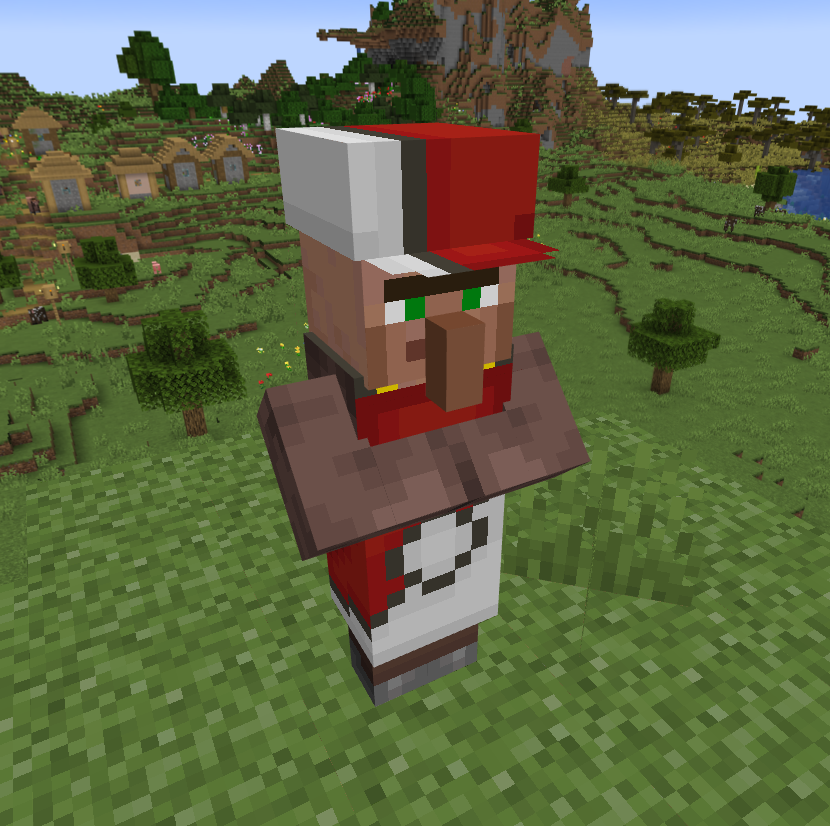
The Merchant Menus
The Shop
- By Right Clicking the merchant:
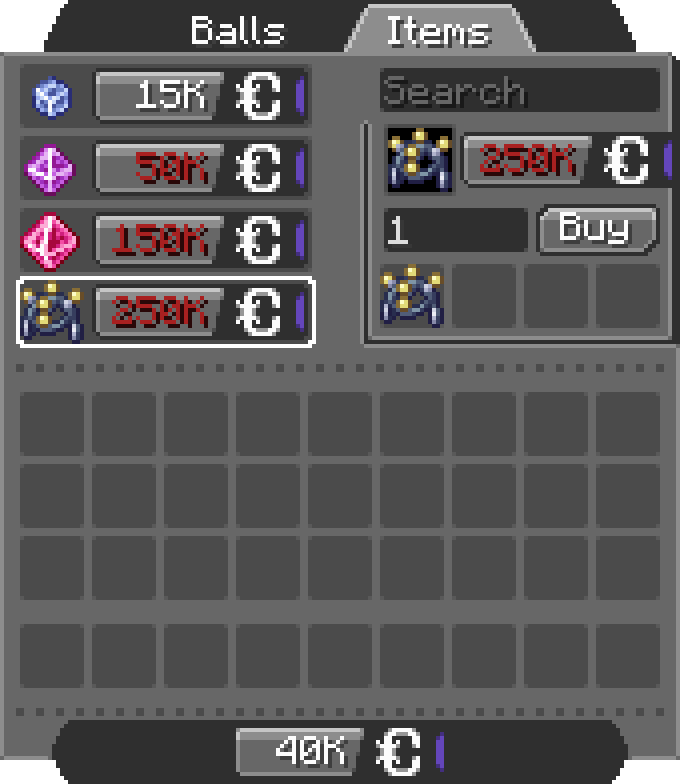
- You can scroll in the list, search for items, set the amount (MAX 256) and click the Buy button (you can see the total price on the right of the preview item) ! (if you don't have enough CobbleDollars the price will be red)
- You can switch between the configured tabs, each one offer different items.
The Bank
- By Shift + Right Clicking the merchant:
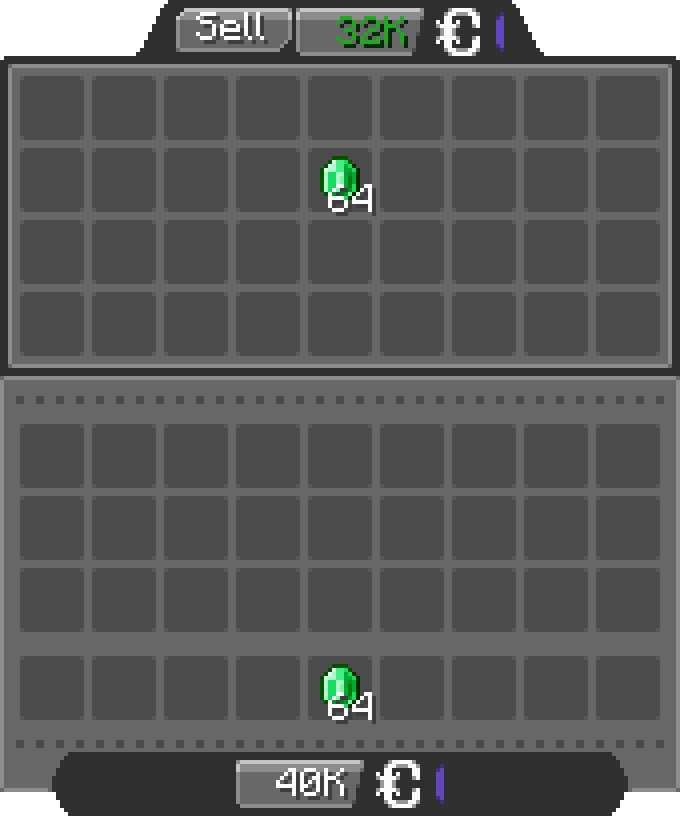
- You can insert any items allowed by the config in the bank inventory, the merchant will buy the items for the configured price (by default 1 Emerald = 500 CobbleDollars).
Configuration
The configuration files are located under "[Minecraft files or Server location]\config\cobbledollars"
Client
You can choose the position of the money overlay:
- top left
- top right
- bottom left
- bottom right (default)
Common
Shop
You can configure which items the merchant sells, for example:
2.X.X:
{
  "defaultShop": [
    {
      "Poké Balls": [
        {
          "item": "cobblemon:poke_ball",
          "price": 2000
        }
      ]
    },
    {
      "Items": [
        {
          "item": "minecraft:stick",
          "price": 250000
        },
        {
          "item": "create:cogwheel",
          "price": 100
        }
      ]
    }
  ]
}
1.5.X:
{
  "merchantShop": {
    "balls": {
      "cobblemon:poke_ball": 2000
    },
    "items": {
      "minecraft:stick": 250000,
      "create:cogwheel": 100
    }
  }
}
Before 1.5:
{
  "merchantBalls": {
    "cobblemon:poke_ball": 2000
  },
  "merchantItems": {
    "minecraft:stick": 250000,
    "create:cogwheel": 100
  }
}
Here they will sell
- Pokéballs for 2k CobbleDollars each under the category "Balls"
- Sticks for 250k CobbleDollars each and Cogwheels from the mod Create for 100 CobbleDollars each under the category "Items"
Bank
You can configure the items accepted in the bank and for what price:
2.X.X:
{
  "bank": [
    {
      "item": "minecraft:emerald",
      "price": 500
    },
    {
      "item": "cobblemon:red_apricorn",
      "price": 2500
    }
  ]
}
1.5.X:
{
  "bankItems": {
    "minecraft:emerald": 500,
    "cobblemon:red_apricorn": 2500
  }
}
Here the bank accept
- Emeralds for 500 CobbleDollars each
- Red Apricorns for 2.5k each
You can even put items from other mods.
Permissions
- cobbledollars
- cobbledollars.reload
- cobbledollars.leaderboard
- cobbledollars.leaderboard.update
- cobbledollars.cobbledollars
- cobbledollars.cobbledollars.give
- cobbledollars.cobbledollars.pay
- cobbledollars.cobbledollars.query
- cobbledollars.cobbledollars.remove
- cobbledollars.cobbledollars.set
- cobbledollars.cobblemerchant
- cobbledollars.cobblemerchant.edit
- cobbledollars.cobblemerchant.open
- cobbledollars.cobblemerchant.open.bank
- cobbledollars.cobblemerchant.open.shop
Ченджлог
2.0.0+Beta-6.1Бета1.21.1 · 22 июля 2026 г.
⚠️ Important
This update introduces a new Shop/Bank serialization format. Your existing data should automatically migrate, but migration issues are always possible.
Before updating, it is strongly recommended to:
- Create a backup of your world.
- Create a backup of your configuration files.
This update may affect:
- Merchant shops stored on entities
- Shop configuration files
- Bank configuration files
Changed
- Renamed the bank config:
bank.json->default_bank.json
Fixed
- Fixed the migration of the bank config
2.0.0+Beta-6.1Бета1.21.1 · 22 июля 2026 г.
⚠️ Important
This update introduces a new Shop/Bank serialization format. Your existing data should automatically migrate, but migration issues are always possible.
Before updating, it is strongly recommended to:
- Create a backup of your world.
- Create a backup of your configuration files.
This update may affect:
- Merchant shops stored on entities
- Shop configuration files
- Bank configuration files
Changed
- Renamed the bank config:
bank.json->default_bank.json
Fixed
- Fixed the migration of the bank config
2.0.0+Beta-6Бета1.21.1 · 21 июля 2026 г.
⚠️ Important
This update introduces a new Shop/Bank serialization format. Your existing data should automatically migrate, but migration issues are always possible.
Before updating, it is strongly recommended to:
- Create a backup of your world.
- Create a backup of your configuration files.
This update may affect:
- Merchant shops stored on entities
- Shop configuration files
- Bank configuration files
Added
CobbleDollars Omnitool
Added a new item for managing Cobble Merchants. Requires:
- Operator or
- The permission:
cobbledollars.item.omnitool
Modes
Change modes by holding Shift and scrolling while holding the tool.
Edit
- Right-click a merchant to open the editor.
Copy/Paste Shop
- Shift + Right-click a merchant to copy its shop.
- Right-click a merchant to paste the copied shop.
- Shift + Right-click in the air to clear the stored shop.
Copy/Paste Bank
- Shift + Right-click a merchant to copy its bank.
- Right-click a merchant to paste the copied bank.
- Shift + Right-click in the air to clear the stored bank.
Save Shop
- Shift + Right-click a merchant to export its shop as JSON.
- Files are saved to:
[World Folder]/generated/cobbledollarsshops/[UUID].json
Datapack Shops & Banks
- Multiple shops and banks can now be defined through datapacks.
- Datapack shops and banks can be assigned to merchants using:
/cm edit <merchant_uuid> set shop <shop_id>
/cm edit <merchant_uuid> set bank <bank_id>
- Added a command to directly open datapack shops and banks:
/cm open shop <shop_id>
/cm open bank <bank_id>
- Added default Shop and Bank in the built-in datapack
Bank Improvements
- Bank inventory slots only accept items that can be sold.
- Banks will by default accept items regardless of their components unless specified with:
required_components required_componentsallows matching specific item components such as enchantments, rarity, durability, etc.- example (only accepts diamond shovel that have the same rarity and enchantments):
{
  "required_components": [
    "minecraft:rarity",
    "minecraft:enchantments"
  ],
  "item": "minecraft:diamond_shovel",
  "price": "2500"
}
- Added a visual texture overlay around sellable items in bank menus.
Quick Battle Compatibility
- Added compatibility with Cobblemon Quick Battle 1.3.8.
- Added a common config option:
"earnCobbleDollarsFromQuickBattle": true, which controls whether players earn CobbleDollars from Quick Battles.
Changed
New Shop & Bank Format
Shops and banks now use Mojang Codecs for serialization.
Automatic migration is performed for:
- Shop configuration files
- Bank configuration files
- Merchant shops stored on entities
Again, backups are strongly recommended before updating.
UI & Quality of Life
- Offer tooltips now display shortened prices.
- Hold Shift to view the full value.
- Various UI texts now use translation keys instead of hardcoded strings.
Permissions
Changed
cobbledollars.reload->cobbledollars.command.reloadcobbledollars.leaderboard->cobbledollars.command.leaderboardcobbledollars.leaderboard.update->cobbledollars.command.leaderboard.updatecobbledollars.cobbledollars->cobbledollars.command.cobbledollarscobbledollars.cobbledollars.give->cobbledollars.command.cobbledollars.givecobbledollars.cobbledollars.pay->cobbledollars.command.cobbledollars.paycobbledollars.cobbledollars.query->cobbledollars.command.cobbledollars.querycobbledollars.cobbledollars.remove->cobbledollars.command.cobbledollars.removecobbledollars.cobbledollars.set->cobbledollars.command.cobbledollars.setcobbledollars.cobblemerchant->cobbledollars.command.cobblemerchantcobbledollars.cobblemerchant.edit->cobbledollars.command.cobblemerchant.editcobbledollars.cobblemerchant.open->cobbledollars.command.cobblemerchant.opencobbledollars.cobblemerchant.open.bank->cobbledollars.command.cobblemerchant.open.bankcobbledollars.cobblemerchant.open.shop->cobbledollars.command.cobblemerchant.open.shop
Added
cobbledollars.item.omnitool
Fixed
- Fixed loading of item components that require registry access (such as enchantments) in:
- Bank configuration file
- Default shop configuration file
2.0.0+Beta-6Бета1.21.1 · 21 июля 2026 г.
⚠️ Important
This update introduces a new Shop/Bank serialization format. Your existing data should automatically migrate, but migration issues are always possible.
Before updating, it is strongly recommended to:
- Create a backup of your world.
- Create a backup of your configuration files.
This update may affect:
- Merchant shops stored on entities
- Shop configuration files
- Bank configuration files
Added
CobbleDollars Omnitool
Added a new item for managing Cobble Merchants. Requires:
- Operator or
- The permission:
cobbledollars.item.omnitool
Modes
Change modes by holding Shift and scrolling while holding the tool.
Edit
- Right-click a merchant to open the editor.
Copy/Paste Shop
- Shift + Right-click a merchant to copy its shop.
- Right-click a merchant to paste the copied shop.
- Shift + Right-click in the air to clear the stored shop.
Copy/Paste Bank
- Shift + Right-click a merchant to copy its bank.
- Right-click a merchant to paste the copied bank.
- Shift + Right-click in the air to clear the stored bank.
Save Shop
- Shift + Right-click a merchant to export its shop as JSON.
- Files are saved to:
[World Folder]/generated/cobbledollarsshops/[UUID].json
Datapack Shops & Banks
- Multiple shops and banks can now be defined through datapacks.
- Datapack shops and banks can be assigned to merchants using:
/cm edit <merchant_uuid> set shop <shop_id>
/cm edit <merchant_uuid> set bank <bank_id>
- Added a command to directly open datapack shops and banks:
/cm open shop <shop_id>
/cm open bank <bank_id>
- Added default Shop and Bank in the built-in datapack
Bank Improvements
- Bank inventory slots only accept items that can be sold.
- Banks will by default accept items regardless of their components unless specified with:
required_components required_componentsallows matching specific item components such as enchantments, rarity, durability, etc.- example (only accepts diamond shovel that have the same rarity and enchantments):
{
  "required_components": [
    "minecraft:rarity",
    "minecraft:enchantments"
  ],
  "item": "minecraft:diamond_shovel",
  "price": "2500"
}
- Added a visual texture overlay around sellable items in bank menus.
Quick Battle Compatibility
- Added compatibility with Cobblemon Quick Battle 1.3.8.
- Added a common config option:
"earnCobbleDollarsFromQuickBattle": true, which controls whether players earn CobbleDollars from Quick Battles.
Changed
New Shop & Bank Format
Shops and banks now use Mojang Codecs for serialization.
Automatic migration is performed for:
- Shop configuration files
- Bank configuration files
- Merchant shops stored on entities
Again, backups are strongly recommended before updating.
UI & Quality of Life
- Offer tooltips now display shortened prices.
- Hold Shift to view the full value.
- Various UI texts now use translation keys instead of hardcoded strings.
Permissions
Changed
cobbledollars.reload->cobbledollars.command.reloadcobbledollars.leaderboard->cobbledollars.command.leaderboardcobbledollars.leaderboard.update->cobbledollars.command.leaderboard.updatecobbledollars.cobbledollars->cobbledollars.command.cobbledollarscobbledollars.cobbledollars.give->cobbledollars.command.cobbledollars.givecobbledollars.cobbledollars.pay->cobbledollars.command.cobbledollars.paycobbledollars.cobbledollars.query->cobbledollars.command.cobbledollars.querycobbledollars.cobbledollars.remove->cobbledollars.command.cobbledollars.removecobbledollars.cobbledollars.set->cobbledollars.command.cobbledollars.setcobbledollars.cobblemerchant->cobbledollars.command.cobblemerchantcobbledollars.cobblemerchant.edit->cobbledollars.command.cobblemerchant.editcobbledollars.cobblemerchant.open->cobbledollars.command.cobblemerchant.opencobbledollars.cobblemerchant.open.bank->cobbledollars.command.cobblemerchant.open.bankcobbledollars.cobblemerchant.open.shop->cobbledollars.command.cobblemerchant.open.shop
Added
cobbledollars.item.omnitool
Fixed
- Fixed loading of item components that require registry access (such as enchantments) in:
- Bank configuration file
- Default shop configuration file
2.0.0+Beta-5.1Бета1.21.1 · 1 июня 2025 г.
Changed:
- Removed the
Saved CobbleDollars Accounts!message in the console to prevent console spam.
Fixed:
- The shop of Vanilla Villagers with the CobbleMerchant profession now works correctly.
2.0.0+Beta-5.1Бета1.21.1 · 1 июня 2025 г.
Changed:
- Removed the
Saved CobbleDollars Accounts!message in the console to prevent console spam.
Fixed:
- The shop of Vanilla Villagers with the CobbleMerchant profession now works correctly.
2.0.0+Beta-5Бета1.21.1 · 30 мая 2025 г.
Added:
- An option to set a limited stock on custom merchant offers (currently only in the
/cm edit [merchant uuid]UI). - A
tagelement in the default shop & bank config - A
componentselement in the default shop & bank config, example:
{
  "defaultShop": [
    {
      "Apricorns": [
        {
          "tag": "#cobblemon:apricorns",
          "price": 2000,
          "components": {
            "minecraft:rarity": "epic",
            "minecraft:food": {
              "nutrition": 3,
              "saturation": 1.8
            }
          }
        }
      ]
    }
  ]
}
Changed:
- Improved the config loading system:
- Incorrect items in the config will now be skipped instead of preventing the entire config from loading and defaulting to a fallback version.
- Incorrect items in the config won't be replaced by
minecraft:airwhen loaded. - Added precise logs to see where the errors come from
- Remade the networking system so that all the logic is calculated on the server.
Fixed:
- A crash when the game was trying to save a merchant shop containing an empty item.
- A crash when trying to connect to a server when receiving the packet
clientbound/minecraft:set_entity_data - The logs when the bank config encountered an error was mentioning the shop config instead of the bank.
- The shop when clicking on the
shopbutton in the bank menu while it was accessed byshift + clickingon a Cobble Merchant, now contains the correct shop instead of the default config.
2.0.0+Beta-5Бета1.21.1 · 30 мая 2025 г.
Added:
- An option to set a limited stock on custom merchant offers (currently only in the
/cm edit [merchant uuid]UI). - A
tagelement in the default shop & bank config - A
componentselement in the default shop & bank config, example:
{
  "defaultShop": [
    {
      "Apricorns": [
        {
          "tag": "#cobblemon:apricorns",
          "price": 2000,
          "components": {
            "minecraft:rarity": "epic",
            "minecraft:food": {
              "nutrition": 3,
              "saturation": 1.8
            }
          }
        }
      ]
    }
  ]
}
Changed:
- Improved the config loading system:
- Incorrect items in the config will now be skipped instead of preventing the entire config from loading and defaulting to a fallback version.
- Incorrect items in the config won't be replaced by
minecraft:airwhen loaded. - Added precise logs to see where the errors come from
- Remade the networking system so that all the logic is calculated on the server.
Fixed:
- A crash when the game was trying to save a merchant shop containing an empty item.
- A crash when trying to connect to a server when receiving the packet
clientbound/minecraft:set_entity_data - The logs when the bank config encountered an error was mentioning the shop config instead of the bank.
- The shop when clicking on the
shopbutton in the bank menu while it was accessed byshift + clickingon a Cobble Merchant, now contains the correct shop instead of the default config.
Комментарии
Загружаем…