 Mineforgian
Chest Search
This project adds search bars to chest and shulker boxes to help you find items by highlighting matching words.
- Загрузки
- 8K
- Подписчики
- 11
- Обновлён
- 19 июня 2026 г.
- Лицензия
- MIT
Опубликован 7 января 2026 г.
Chest Search
About
This mod adds a search bar to let you search through chest and shulker boxes. It will then highlight with a chosen colour in Mod Menu the items that match what you type. The coolest feature is you can change the colour (if you have modmenu and clothconfig installed to match either your resource pack or how you like to play the game. To do this hit Esc -> Mods -> Search "Chest Search" -> Click Settings -> Change Colour.
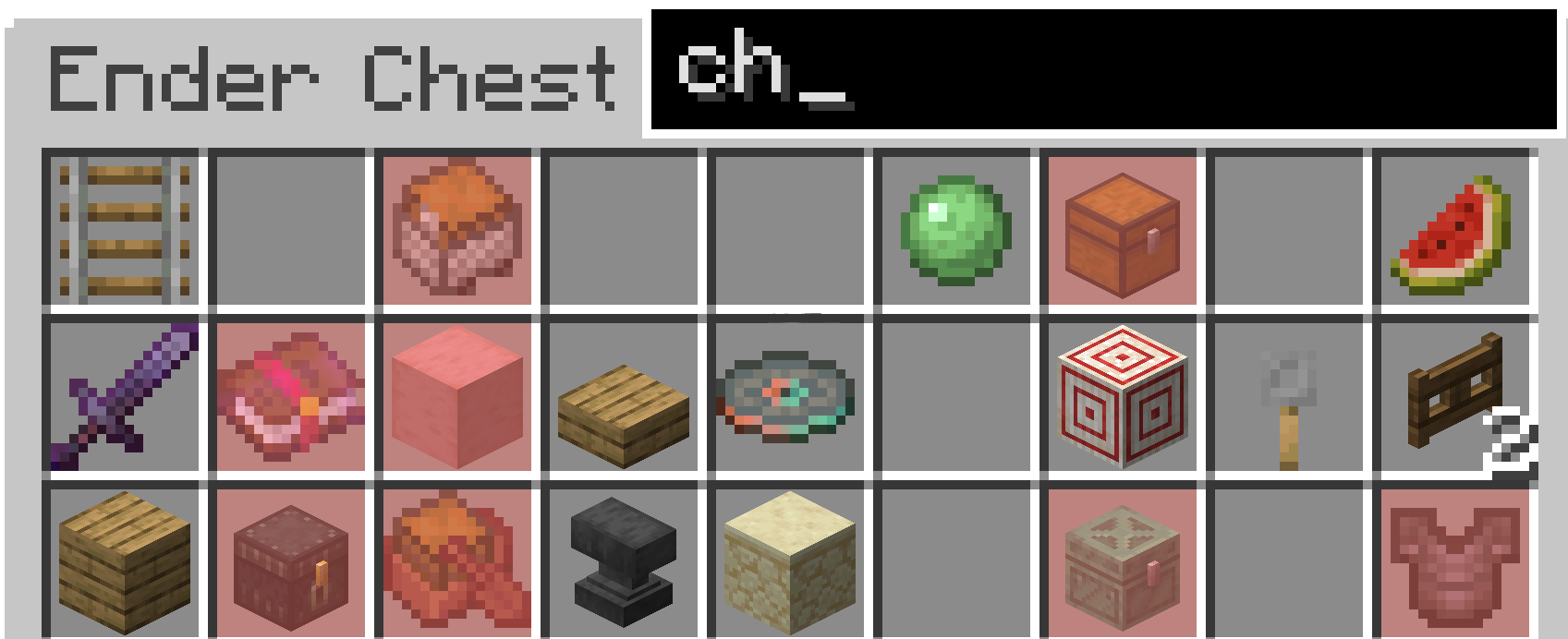
From 1.2.0+
You can now search for enchantments on weapons and books.
Installation
To install it on Fabric first you must install the Fabric installer. Or have the Modrinth app or a similar installation manager.
Fabric (for one version)
Modrinth (for multiple installations)
After having an instance of fabric installed, you must either navigate to the mods folder (Minecraft Launcher Fabric) or directly install it through the modrinth launcher.
Fabric
Windows
On Windows press WIN + R and in the box that shows up type appdata then hit enter. From there you should see a folder called .minecraft. Once inside there, you should see a folder called mods. In there put the mod .jar for the correct version.
Mac
Open Finder Window. In the top bar, select Go → Go to folder. Type in "~/Library/Application Support/minecraft". In there put the mod .jar for the correct version.
Linux (On Ubuntu could vary from distro)
Open Files and navigate to home. From there, press CTR + H to show hidden folders. From there, navigate to .minecraft. Then go to the mods folder and place the mod .jar for the correct version.
Modrinth
In the modrinth app go to your installation of fabric and there should be a tab called install mods. Click on this and search for this project. Then hit install. If you have trouble with this there are tutorials online, however it is quite straight forward.
Ченджлог
1.2.3Релиз26.2 · 19 июня 2026 г.
- Updated to 26.2
- Removed the modmenu default discord link and switched for modrinth link
1.2.2Релиз26.1, 26.1.1, 26.1.2 · 1 июня 2026 г.
Changes
- Changed default color to be red.
- Spaces supported
Note: The color change will not affect any people updating the mod as the config is already saved.
1.2.0Релиз26.1, 26.1.1, 26.1.2 · 31 мая 2026 г.
This version adds support for 26.1.X and also adds enchantment search.
1.1.0Релиз1.20.1 · 19 марта 2026 г.
Friends wanted 1.20.1
1.1.0Релиз1.21.11 · 8 января 2026 г.
Fixed a bug that would have the Search bar in Dispensers and Droppers.
1.1.0Релиз1.21.9, 1.21.10 · 8 января 2026 г.
Fixed a bug that would have the Search bar in Dispensers and Droppers.
1.1.0Релиз1.21.6, 1.21.7, 1.21.8 · 8 января 2026 г.
Fixed a bug that would have the Search bar in Dispensers and Droppers.
1.0.0Бета1.21.6, 1.21.7, 1.21.8 · 7 января 2026 г.
Added 1.21.5 - 1.21.8
Комментарии
Загружаем…