 Mineforgian
Build Blueprint Preview
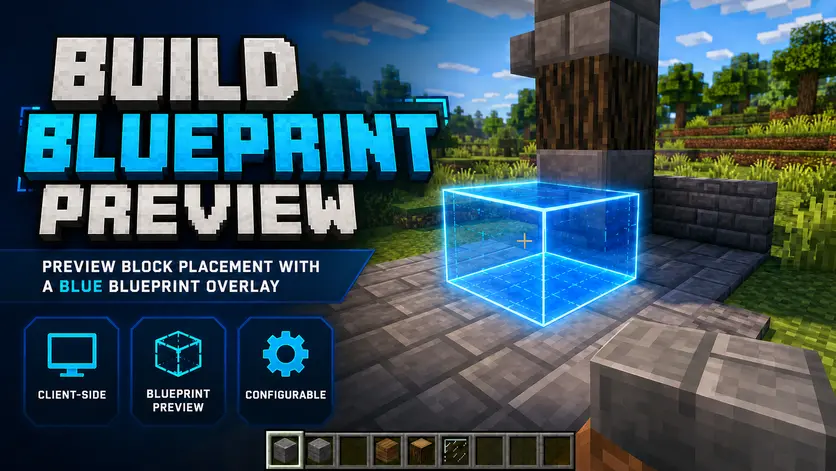
A client-side building helper that shows a blue blueprint-style preview of where your held block will be placed. 블록 설치 위치를 파란 청사진 오버레이로 미리 확인하세요!
- Загрузки
- 76
- Подписчики
- 1
- Обновлён
- 13 июня 2026 г.
- Лицензия
- MIT
Опубликован 2 июня 2026 г.
🟦 Build Blueprint Preview
Build Blueprint Preview is a client-side Minecraft building helper that shows a blue blueprint-style preview of where your held block will be placed.
It helps builders check the placement position, block shape, and outline before actually placing a block.
This mod is designed as a clean visual QoL tool for building. It does not automate gameplay.
✨ Features
🟦 Blue blueprint-style placement preview
🔷 Clear cyan outline for accurate placement
⌨️ Toggle preview on/off with a keybind
- Default key:
B
- Default key:
⚙️ In-game settings screen
- Default key:
N
- Default key:
👁️ Fill preview ON/OFF option
🎚️ Fill opacity control
🧱 Optional actual model preview
🏗️ Supports many common block shapes, including:
- Full blocks
- Slabs
- Stairs
- Doors
- Beds
- Tall plants
- Chests
- Fences
- Glass panes
- Iron bars
- Torches and similar placeable blocks
🎮 Controls
B- Toggle blueprint preview ON/OFFN- Open the settings screen
You can also change these keybinds in Minecraft’s keybind settings.
⚙️ Configuration
The settings screen allows you to adjust:
- 👁️ Fill preview ON/OFF
- 🎚️ Fill opacity
- 🧱 Actual model preview ON/OFF
The cyan outline is always enabled to keep the placement preview clear and easy to understand.
⚠️ Important
Build Blueprint Preview is a visual QoL building helper only.
It does not include:
- ❌ Auto-build
- ❌ Scaffold
- ❌ Macro
- ❌ Auto-placement
- ❌ Auto-click
- ❌ Server-side automation
- ❌ Packet manipulation
All block placement is still performed manually by the player.
📦 Requirements
- Minecraft
1.21.4 - Fabric Loader
- Fabric API
- Java
21+
Mod Menu is optional, but recommended if you want to open the config screen from the Mods menu.
🇰🇷 한국어 안내
Build Blueprint Preview는 손에 든 블록이 설치될 위치를 파란 청사진 스타일의 프리뷰로 미리 보여주는 클라이언트 전용 마인크래프트 건축 보조 모드입니다.
블록을 실제로 설치하기 전에 위치, 형태, 외곽선을 미리 확인할 수 있어 건축 작업을 더 편하게 도와줍니다.
이 모드는 자동화 모드가 아닌, 순수한 시각적 QoL 건축 보조 모드입니다.
✨ 주요 기능
🟦 파란 청사진 스타일 설치 프리뷰
🔷 정확한 위치 확인을 위한 하늘색 외곽선
⌨️ 키바인드로 프리뷰 ON/OFF
- 기본 키:
B
- 기본 키:
⚙️ 인게임 설정창 지원
- 기본 키:
N
- 기본 키:
👁️ 채우기 프리뷰 ON/OFF 설정
🎚️ 채우기 투명도 조절
🧱 선택형 실제 모델 프리뷰
🏗️ 다양한 블록 형태 지원
- 일반 블록
- 반블록
- 계단
- 문
- 침대
- 큰 식물
- 상자
- 울타리
- 유리판
- 철창
- 횃불류 블록
🎮 조작법
B- 블루프린트 프리뷰 ON/OFFN- 설정창 열기
마인크래프트 키 설정에서 단축키를 직접 변경할 수 있습니다.
⚙️ 설정
설정창에서 다음 항목을 조절할 수 있습니다.
- 👁️ 채우기 프리뷰 ON/OFF
- 🎚️ 채우기 투명도
- 🧱 실제 모델 프리뷰 ON/OFF
하늘색 외곽선은 프리뷰 위치를 명확하게 보여주기 위해 항상 켜진 상태로 유지됩니다.
⚠️ 주의사항
Build Blueprint Preview는 시각적 건축 보조 QoL 모드입니다.
다음 기능은 포함하지 않습니다.
- ❌ 자동 건축
- ❌ 스캐폴드
- ❌ 매크로
- ❌ 자동 설치
- ❌ 자동 클릭
- ❌ 서버 자동화
- ❌ 패킷 조작
모든 블록 설치는 플레이어가 직접 수행합니다.
📦 요구 사항
- Minecraft
1.21.4 - Fabric Loader
- Fabric API
- Java
21+
Mod Menu는 필수는 아니지만, 모드 메뉴에서 설정창을 열고 싶다면 설치를 권장합니다.
Ченджлог
1.1.0Релиз1.21.4 · 13 июня 2026 г.
🟦 Build Blueprint Preview 1.1.0
Build Blueprint Preview 1.1.0 adds an optional actual model preview mode and improves the overall visual clarity of the blueprint preview.
This update focuses on making block placement previews easier to understand while keeping the mod lightweight, client-side, and non-automated.
✨ Added
🧱 Added optional Actual Model Preview
- Shows the held block’s actual model at the expected placement position
- Can be enabled or disabled from the settings screen
⚙️ Added model preview option to the in-game config screen
🟦 Added stronger blue fill behavior when actual model preview is enabled
- Helps prevent confusion between real placed blocks and preview blocks
📦 Improved chest preview handling
- Chest model preview now better follows the expected front-facing direction behavior
🛠️ Improved
- 👀 Improved blueprint visibility when using actual model preview
- 🟦 Blue fill now works better as a preview coating over model previews
- 🔷 Cyan outline remains always enabled for clearer placement recognition
- 🧭 Improved chest preview direction logic
- 🧱 Better separation between “preview” and “already placed block” visuals
- ⚡ Continued optimization of preview updates and cached placement calculations
⚙️ Configuration
The settings screen now includes:
- 👁️ Fill preview ON/OFF
- 🎚️ Fill opacity control
- 🧱 Actual model preview ON/OFF
Default keybinds:
B- Toggle blueprint preview ON/OFFN- Open settings screen
You can change these keybinds in Minecraft’s keybind settings.
⚠️ Important
Build Blueprint Preview is still a visual QoL building helper only.
It does not include:
- ❌ Auto-build
- ❌ Scaffold
- ❌ Macro
- ❌ Auto-placement
- ❌ Auto-click
- ❌ Server-side automation
- ❌ Packet manipulation
All block placement is still performed manually by the player.
🇰🇷 한국어 안내
Build Blueprint Preview 1.1.0 업데이트입니다.
이번 버전에서는 선택형 실제 모델 프리뷰 기능이 추가되었고, 블루프린트 프리뷰의 시각적 구분감이 개선되었습니다.
건축 중 블록이 설치될 위치와 형태를 더 쉽게 확인할 수 있도록 개선했으며, 모드는 여전히 클라이언트 전용 시각 보조 기능에 집중합니다.
✨ 추가된 기능
🧱 선택형 실제 모델 프리뷰 기능 추가
- 손에 든 블록의 실제 모델을 설치 예상 위치에 표시합니다
- 설정창에서 켜거나 끌 수 있습니다
⚙️ 인게임 설정창에 실제 모델 프리뷰 옵션 추가
🟦 실제 모델 프리뷰 사용 시 파란 채우기 표시 강화
- 실제 설치된 블록과 프리뷰가 헷갈리지 않도록 개선했습니다
📦 상자 프리뷰 처리 개선
- 상자 모델 프리뷰의 앞면 방향이 더 자연스럽게 보이도록 조정했습니다
🛠️ 개선된 부분
- 👀 실제 모델 프리뷰 사용 시 블루프린트 표시 가독성 개선
- 🟦 모델 프리뷰 위에 파란 채우기가 더 잘 보이도록 개선
- 🔷 하늘색 외곽선은 항상 표시되도록 유지
- 🧭 상자 프리뷰 방향 로직 개선
- 🧱 프리뷰 블록과 실제 설치된 블록의 시각적 구분 강화
- ⚡ 프리뷰 갱신 및 설치 위치 계산 최적화 유지
⚙️ 설정
설정창에서 다음 항목을 조절할 수 있습니다.
- 👁️ 채우기 프리뷰 ON/OFF
- 🎚️ 채우기 투명도 조절
- 🧱 실제 모델 프리뷰 ON/OFF
기본 단축키:
B- 블루프린트 프리뷰 ON/OFFN- 설정창 열기
마인크래프트 키 설정에서 단축키를 직접 변경할 수 있습니다.
⚠️ 주의사항
Build Blueprint Preview는 여전히 시각적 건축 보조 QoL 모드입니다.
다음 기능은 포함하지 않습니다.
- ❌ 자동 건축
- ❌ 스캐폴드
- ❌ 매크로
- ❌ 자동 설치
- ❌ 자동 클릭
- ❌ 서버 자동화
- ❌ 패킷 조작
모든 블록 설치는 플레이어가 직접 수행합니다.
1.0.0Релиз1.21.4 · 2 июня 2026 г.
🚀 Build Blueprint Overlay 1.0.0
The first release of Build Blueprint Overlay is here!
This version focuses on a clean, lightweight, client-side blueprint preview for Minecraft builders.
✨ Added
- 🟦 Added blue blueprint-style placement preview
- 🔷 Added clear cyan outline preview
- ⌨️ Added preview toggle keybind
- Default:
B
- Default:
- ⚙️ Added in-game settings screen
- Default:
N
- Default:
- 🎚️ Added fill opacity control
- 👁️ Added fill preview ON/OFF option
- 🧱 Added optional actual model preview
- 🏗️ Added support for various block shapes, including:
- Full blocks
- Slabs
- Stairs
- Doors
- Beds
- Tall plants
- Chests
- Fences
- Glass panes
- Iron bars
- Torches and similar placeable blocks
🛠️ Improved
- 🚫 Preview is hidden when the target position is not placeable
- 🧍 Preview is hidden when the block would collide with the player
- 👀 Hidden parts behind terrain or blocks are no longer rendered like X-ray
- 📦 Chest preview direction behavior has been adjusted for better visual clarity
- ⚡ Optimized preview updates to reduce unnecessary recalculation
⚙️ Configuration
- 👁️ Toggle fill preview on or off
- 🎚️ Adjust fill opacity
- 🧱 Toggle actual model preview on or off
- ⌨️ Keybinds can be changed in Minecraft's keybind settings
⚠️ Important
Build Blueprint Overlay is a visual QoL building helper only.
It does not include:
- ❌ Auto-build
- ❌ Scaffold
- ❌ Macro
- ❌ Auto-placement
- ❌ Auto-click
- ❌ Server-side automation
All block placement is still performed manually by the player.
🇰🇷 한국어 안내
Build Blueprint Overlay 1.0.0 첫 릴리즈입니다!
이 버전은 마인크래프트 건축 시 블록이 설치될 위치를 파란 청사진 스타일로 미리 보여주는 클라이언트 전용 시각 보조 기능에 집중했습니다.
✨ 추가된 기능
- 🟦 파란 청사진 스타일 설치 프리뷰 추가
- 🔷 하늘색 외곽선 프리뷰 추가
- ⌨️ 프리뷰 ON/OFF 단축키 추가
- 기본값:
B
- 기본값:
- ⚙️ 인게임 설정창 추가
- 기본값:
N
- 기본값:
- 🎚️ 채우기 투명도 조절 기능 추가
- 👁️ 채우기 프리뷰 ON/OFF 설정 추가
- 🧱 선택형 실제 모델 프리뷰 추가
- 🏗️ 다양한 블록 형태 지원
- 일반 블록
- 반블록
- 계단
- 문
- 침대
- 큰 식물
- 상자
- 울타리
- 유리판
- 철창
- 횃불류 블록
🛠️ 개선된 부분
- 🚫 설치할 수 없는 위치에서는 프리뷰가 표시되지 않도록 개선
- 🧍 플레이어와 겹치는 위치에서는 프리뷰가 표시되지 않도록 개선
- 👀 벽이나 지형 뒤에 가려진 부분이 X-ray처럼 보이지 않도록 개선
- 📦 상자 프리뷰 방향 표시를 더 자연스럽게 조정
- ⚡ 불필요한 프리뷰 재계산을 줄이도록 최적화
⚙️ 설정
- 👁️ 채우기 프리뷰 ON/OFF
- 🎚️ 채우기 투명도 조절
- 🧱 실제 모델 프리뷰 ON/OFF
- ⌨️ 마인크래프트 키 설정에서 단축키 변경 가능
⚠️ 주의사항
Build Blueprint Overlay는 시각적 건축 보조 QoL 모드입니다.
다음 기능은 포함하지 않습니다.
- ❌ 자동 건축
- ❌ 스캐폴드
- ❌ 매크로
- ❌ 자동 설치
- ❌ 자동 클릭
- ❌ 서버 자동화
모든 블록 설치는 플레이어가 직접 수행합니다.
Комментарии
Загружаем…