 Mineforgian
Blueprints
A Minecraft client side mod to project, scale and rotate real blueprint schematics and images into your world as in-place references for creating accurate builds.
- Загрузки
- 27K
- Подписчики
- 48
- Обновлён
- 4 июля 2026 г.
- Лицензия
- MIT
Опубликован 28 марта 2024 г.
A client side mod I created to project reference images and schematics into the minecraft world.
- Images can be positioned, scaled, rotated and made transparent.
You need to be holding an ItemFrame in either your hand or your offhand to see the images.
Main Config Screen
The default key "O" will launch the config which will create folders for you to upload images in your filesystem:
{Minecraft}/config/blueprints/{world name}/{dimension name}
![Main config screen]
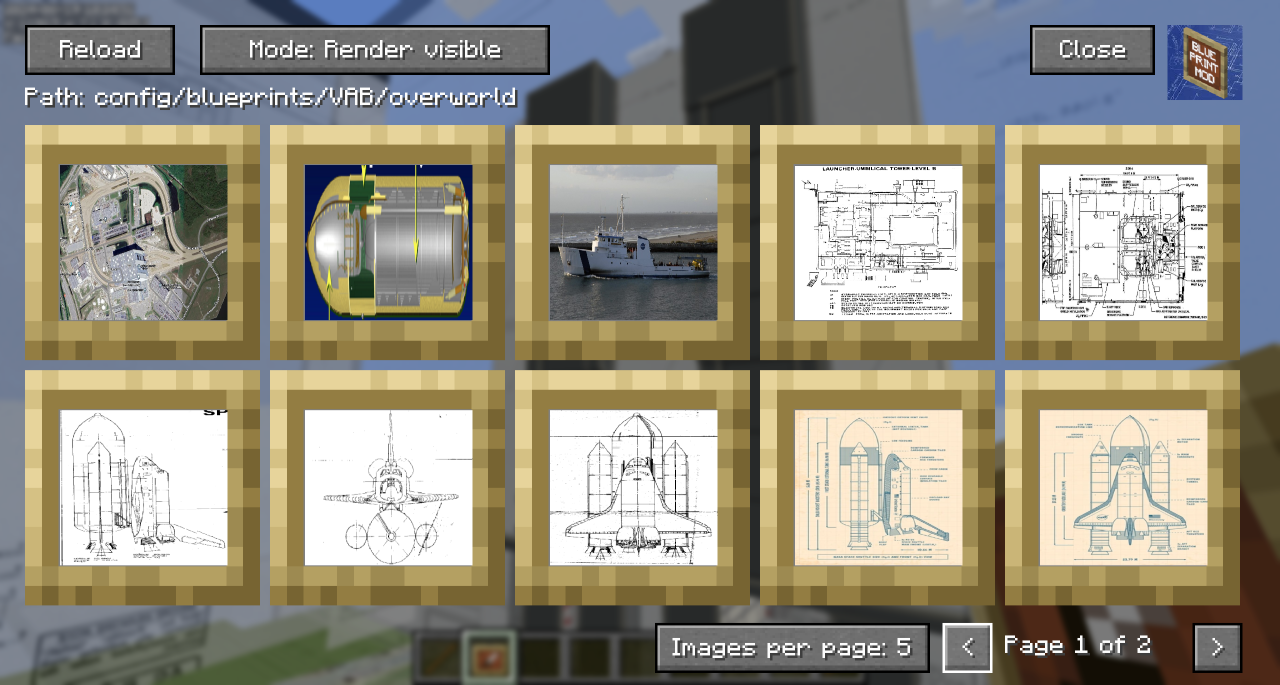
- The Reload button will rescan the filesystem for any files you have uploaded.
- The 'Path' shows the relative position of the filesystem you'll need to work with outside of Minecraft
- You can toggle the Render mode to hide behind blocks or always show through them.
- Blueprints that are hidden show with a dark overlay.
- You can use Control-Click as a shortcut to show/hide the blueprint in the world.
- You can click on a blueprint to get to the moving and positioning screen.
- In the bottom right, you can change the number of images per page to zoom in/out on the selection screen and navigate pages with the left and right chevrons.
Blueprint Moving and Positioning
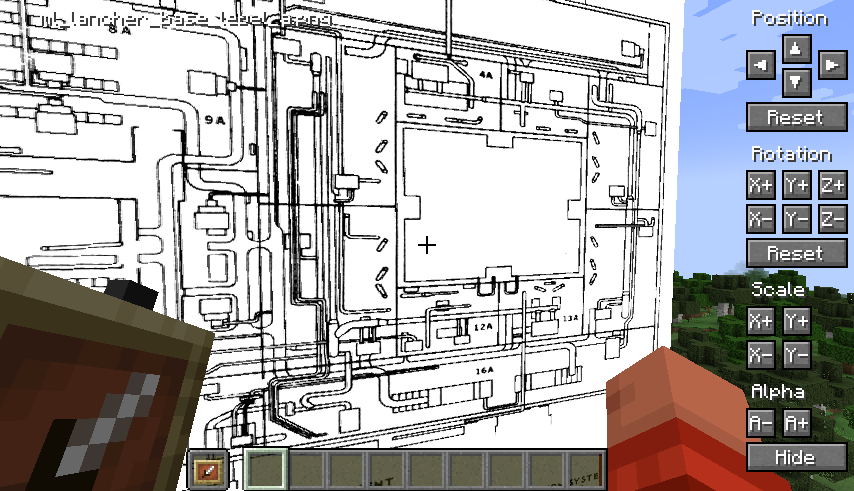
Position tweaking is player-facing aware: e.g. left is always left
You can hold down Shift to increase the amount of change each button applies for bigger tweaks.
You can hold down Ctrl to reduce the amount of change each button applies for small tweaks.
You can hold down both Shift and Ctrl to make big changes to settings on each click.
Demo
A quick overview can be seen in this video which was the reason I created the mod:
Ченджлог
26.2.12Релиз26.2 · 4 июля 2026 г.
[26.2.12] - 2026-07-04
Added
- Flip/mirror toggles per blueprint (horizontal and vertical)
- Drag and drop image files onto the config screen to import them into the current world's blueprint folder
- Search box in the config screen to filter blueprints by filename
Fixed
- Current page no longer resets when clicking buttons on the config screen
Changed
- Upgraded to Minecraft 26.2
- Updated Fabric Loader to 0.19.3 and Fabric API to 0.154.0+26.2
- Ported to the 26.2 rendering and GUI APIs (PrimitiveTopology, GpuBufferSlice mapping, Gui.setScreen, GameRenderer.mainRenderTarget)
[1.21.11.10] - 2026-02-27
Fixed
- Images rendering through blocks in "Render visible" mode (issue #24)
- Switched render-visible mode to a direct GPU render pass with explicit DynamicTransforms UBO binding
- Registered a custom pipeline (POSITION_TEX_COLOR_SNIPPET base) with depth testing, depth write, and face culling disabled
[1.21.10.9] - 2025-10-12
Added
- Automated publishing to Modrinth and CurseForge via GitHub Actions
- CHANGELOG.md for version history tracking
Changed
- Mod is now properly marked as client-side only
[1.21.10.8] - 2025-10-12
Added
- Calibration feature to resize images based on known dimensions
Fixed
- Crash due to mixin bindings
[1.21.10.7] - 2025-10-11
Changed
- Upgraded to Minecraft 1.21.10
[1.21.9.7] - 2025-10-11
Changed
- Upgraded to Minecraft 1.21.9
[1.21.8.7] - 2025-08-17
Changed
- Upgraded to Minecraft 1.21.8
[1.21.7.7] - 2025-08-17
Changed
- Upgraded to Minecraft 1.21.7
[1.21.6.7] - 2025-06-22
Added
- Blueprints now render in order from furthest away from the player to closest
Changed
- Updated to Minecraft 1.21.6
[1.21.5.7] - 2025-06-02
Added
- Support for many more image types
- Experimental support for animated GIFs
Changed
- Updated to Minecraft 1.21.5
Known Issues
- Some GIFs may distort slightly while animating
[1.21.4.6] - 2024-12-30
Changed
- Updated to Minecraft 1.21.4
[1.21.0.6] - 2024-09-01
Added
- Overhauled configuration screen with hover-to-scroll functionality
- In-world push/pull buttons that move the last configured blueprint based on player facing direction
- Keyboard shortcuts for push/pull (configurable in settings)
Changed
- Position/rotation/scale boxes now support scroll wheel for value changes
- Ctrl/Shift/Both modifiers change scroll rate
[1.21.0.5] - 2024-08-19
Added
- Blueprints are now always visible from both sides
Changed
- Overhauled blueprint selection screen to a grid layout with paging
[1.21.0.4] - 2024-08-18
Added
- New push and pull buttons for individual images on positioning screen
- Scrollable image list component
Changed
- Disabled background blur effect on positioning screen
[1.21.0.3] - 2024-07-07
Changed
- Images now render in their original aspect ratio
[1.20.1.2] - 2024-03-29
Fixed
- Crash when used with ReplayMod viewer
[1.21.10.9] - 2025-10-15
Added
- New blueprint template system
- Support for custom block palettes
Fixed
- Fixed crash when placing large blueprints
26.1.2.11Релиз26.1.2 · 24 апреля 2026 г.
[1.21.11.10] - 2026-02-27
Fixed
- Images rendering through blocks in "Render visible" mode (issue #24)
- Switched render-visible mode to a direct GPU render pass with explicit DynamicTransforms UBO binding
- Registered a custom pipeline (POSITION_TEX_COLOR_SNIPPET base) with depth testing, depth write, and face culling disabled
[1.21.10.9] - 2025-10-12
Added
- Automated publishing to Modrinth and CurseForge via GitHub Actions
- CHANGELOG.md for version history tracking
Changed
- Mod is now properly marked as client-side only
[1.21.10.8] - 2025-10-12
Added
- Calibration feature to resize images based on known dimensions
Fixed
- Crash due to mixin bindings
[1.21.10.7] - 2025-10-11
Changed
- Upgraded to Minecraft 1.21.10
[1.21.9.7] - 2025-10-11
Changed
- Upgraded to Minecraft 1.21.9
[1.21.8.7] - 2025-08-17
Changed
- Upgraded to Minecraft 1.21.8
[1.21.7.7] - 2025-08-17
Changed
- Upgraded to Minecraft 1.21.7
[1.21.6.7] - 2025-06-22
Added
- Blueprints now render in order from furthest away from the player to closest
Changed
- Updated to Minecraft 1.21.6
[1.21.5.7] - 2025-06-02
Added
- Support for many more image types
- Experimental support for animated GIFs
Changed
- Updated to Minecraft 1.21.5
Known Issues
- Some GIFs may distort slightly while animating
[1.21.4.6] - 2024-12-30
Changed
- Updated to Minecraft 1.21.4
[1.21.0.6] - 2024-09-01
Added
- Overhauled configuration screen with hover-to-scroll functionality
- In-world push/pull buttons that move the last configured blueprint based on player facing direction
- Keyboard shortcuts for push/pull (configurable in settings)
Changed
- Position/rotation/scale boxes now support scroll wheel for value changes
- Ctrl/Shift/Both modifiers change scroll rate
[1.21.0.5] - 2024-08-19
Added
- Blueprints are now always visible from both sides
Changed
- Overhauled blueprint selection screen to a grid layout with paging
[1.21.0.4] - 2024-08-18
Added
- New push and pull buttons for individual images on positioning screen
- Scrollable image list component
Changed
- Disabled background blur effect on positioning screen
[1.21.0.3] - 2024-07-07
Changed
- Images now render in their original aspect ratio
[1.20.1.2] - 2024-03-29
Fixed
- Crash when used with ReplayMod viewer
[1.21.10.9] - 2025-10-15
Added
- New blueprint template system
- Support for custom block palettes
Fixed
- Fixed crash when placing large blueprints
1.21.11.10Релиз1.21.11 · 26 февраля 2026 г.
Fixed
- Images rendering through blocks in "Render visible" mode (issue #24)
- Switched render-visible mode to a direct GPU render pass with explicit
1.21.11.9Релиз1.21.11 · 12 декабря 2025 г.
Upgrade to support Minecraft 1.21.11
1.21.10.9Релиз1.21.10 · 12 октября 2025 г.
Added
- Automated publishing to Modrinth and CurseForge via GitHub Actions
- CHANGELOG.md for version history tracking
Changed
- Mod is now properly marked as client-side only
1.21.10.8Релиз1.21.10 · 12 октября 2025 г.
- fixed crash due to mixin bindings
- added 'calibration' feature to resize images based on known dimensions
1.21.10.7Релиз1.21.10 · 11 октября 2025 г.
Upgrade to 1.21.10
1.21.9.7Релиз1.21.9, 1.21.10 · 11 октября 2025 г.
Upgrade to Minecraft 1.21.9
Комментарии
Загружаем…