 Mineforgian
Better Shulker Boxes
Better Shulker Boxes is a premium utility mod that lets you preview and manipulate the contents of Shulker Boxes and Ender Chests directly from your inventory.
- Загрузки
- 2K
- Подписчики
- 3
- Обновлён
- 14 августа 2026 г.
- Лицензия
- MIT
Опубликован 2 июня 2026 г.
Better Shulker Boxes
Better Shulker Boxes is a highly interactive UI/UX mod that revolutionizes how you interact with Shulker Boxes in Minecraft. Instead of the tedious cycle of placing down a Shulker Box, opening it, interacting with it, breaking it, and picking it back up, this mod allows you to interact with Shulker Boxes and Ender Chests directly from your inventory using an advanced interactive tooltip!
Key Features
The Modern Tooltip
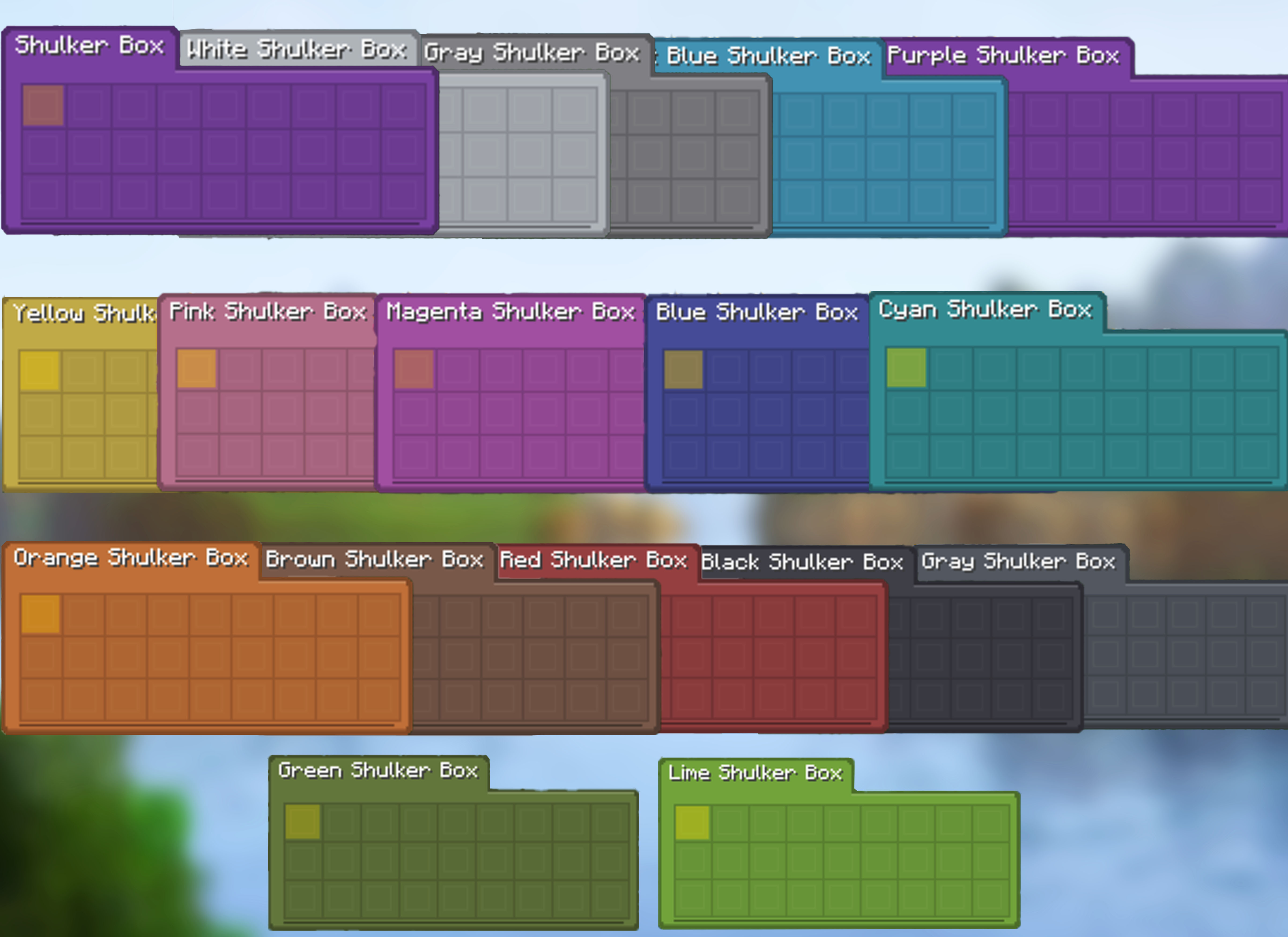
A flat rounded card, coloured by the box's own dye, with the container name and the selected item's name in tabs along its top edge. It is the default style as of 1.5.0, and the previous look is still available as the Vanilla style.
- Modern — a dye-coloured card, no vanilla tooltip frame
- Vanilla — built from the container's GUI texture, as before
- Every dye has its own card colour, and Ender Chests have theirs
- Theme and colour sliders apply to the Vanilla style; Modern colours itself
Full & Compact Tooltips
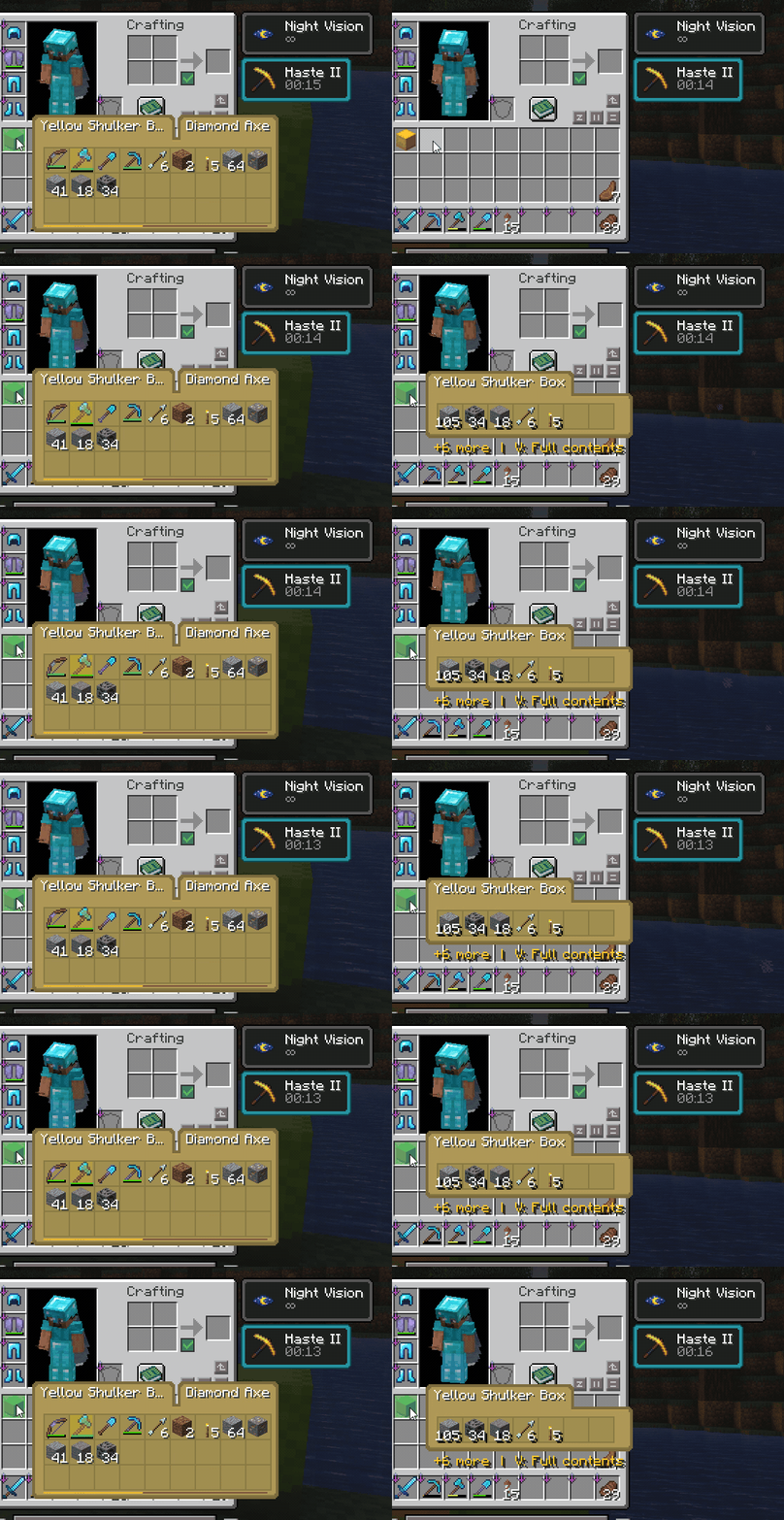
Quickly check what is inside a Shulker Box without placing it down. Use the full 9×3 preview when you want to see every slot, or compact mode when you only need a small summary of the most important contents.
- Full 27-slot preview for complete box contents
- Compact mode with merged duplicate stacks
- Compact shows the five largest stacks and a
+N morefooter for the rest - Total item counts in compact view, reading as
1.7krather than999+ - Merged tools keep their durability bar
- Empty compact containers stay hidden to reduce clutter
Fast Insertion & Extraction
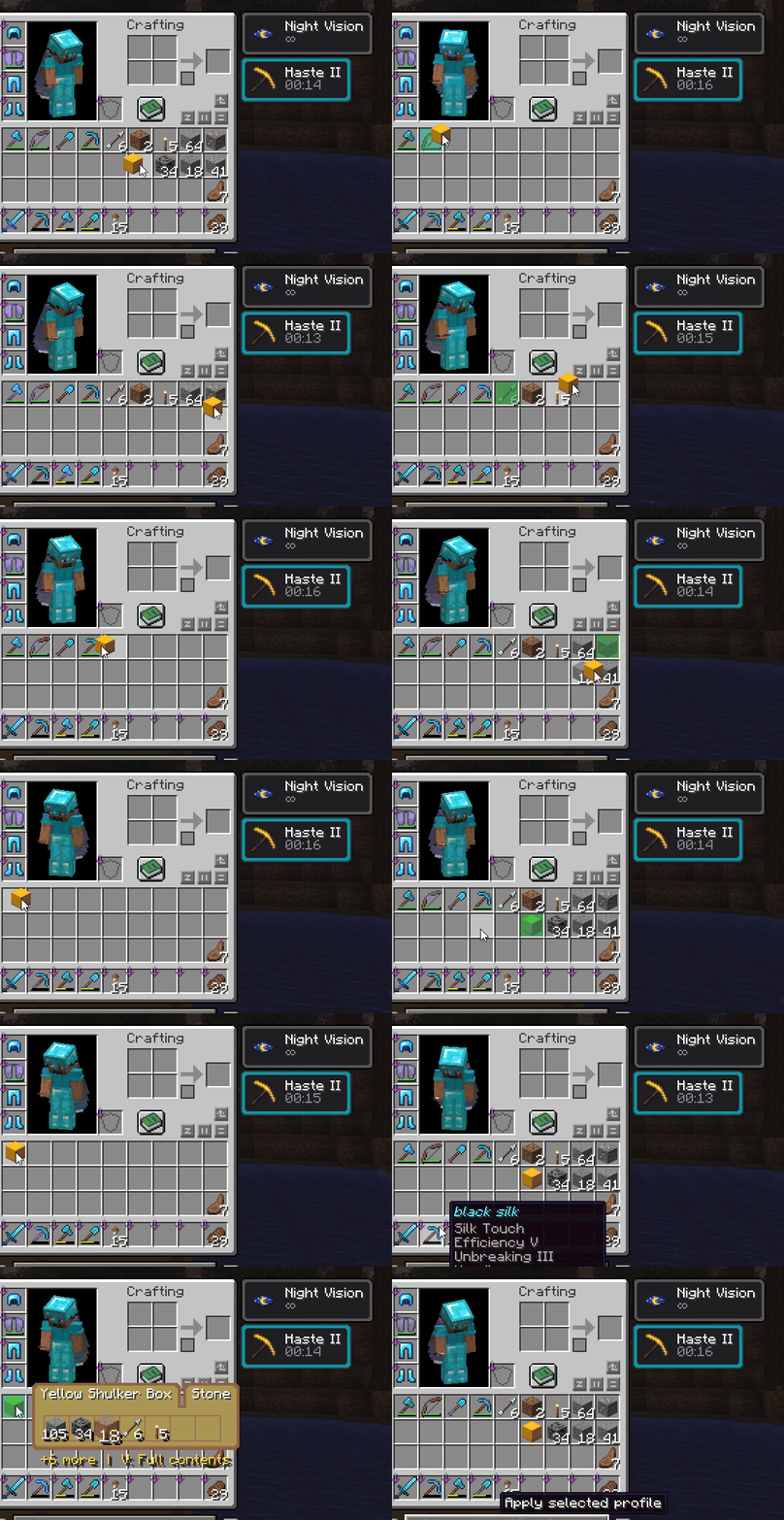
Move items in and out of Shulker Boxes directly from the tooltip. The mod gives instant visual feedback while still keeping the server authoritative.
- Hold left-click and drag to insert and right-click and drag to extract
- Insert cursor-held items directly into boxes
- Extract items directly from preview slots
- Smart merging with existing stacks
- Smooth client-side feedback with server-side validation
Select Slots and Extract with E
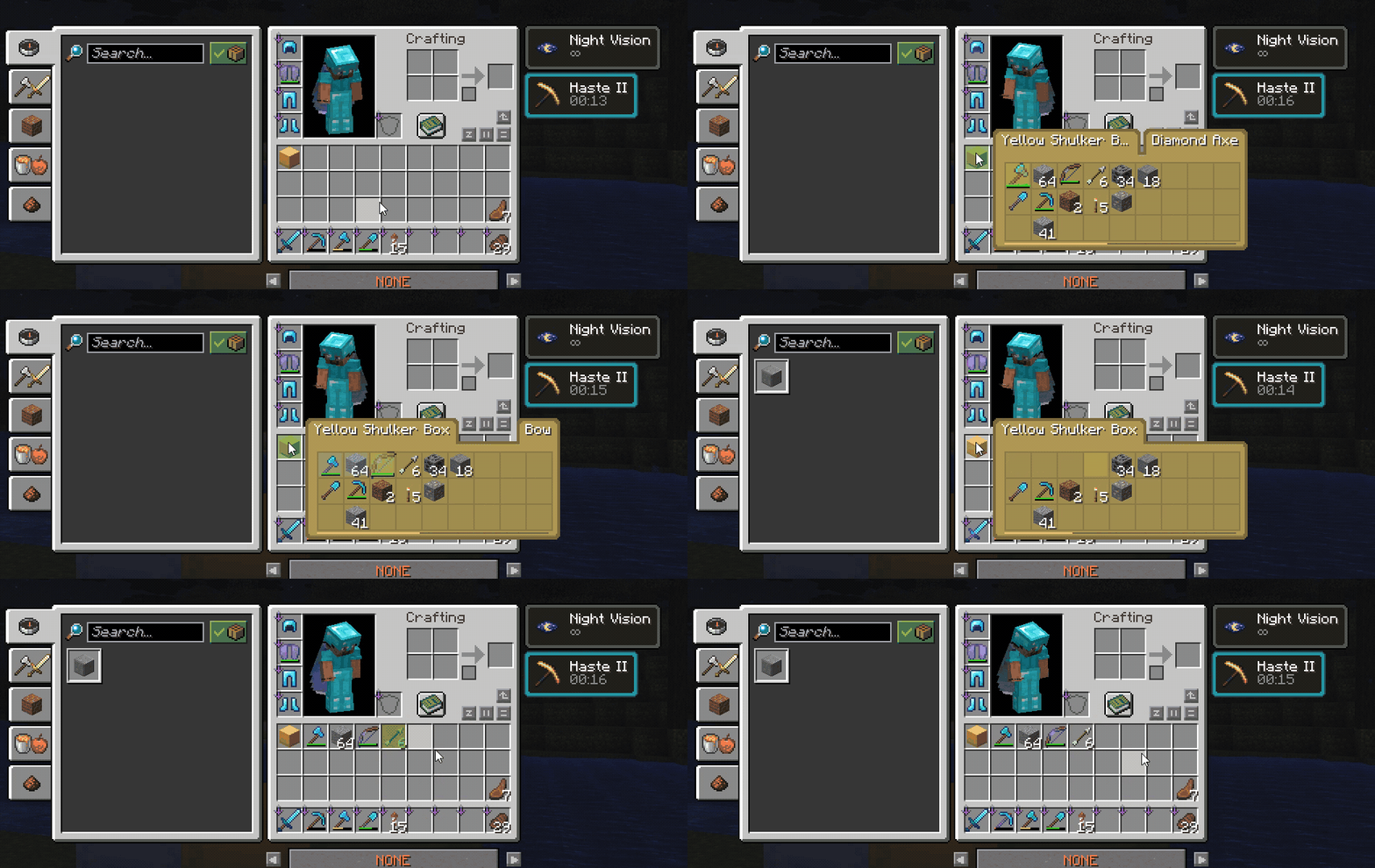
Select specific slots from the tooltip and extract them together. This makes it easy to grab only the items you want without opening or placing the box.
Spaceselects or toggles tooltip slotsEextracts selected slots- If no slots are selected,
Ebehaves normally and closes the inventory - Selections clear when you move to another container, so you never empty the wrong box
Keyboard & Scroll Navigation
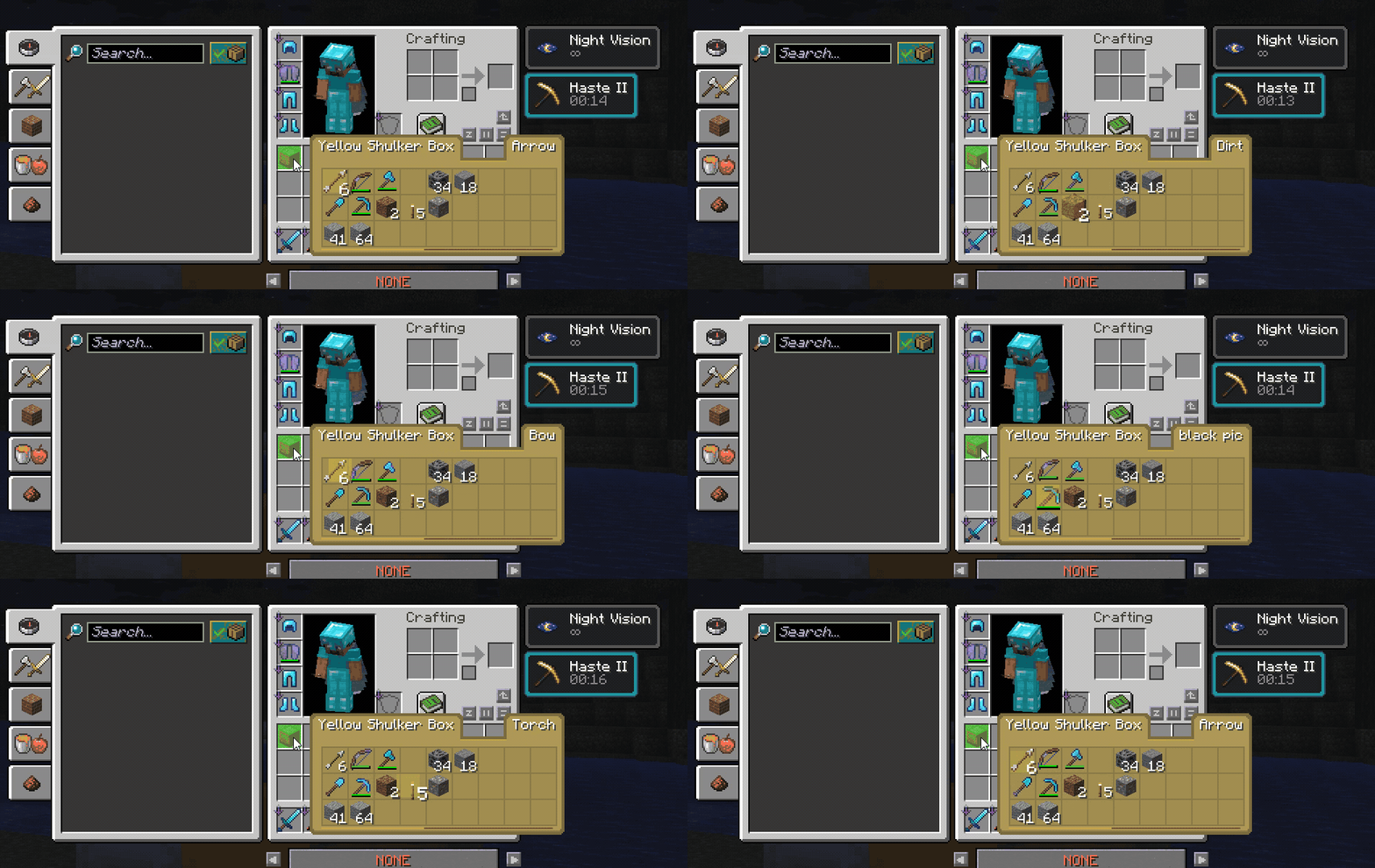 Navigate tooltip slots with the mouse wheel or arrow keys for faster control, especially when managing boxes with many items.
- Mouse wheel selection movement
- Arrow-key slot navigation, wrapping to the same column
- Selection steps to the next slot that holds something instead of stopping on every empty one
- Stable selected-slot highlight
- Smooth selection behavior while hovering tooltips
Restock & Deposit
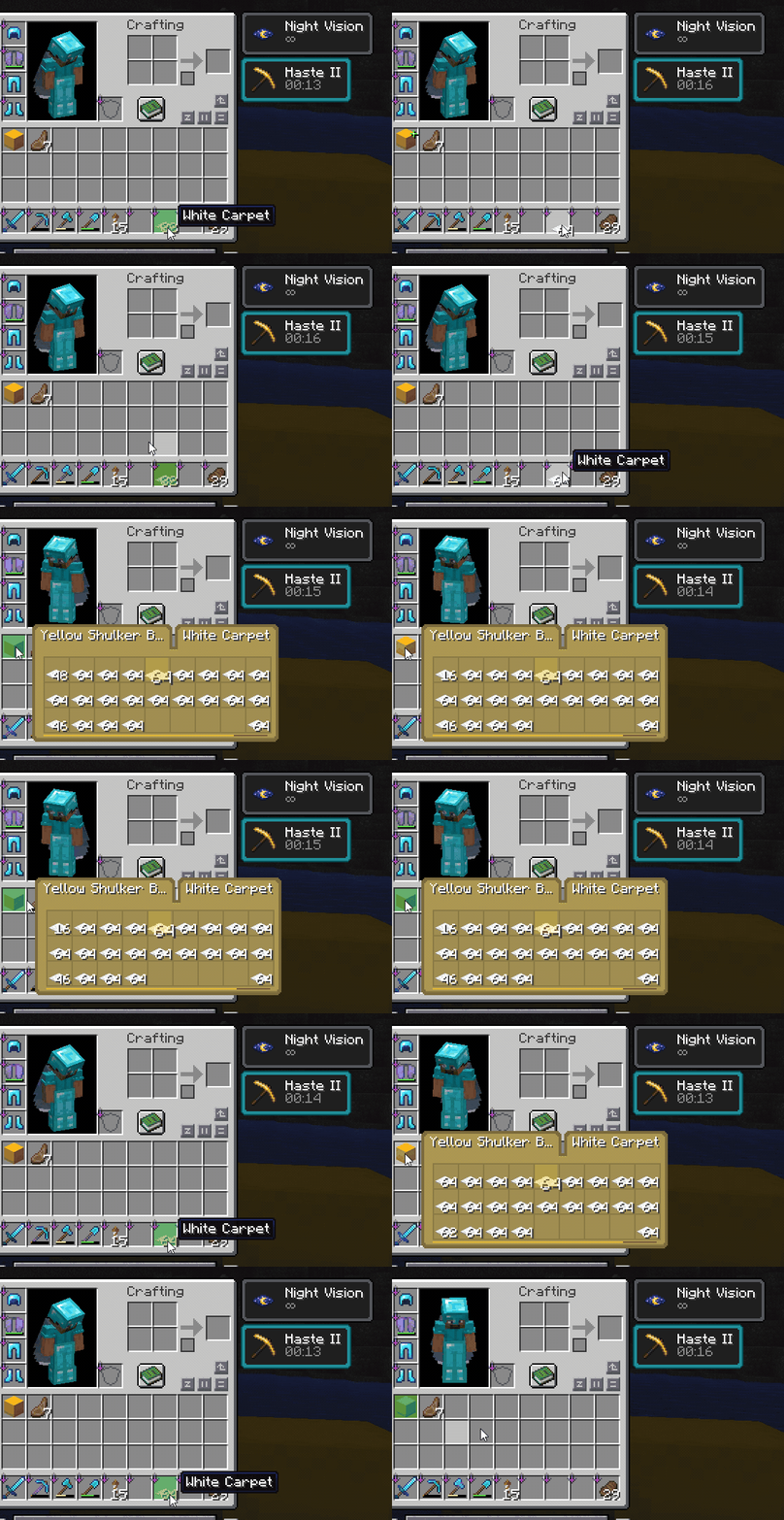
Use the Restock / Deposit key to quickly move matching items between your inventory and the hovered container. By default this key is R.
- Press
Rwhile hovering a container preview to restock matching items - Use the same shift+
Rkey to deposit matching inventory items into storage - Works with Shulker Boxes and Ender Chests
- The keybind can be changed in Minecraft's controls menu
Resource Pack Compatibility
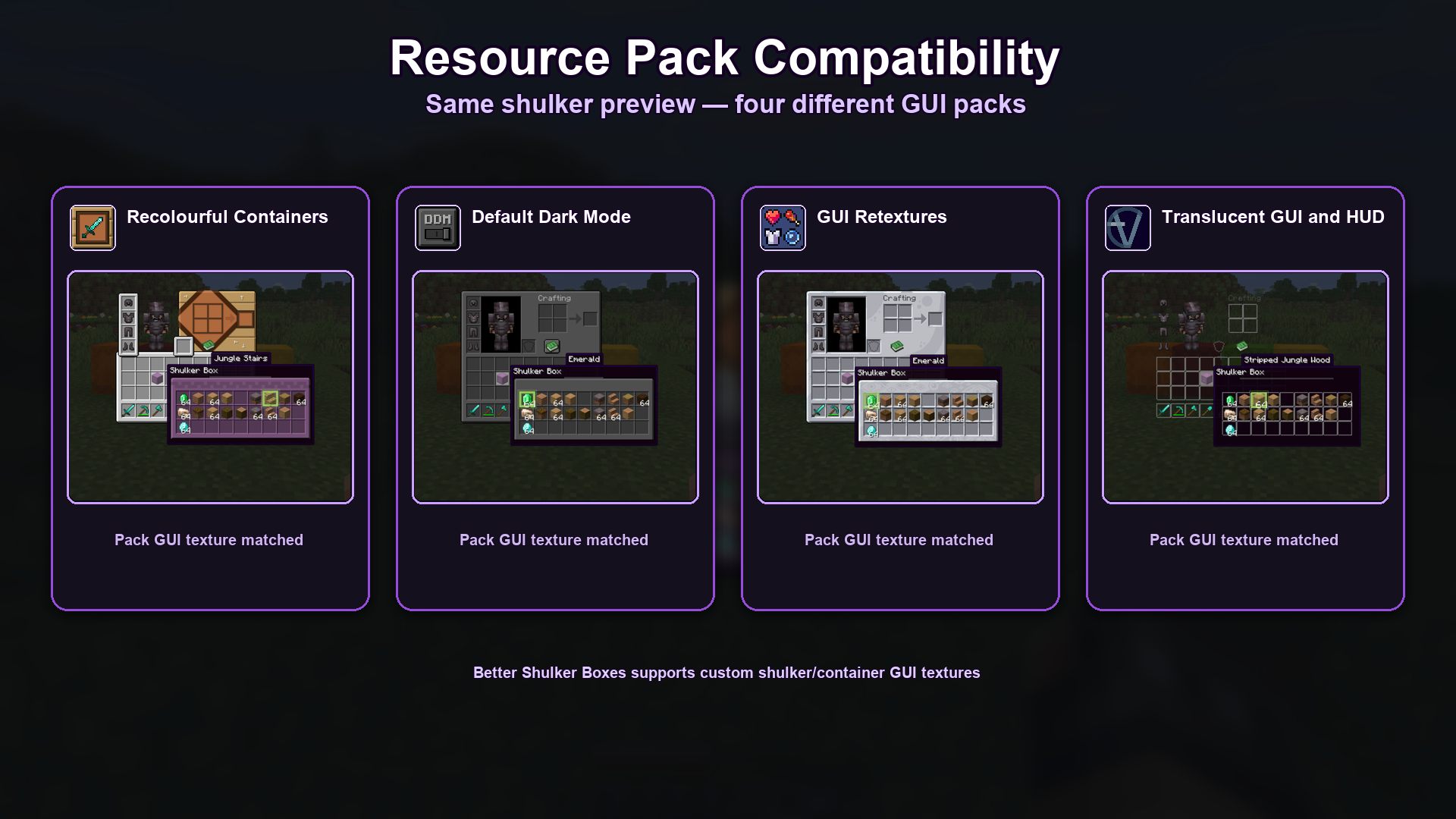
Better Shulker Boxes is designed to respect custom GUI textures from resource packs, so previews can match the style of your current pack instead of looking out of place. This applies to the Vanilla tooltip style, which is drawn from the container GUI texture.
- Supports custom shulker/container GUI textures
- Supports colored shulker GUI styles where available
- Automatic layout profiles for OptiGUI/OptiFine-style packs
- Packs can ship their own slot layout at
assets/bettershulker/layouts/*.json - X/Y slot offsets and bottom-cap controls in the settings screen for unusual packs
- Tested showcase packs include:
- Recolourful Containers
- Default Dark Mode
- GUI Retextures
- Translucent GUI and HUD
This Packs Has Been Tested And 100% Working Other Packs Might Face Some Issues.
More Features
- Wireless Ender Chest preview
- A Shulker Box bounces in its slot while you carry an item it still has room for, and can be turned off
- Fill indicator on the slot and along the tooltip's lower edge
- Shulker Box previews work in the creative inventory
- Alt Force tooltip while holding a box
- Colored shulker support
- Selected item name tooltip
- Multiple tooltip themes
- Custom theme colors
- Cloth Config settings screen
- Live Theme & Colors preview
- Sound and volume options
License
This mod is licensed under the MIT License
Ченджлог
1.5.0Релиз26.2 · 14 августа 2026 г.
Changelog
1.5.0
New
- Modern tooltip style — a flat rounded card coloured by the box's own dye, with the container and selected item names in tabs along the top. It is now the default; the previous look is still available as the Vanilla style. The theme and colour sliders apply to Vanilla only, and are greyed out under Modern, which colours itself.
- The container bounce can be turned off, and is slower than it was.
Fixed
- Arrow keys lost your column. Pressing Up from the top row jumped to the far corner of the grid instead of wrapping to the bottom of the same column. Down did the mirror of it.
- The selection stopped on every empty slot. Crossing a box holding three items took two dozen presses. It now steps straight to the next slot that actually holds something.
- Marks could empty the wrong box. Selecting slots with
Spacein one box and then pressing the extract key over a different box took items out of that box, at the same slot numbers. Marks now clear when you move to another container. - Full boxes still invited a drop. A box with no room left kept bouncing and showing the green
+while you carried an item over it, and dragging across one played a sound per slot for nothing. - Interaction sounds fell back to a generic click when a whole stack went into, or came out of, an Ender Chest. Contextual Materials now picks the right sound for the item in both directions.
- Compact mode hid stacks silently. It shows only the five largest, and now says how many it
left out. Totals above 999 read as
1.7krather than being flattened to999+, and merged tools keep their durability bar. - The fill indicator ignored its own setting. The strip along the bottom of the tooltip stayed on with Fill Indicator turned off, sat on the Modern card's border, and never appeared for Ender Chests under Modern.
- The settings preview disagreed with the tooltip. It spelled out
Vwhatever the key was really bound to, framed the selected slot in gold when the real one has no frame, and drew a name badge under Modern that no Modern tooltip has.
Removed
- The item filter. It was unfinished and is gone rather than left half-working.
Internal
- The five largest classes were split into twenty focused ones. No behaviour was meant to change, and each move was checked line by line against the original.
- Added a client game test suite — twelve tests that open the inventory, click on slots, and check
the results against the server. Run with
gradlew :fabric:runClientGameTest.
1.4.0Релиз26.2 · 11 августа 2026 г.
Better Shulker Boxes 1.4.0
Minecraft 26.2 · Fabric · NeoForge · Quilt
New
- Works in the creative inventory. Insert, extract, drag, restock and deposit all work with shulker boxes there now. Before, nothing happened.
- "Check for Updates" toggle in the settings screen.
Fixed
- Items looked like they moved when they hadn't. During fast batches of interactions, some were dropped and the preview kept showing the wrong contents.
- Ender chest preview could be wrong after an action the server refused or handled differently. It now always matches the real chest.
- Server lag from Deposit and Restock. Both did far more work than needed. Around 13x faster, with items still placed the same way.
- Update message now appears once per game launch instead of on every world join.
- Removed a crash risk in a rare container case that could stop a server.
Known limits
- Ender chests do not work in the creative inventory. This cannot be fixed. Their contents live on the server, and creative mode has no way to change them. Shulker boxes work because their contents are stored inside the item.
Tested
By hand on NeoForge and Fabric: insert, extract, drag, multi-select, restock, deposit, ender chest, and creative mode. Quilt uses the same code as Fabric but was not tested directly.
1.3.5Релиз26.2 · 5 августа 2026 г.
fix huge bugs add update notification
1.3.4Релиз26.2 · 28 июля 2026 г.
update the mod logo
1.3.4Бета26.2 · 28 июля 2026 г.
update the mod logo
1.3.4Релиз26.2 · 28 июля 2026 г.
update the mod logo
1.3.3Релиз26.2 · 26 июля 2026 г.
update the mod to depends on stable loader version
1.3.2Релиз26.2 · 14 июля 2026 г.
1.3.2
- Improved resource-pack compatibility for Shulker tooltip previews.
- fix syncing issue between the client and the server to avoid duplication
- prevent the mod from extracting the items to protected slots like armor slots and crafting slots etc
Комментарии
Загружаем…