 Mineforgian
Bell Highlights
Nowhere to Hide!
- Загрузки
- 745
- Подписчики
- 3
- Обновлён
- 27 августа 2026 г.
- Лицензия
- MIT
Опубликован 5 мая 2024 г.

IMPORTANT - I (AverageTaTeMan) only share my content on Planet Minecraft, Modrinth, and CurseForge - If you see this project on any other site, IT IS NOT ME AND SHOULD NOT BE TRUSTED!
This data pack makes it so that ringing a bell while certain blocks are above it or holding specific items will cause it to highlight different mobs whenever it is rung. Useful for when you're searching for unlit caves, or trying to find that nearby zombie that keeps annoying you with its growls...
Tags and scoreboards can be cleaned up by running /function bellhighlight:cleanup
Highlight Details:
By default, the highlight is triggered when a valid mob for the item/block is detected within 32 blocks, causing all valid mobs within 48 blocks to be highlighted. These distances can be doubled by holding a Nether Star in the offhand.Blocks:
- Creeper Head - Creeper
- Zombie Head - Zombie, Zombie Villager, Husk, Drowned
- Skeleton Skull - Skeleton, Stray, Bogged, Parched
- Wither Skeleton Skull - Wither Skeleton
- Piglin Head (Post 1.20)/Gold Block (Pre 1.20) - Piglin, Piglin Brute, Zombified Piglin
- Dragon Head - Nothing (Ender Dragon Unaffected)
- Player Head - Player, Mannequin
- Emerald Block - Villager, Wandering Trader, Zombie Villager
- Cobweb - Spider, Cave Spider
- Turtle Egg - Turtle
- Sniffer Egg - Sniffer
- Slime Block - Slime
- Sculk Shrieker - Warden
- Creaking Heart - Creaking
- Dried Ghast - Ghast, Happy Ghast
- Jukebox (with Music Disc inside) - Allay, Vex, Parrot
- Ender Chest - Enderman, Blaze
- Conduit - Guardian, Elder Guardian
- Beacon (Toggles Glowing Rather Than Giving Temporary Status Effect) - Wither
- Dragon Egg - Endermite
- Bee Nest/Bee Hive (with Bees inside) - Bee
- Copper Golem Statues - Copper Golem
- Shulker Boxes - Shulker
- Carved Pumpkin/Jack o'Lantern - Snow Golem, Iron Golem, Copper Golem
- Infested Blocks - Silverfish
- Froglights - Frog, Magma Cube
Items:
- Bone - Wolf, Skeleton Horse
- Red Mushroom - Zombie Horse
- Cactus - Camel
- Rabbit Foot - Camel Husk
- Snowball - Snow Golem, Happy Ghast
- Iron Ingot - Iron Golem
- Gold Ingot - Piglin
- Emerald - Villager, Wandering Trader, Zombie Villager
- Saddle - Horse, Donkey, Mule, Zombie Horse, Skeleton Horse, Camel, Camel Husk, Nautilus, Zombie Nautilus, Pig, Strider
- Shears - Sheep, Mooshroom, Snow Golem, Bogged
- Bucket - Cow, Mooshroom, Goat, Sulfur Cube
- Water Bucket - Cod, Salmon, Pufferfish, Tropical Fish, Axolotl, Tadpole
- Bowl - Mooshroom
- Goat Horn - Goat
- Carrot on a Stick - Pig
- Warped Fungus on a Stick - Strider
- Brush - Armadillo
- Armor Stand - Armor Stand
- Wolf Armor - Wolf
- Seeds - Parrot
- Cod/Salmon - Cat, Ocelot
- Golden Apples/Golden Carrot - Horse, Donkey, Mule
- Pufferfish/Bucket of Pufferfish - Nautilus, Zombie Nautilus
- Eggs - Chicken
- Harnesses - Happy Ghast
- Haybale/Wool Carpets - Llama, Trader Llama
- Horse Armor - Horse, Zombie Horse
- Nautilus Armor - Nautilus, Zombie Nautilus
Installation Instructions to Get the Data AND Resource Packs:
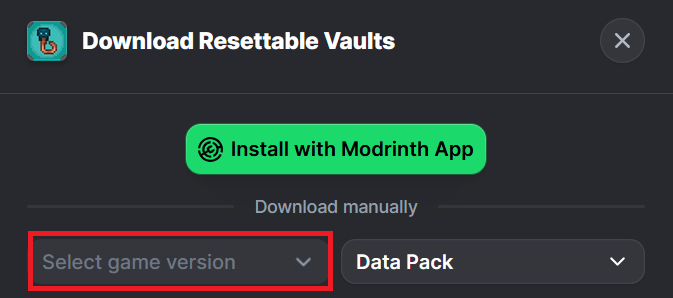
Click "Download".

Click "Select game version".
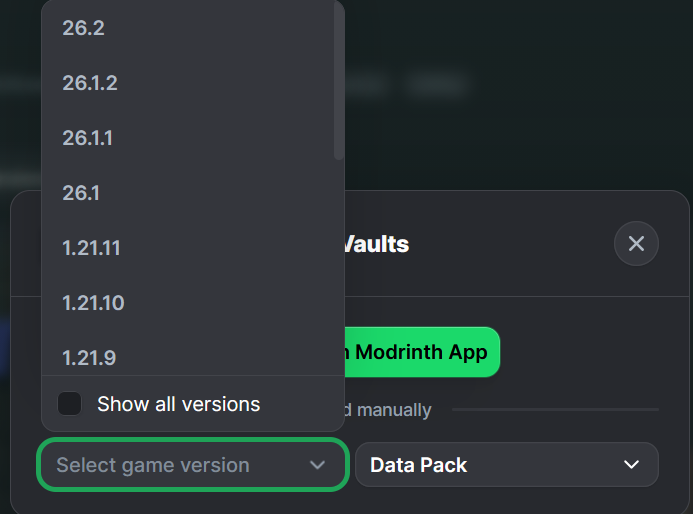
Select a Game Version.
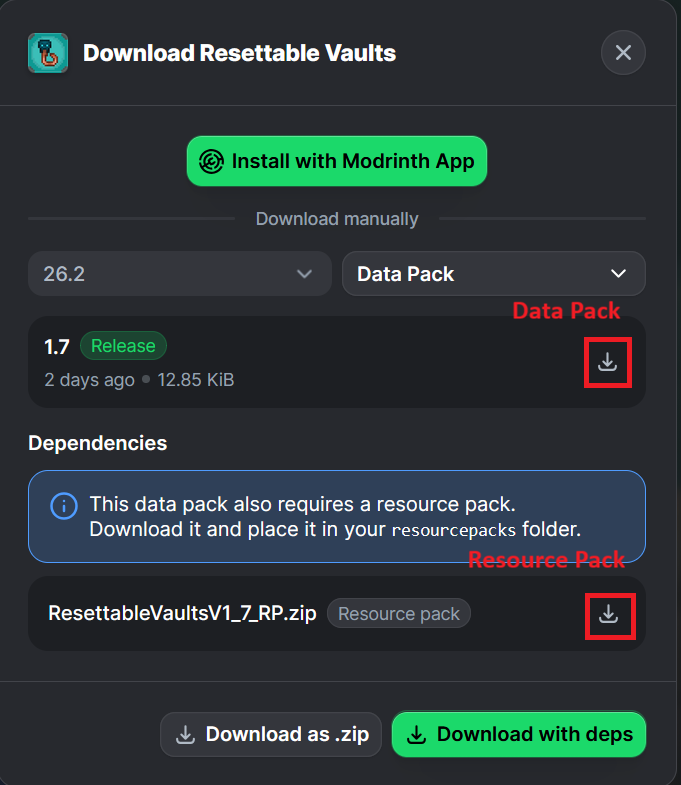
Click the download icon for both the data and resource pack files, as shown below.
Unzip the files (optional, but recommended as that's how I use/test them).
Add the resource pack to your Selected Packs (ideally at the top) in your Resource Packs menu.
Add the data pack to either your Selected Packs in the Data Packs menu (if adding at world creation) OR put it in your world's 'datapacks' folder (if adding afterwards. Recommended to either not have world open at the time or to close and reopen it afterwards).
You may get a prompt about experimental settings not being supported when opening the world. This can safely be ignored, but it's also never a bad idea to make a backup if it's a world you care about.
Ченджлог
3.2Релиз26.2 · 27 августа 2026 г.
- Resource pack now required
- Addition of translatable strings
26.1_BP_1.1Релиз26.1, 26.1.1, 26.1.2 · 27 августа 2026 г.
- Backport for versions 1.21.11 - 26.1
- Resource pack now required
- Addition of translatable strings
1.21.10_BP_1.1Релиз1.21.9, 1.21.10 · 27 августа 2026 г.
- Backport for versions 1.21.9 - 1.21.10
- Resource pack now required
- Addition of translatable strings
1.21.8_BP_1.1Релиз1.21.6, 1.21.7, 1.21.8 · 27 августа 2026 г.
- Backport for versions 1.21.6 - 1.21.8
- Resource pack now required
- Addition of translatable strings
1.21.5_BP_1.1Релиз1.21.5 · 27 августа 2026 г.
- Backport for version 1.21.5
- Resource pack now required
- Addition of translatable strings
1.21.4_BP_1.1Релиз1.21.4 · 27 августа 2026 г.
- Backport for version 1.21.4
- Resource pack now required
- Addition of translatable strings
1.21.3_BP_1.1Релиз1.21.1, 1.21.2, 1.21.3 · 27 августа 2026 г.
- Backport for versions 1.21 - 1.21.3
- Resource pack now required
- Addition of translatable strings
1.20.6_BP_1.1Релиз1.20.5, 1.20.6 · 27 августа 2026 г.
- Backport for versions 1.20.5 - 1.20.6
- Resource pack now required
- Addition of translatable strings
Комментарии
Загружаем…