 Mineforgian
Basic Storage
Drawer-style, vanilla-friendly mass item storage
- Загрузки
- 43K
- Подписчики
- 107
- Обновлён
- 9 мая 2026 г.
- Лицензия
- GPL-3.0-or-later
Опубликован 16 июля 2024 г.
🏷️ This description may not reflect the version of the mod you’re using. If you have questions or need help, ask in the #support channel on my Discord server.






About
Basic Storage adds simple, vanilla-friendly crates for players who want bulk storage without an upgrade system or a complicated GUI.
- Store up to 1 billion items of a single type in each crate
- Deposit and withdraw directly from the block
- Build crate networks with the Crate Station and Crate Connectors
- Move full crates without losing their contents
- Works with hoppers, hopper carts and common storage mods
Demonstration Video
Crate
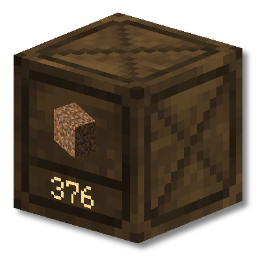
Basic Storage adds a new block, the Crate. It can hold up to 1 billion items of a single type. Items can be quickly deposited and withdrawn by:
- directly interacting with crates (no GUI)
- Right Click inserts one item
- Shift Right Click inserts all matching items from your inventory
- Left Click takes out one item
- Shift Left Click takes out a single stack of items
- using hoppers/hopper carts
- using third party mods (e.g. AE2, RS, Tom's Storage, Copper Pipes)
Crate Station
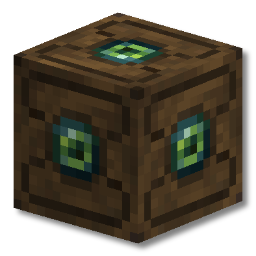
The crate station functions as a quick-insert hub for a network of crates.
Any crates connected directly to the crate station or via crate connectors or other crates are part of the same network.
Interacting with the crate station is similar to crates:
- Right Click inserts the entire stack of what you're holding into a compatible crate
- Shift Right Click inserts all items from your inventory which match crates in the network.
Use Case
Imagine you have a crate wall for materials such as stone, dirt, gravel and raw ore.
You've just been on a mining trip and your inventory is full of these items.
Simply shift right click on the Crate Station and your inventory will be freed up super quick, with
every item in the right place!
Recipes
While resources to make crates are available at the very start of the game, a crate station is slightly harder. This is to encourage players to use crates however they see fit in the early game, and then adapt their storage systems to work on a larger scale later in the game if they wish.

Transporting Crates
Crates are fantastic for keeping your storage organized and accessible, but what if you need to move that storage?
Dynamic Item Models
Crates can easily be broken with an axe. Once you've broken a crate with items in and picked it up you'll notice that it looks different.

Crates with items in them will show the item it contains on both the item model itself, and in the crate's tooltip. The number of items in the crate can be found in the tooltip too.

Frequently Asked Questions
What are the mod's dependencies?
Basic Storage has no extra dependencies.
Is there a NeoForge/Fabric/quilt version?
There is currently a Fabric version. NeoForge is planned. Quilt may work, but is not explicitly supported.
Can you backport the mod to Minecraft 1.X.X?
Unfortunately I don't have the time to backport Basic Storage to earlier versions. The mod will however support each new major version of Minecraft.
I found a bug / my game crashed
If you find any problems with Basic Storage, please feel encouraged to create an issue on the GitHub repository issue tracker. Bug reports are incredibly helpful, and help make Basic Storage the best it can be.
Acknowledgements
Basic Storage wouldn't exist without the hard work and creativity of those that came before it. I'd like to give special thanks to the talented developers and artists behind JABBA, Storage Drawers and Extended Drawers, as well as every other barrel/drawer mod that came before them.
Ченджлог
2.4.3+26.1.xРелиз26.1, 26.1.1, 26.1.2 · 9 мая 2026 г.
IMPORTANT:
⚠️ Back up your world before updating!! Things should work as expected but with any major version update it's important to back up your world just in case.
☀️ New
- Updated to 26.1.x | Thank you cputnam for helping port the mod!
🛠️ Fixes
- Added two migration solutions for old worlds with legacy crate networks which should fix some major pain points with crate networks
- Crate networks are stored per-dimension, and now follow proper a proper namespaced dimension directory structure for .dat files
- Fixed small desync bug on Crate Station readout when adding new crates to a network
- New network .dat files now have top level format, network_uuid and dimension information for easier debugging and error-proofing
- Fixed some smaller edge case networking issues
Existing World Migration Info
TLDR: You can just load your old world and play, and crate networks should heal themselves. If you run into issues, keep reading below:
- legacy networks get updated to the correct format and data over time by being in a loaded chunk (the mod checks a certain amount of networks every 25 seconds if there are legacy .dat files present in the world), but you can trigger this manually:
/basicstorage migrate info- shows you the coordinates of the closest 3 legacy networks to your location. Moving/teleporting there and using "/basicstorage migrate run" will update the networks as long as the chunks are loaded/basicstorage migrate run- this manually triggers the migration behaviour that runs automatically every 25 seconds, but tries to execute it for every network on file in small batches. If your network doesn't seem to be getting updated, move near it and run this command. None of this is a perfect solution, and some old crate networks may be stale/invalid/unfixable. If this is the case, check the UUID of the network from "/basicstorage migrate info" and delete that file in your world/data/basicstorage/networks directory. You'll also find archived copies of migrated networks in world/data/basicstorage/legacy_migrated_network_copies. Once you've done that, break and replace the blocks to build a fresh network.
Important Caveat: Old network data didn't have a dimension defined, so the coordinates given by "/basicstorage migrate info" may point to any dimension. If you can't find blocks from this mod at the coordinates in your current dimension, try the others first before deleting the data file.
2.4.2+1.21.11Релиз1.21.11 · 17 февраля 2026 г.
⚙️ Changes
- Shift+Right click crate station with crate connector places the connector instead of running item insertion routine
2.4.1+1.21.11Бета1.21.11 · 9 января 2026 г.
⚙️ Changed
- Crate Station buffers can be extracted from with hoppers or 3rd party item extraction mods
⚠️ BETA Reason ⚠️
- 2.4.0+1.21.11 brought a BIG rewrite to networking between Crate Stations and Crates. There may be potential bugs that weren't caught during testing, so please make backups of your world before installing the version, and every now and again while using it.
2.4.0+1.21.11Бета1.21.11 · 7 января 2026 г.
IMPORTANT:
Crate station networking has changed.
If you have a setup in your world, you can either break and place your crates again, or use the operator command “/basicstorage networks recalculate ”.
The recalculate command should not be used on gargantuan areas, so start smaller if you’re unsure if your network is too big to do all at once. There are other operator commands too that may be helpful.
🌞 New
- New Block: Crate Connector - Want to link up your crate station to crates far away but don’t want the overhead of a bunch of empty crates? Craft some crate connectors and connect your network.
- New Block: Crate Station Frame - Crate stations can no longer be crafted. Instead, craft a crate station frame and right click it with an eye of ender. This lets you set up automated systems easily with the frame (being able to place blocks on it), and then add the eye of ender into it to turn it into a crate station (which is harder to build against)
- Locking - Crates ‘lock’ automatically when emptied, and can be ‘unlocked’ by left clicking another time to let the crate accept any item
- Merging - Placing a crate on another crate that has the same item inside empties the top crate’s items into the bottom one. Easily combine your crates without waiting hours for hoppers!
- Bigger Range, Better Performance - Crate Station backend has been completely overhauled to use a much more performant network to connect to crates, which allows for theoretical infinite connected distance and lets you insert items into crates that are in unloaded chunks. [This is in beta so please be careful with your crate networks!]
- Better Automation - Hoppers and other insertion methods can now be used on Crate Stations to insert items into a network of crates.
- The Crate Station has a 54 stack buffer (same as double chest), amounting to a maximum distribution rate of 3456 items every 3-6 seconds, or an average of around 768 items/s. This will be enough throughput for most modded farms and will be more than enough for any vanilla system. For context, hoppers in/out is 2.5 items/s.
- Crate Stations can also receive a redstone signal to disable their distribution, and emit a comparator readable signal that is dependent on its buffer fullness.
- Visual Effects - New particles and sounds to convey interaction/automation actions to players, crate station has an animated texture
- Throughput Info - Right clicking a Crate Station that is actively receiving/distributing items automatically will show the number of items in/out per second
- Advancements - 4 advancements to guide players through the mod a little better
- Integration with Sodium - Sodium video settings config screen has a subheading for Basic Storage. Includes settings for disabling things clientside like station sounds & particle beams.
⚠️ BETA Reason ⚠️
- This version brings a BIG rewrite to networking between Crate Stations and Crates. There are potential bugs that weren't caught during testing, so please make backups of your world before installing the version, and every now and again while using it.
2.3.0+1.21.11Релиз1.21.11 · 30 декабря 2025 г.
🌞 New
- New config option to make crates unbreakable if they contain items (lets you prevent crates from being used as portable item storage)
- New item renderer that shows crate contents inside your inventory and when held
2.0.1+1.21.10Релиз1.21.10 · 22 ноября 2025 г.
🛠️ Fixes
- Fix item extraction bug when Collective mod is installed
- Changed config axe check to use tags instead of instanceof
1.2.1+1.21.1Релиз1.21.1 · 22 ноября 2025 г.
🛠️ Fixes
- Fix item extraction bug when Collective mod is installed
- Changed config axe check to use tags instead of instanceof
2.0.0+1.21.10Релиз1.21.10 · 19 ноября 2025 г.
❗❗ BACK UP YOUR SAVE BEFORE UPDATING THE MOD TO THIS VERSION (seriously)
Please back up your world, especially if you're running a dedicated server! Check that your old crates are behaving correctly after giving them a block update and that your contents are correct. If you find that this is not the case, please file an issue on the GitHub Repository with screenshots if possible. This warning exists because crates get migrated to having different blockstate data in this version to facilitate 12-directional placing.
🌞 New
- Better system for extracting items from crates:
- short left clicks (or shift left clicks) extract items
- holding down button to break the crate won't extract any items
- Config option to only allow breaking crates with an axe
- Subtitles added for all crate actions
- Crates can be placed in all 12 orientations (previously only 4 horizontal ones)
- Existing crates (that don't face north) will need to receive a block update to face the right way. Right clicking them with an empty hand will do this, or many other actions.
👹 Removed
- Goodbye Crate Hammer! Your functionality has been superceded by the new extraction system. No more clogging people's inventories.
🛠️ Fixes
- Item/Block lighting for crates is now consistent, no longer changing based on orientation
- Shift clicking crates onto crate stations will place the crate instead of trying to insert items
🔮 Coming Soon
- Reimplementing GUI crate item display
- Crate locking
- Dummy crate (for linking crates to a station without the link being an actual crate)
- Quick sorting to stack identical crates' contents into just 1 crate instead of multiple
🌏 Languages
Added the following languages:
- french
- italian
- japanese
- brazilian portugese
- ukrainian
- simplified chinese
updated existing translations
Thank you to Nordiago for their porting help from 1.21.1 through to 1.21.10
Комментарии
Загружаем…