 Mineforgian
Auto Logout
Automatically disconnects if your life drops below a certain threshold.
- Загрузки
- 10K
- Подписчики
- 36
- Обновлён
- 25 июня 2026 г.
- Лицензия
- CC-BY-NC-4.0
Опубликован 20 ноября 2024 г.

Auto Logout saves you when having low life. When enabled it automatically disconnects you from the sever or world if your lifes drop below the set threshold.
Quilt
To use it on Quilt you need to manually install Fabric API on your Quilt profile:
Browse Content → Loader (on the right) → Unlock Filter → Search for "Fabric API" → Install
Then select your Profiles Minecraft Version.
Config
Use Commands or the Mod Menu Integration to change the settings to fit your wishes.
⚠️ From v2.0.0 (Minecraft 1.21.9+) Auto Logout works without any other Mods except FabricAPI and can be controlled using the commands. But for using the Settings GUI you need Mod Menu and Cloth Config API, which also enables the Keybinding option. ⚠️
Commands
/auto-logout help
/auto-logout enable
/auto-logout disable

/auto-logout health-tracking enable
/auto-logout health-tracking disable
/auto-logout health-tracking threshold
/auto-logout health-tracking threshold <value>

/auto-logout tps-tracking enable
/auto-logout tps-tracking disable
/auto-logout tps-tracking threshold
/auto-logout tps-tracking threshold <value>

/auto-logout entity-scanning enable
/auto-logout entity-scanning disable
/auto-logout entity-scanning entity-count
/auto-logout entity-scanning entity-count <value>
/auto-logout entity-scanning radius
/auto-logout entity-scanning radius <value>

/auto-logout join-message enable
/auto-logout join-message disable
Health/TPS Threshold value has to be between 0 and 20.
Entity Count value has to be between 1 and 10.
Radius value has to be between 1 and 64.
Mod Menu Integration
Requires Mod Menu and Cloth Config API
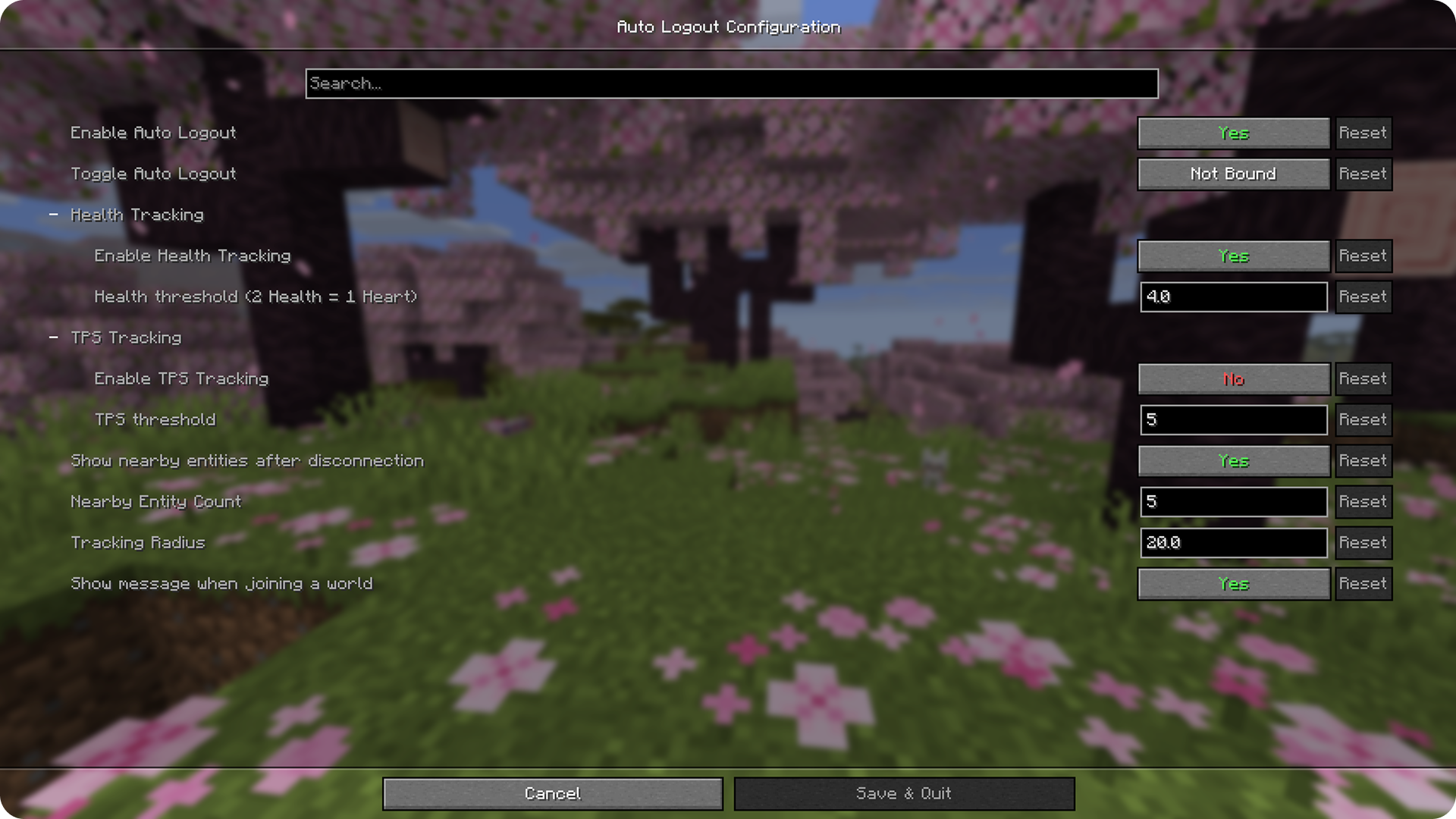
Defaults
- Enabled: Yes
- Keybinding: Not Bound
- Health Tracking Enabled: Yes
- Health Threshold: 4
- TPS Tracking Enabled: No
- TPS Threshold: 5
- Entity Tracking: Yes
- Entity Count: 5
- Radius: 20
- Show message when joining world: Yes
Creator Website: 🔗myownbrain.de
Ченджлог
5.0.0Релиз26.2 · 25 июня 2026 г.
Update v5.0.0
- added: Support for 26.2
4.2.1Релиз26.1, 26.1.1, 26.1.2 · 23 июня 2026 г.
Update v4.2.1
- fixed: spamming logs when no key bound
4.2.0Релиз26.1, 26.1.1, 26.1.2 · 17 июня 2026 г.
Update v4.2.0
- added: config version & migration
- changed: naming for "Entity Tracking" to "Entity Scanning"
- fixed: Entity Scanning not running when not all trackers were enabled
4.1.0Релиз26.1, 26.1.1, 26.1.2 · 6 мая 2026 г.
Update v4.1.0
- added: TPS Tracking
- Singleplayer: calculates TPS + respects tick rate
- Multiplayer: estimates TPS (fully client-side)
- use subcategories on config page
4.0.0Релиз26.1, 26.1.1, 26.1.2 · 28 марта 2026 г.
Update v4.0.0
- added: support for 26.1.x
- changed: some names to align with unobfuscated code
- removed: use of mappings
3.0.0Релиз1.21.11 · 13 декабря 2025 г.
Update v3.0.0
- Support for 1.21.11
- Migrated Mappings from Yarn to official Mojang Mappings
2.1.0Релиз1.21.9, 1.21.10 · 29 октября 2025 г.
Update v2.1.0
- added option to hide/show message on joining a world
- Entity Tracker not running anymore when Auto Logout is disabled
2.0.0Релиз1.21.9, 1.21.10 · 9 октября 2025 г.
Update v2.0.0
- Mod Menu and Cloth Config API are now optional
- Support for Minecraft 1.21.9 & 1.21.10
Комментарии
Загружаем…