 Mineforgian
Animated Timer
This data pack adds an animated and extensively configurable in-game timer.
- Загрузки
- 5K
- Подписчики
- 14
- Обновлён
- 4 апреля 2026 г.
- Лицензия
- MIT
Опубликован 3 августа 2024 г.
Introduction
Animated Timer (AT) data pack adds an in-game timer via the actionbar field of Minecraft’s HUD. A wide range of functions ensures a simple yet versatile configuration, allowing you to customize your timer according to your likings and needs.
Features
In its original and unmodified state, features include:
- Count-up & count-down
- Multiple render (display) types
- Both static (never changing) and animated (always changing) color configuration
- General style configuration (bold & italic text)
- Pre-built animations
- Profiles (ability to save current configuration & load at a later time)
- Trigger scoreboards for complete configuration & interaction even if cheats are disabled
- Advanced features for map makers (facilitated embedding into external projects)
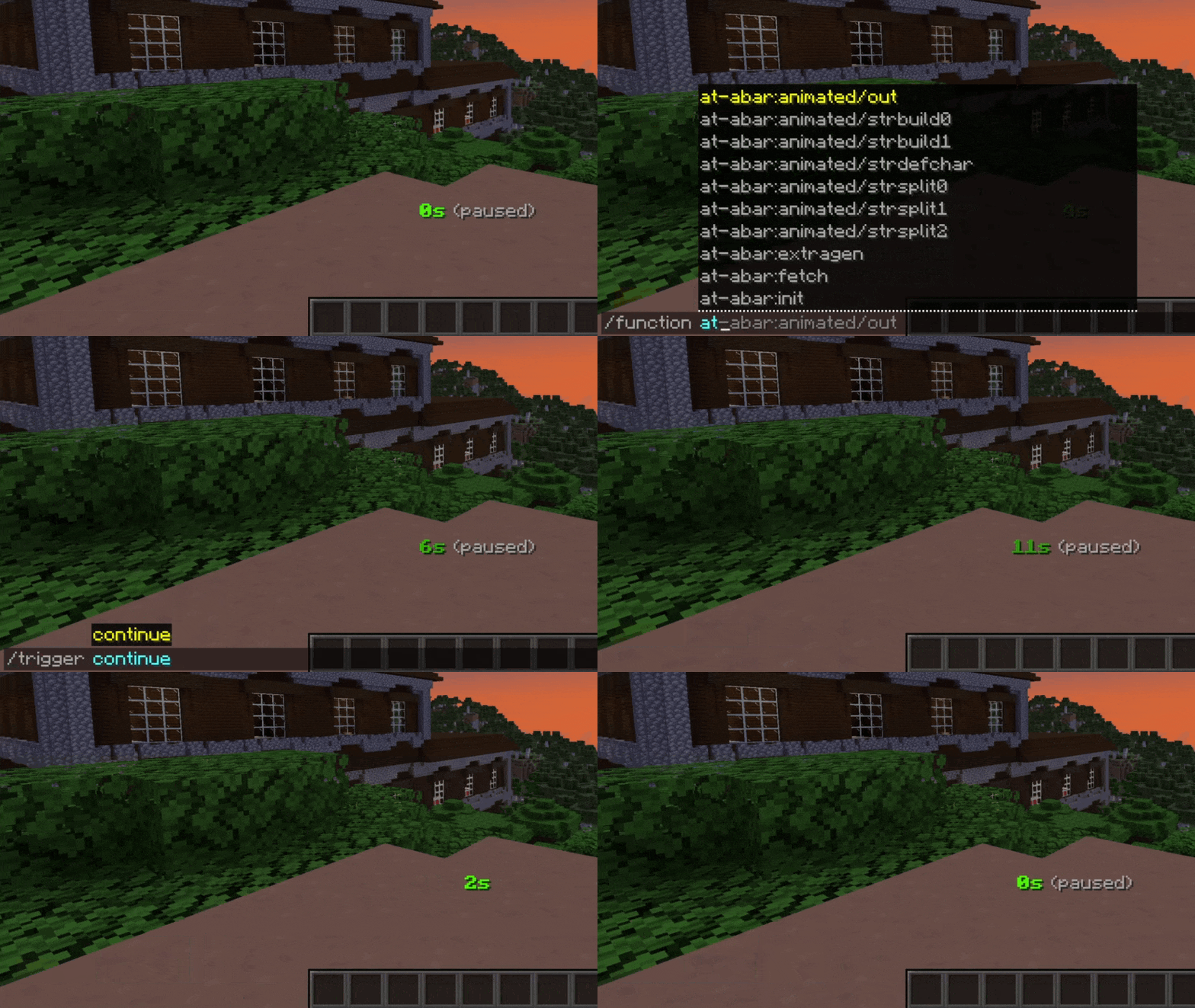
Controlling the timer
AT can be controlled the following way:
| Description | Cheats enabled | Without cheats |
|---|---|---|
| Start / resume the timer | /function at:continue |
/trigger continue |
| Pause the timer | /function at:pause |
/trigger pause |
| Set timer to its initial value and start it | /function at:reset |
/trigger reset |
| Set timer to zero and stay paused | /function at:reboot |
/trigger reboot |
Manually setting time
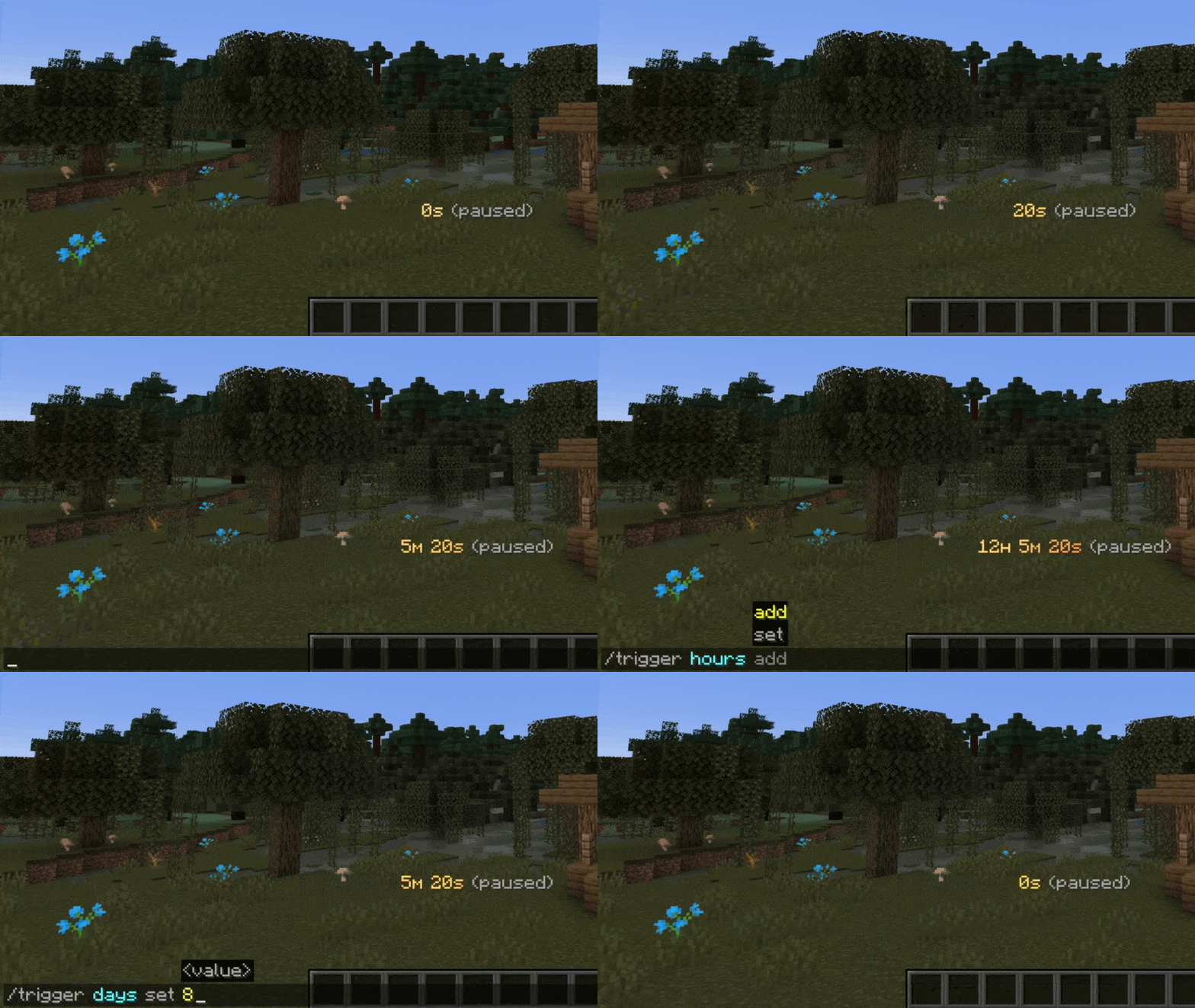
In some situations, you may want to alter the current time manually. This can be done either with a function in the at-time namespace or with /trigger:
| Description | Cheats enabled | Without cheats |
|---|---|---|
| Add one second | /function at-time:add/second |
|
| Remove one second | /function at-time:remove/second |
|
| Set seconds | /function at-time:set/seconds/10 |
/trigger seconds set 10 |
| Add one minute | /function at-time:add/minute |
|
| Remove one minute | /function at-time:remove/minute |
|
| Set minutes | /function at-time:set/minutes/15 |
/trigger minutes set 15 |
| Add one hour | /function at-time:add/hour |
|
| Remove one hour | /function at-time:remove/hour |
|
| Set hours | /function at-time:set/hours/3 |
/trigger hours set 3 |
| Add one day | /function at-time:add/day |
|
| Remove one day | /function at-time:remove/day |
|
| Set days | /function at-time:set/days/7 |
/trigger days set 7 |
Note: The above functions that include at-time:set are just examples. In fact, a multitude of set functions are available for use.
Timer modes
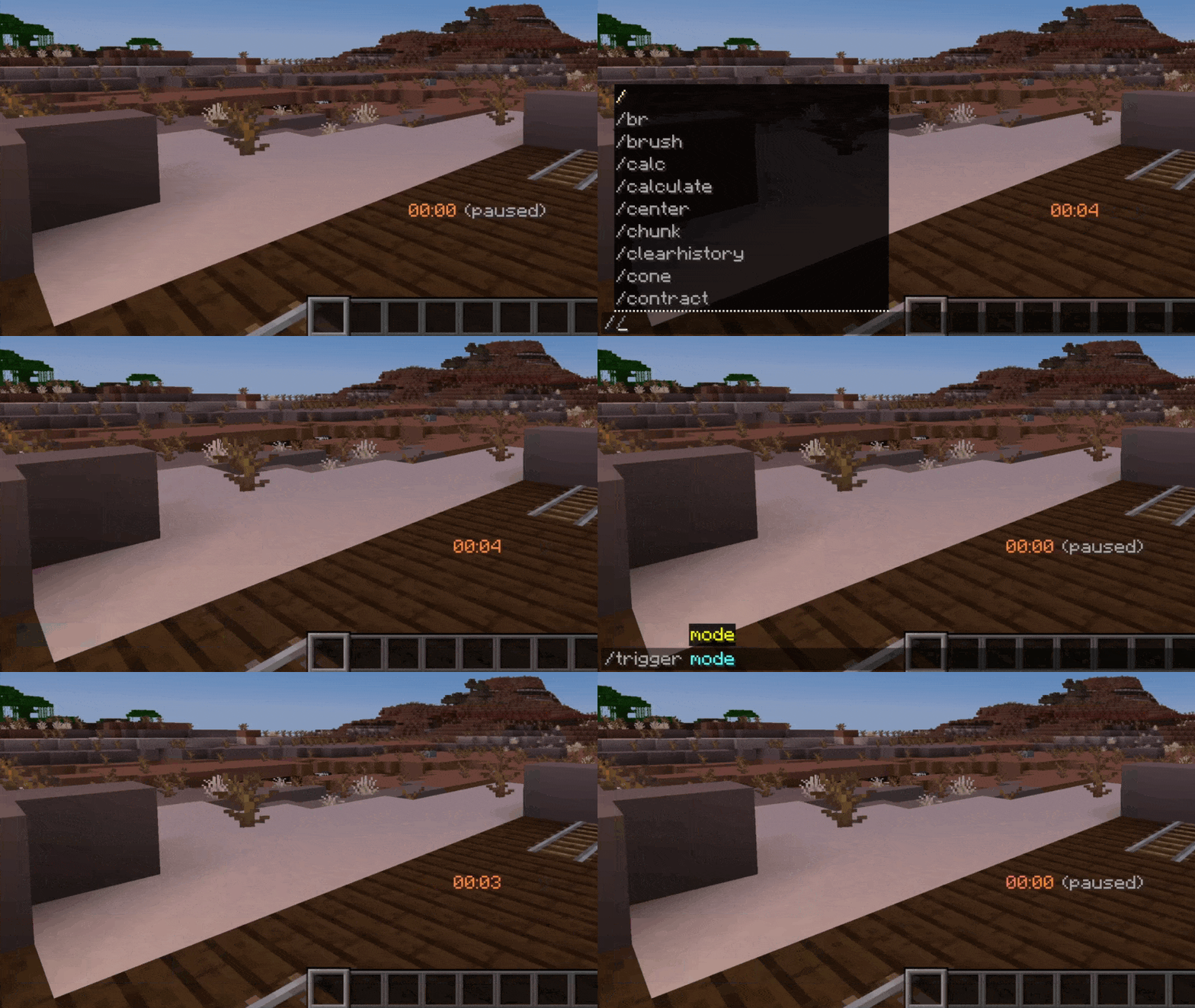
AT is counting up by default but count-down is also available. You can toggle between both count modes with a single command:
| Description | Cheats enabled | Without cheats |
|---|---|---|
| Switch between timer modes | /function at-conf:mode |
/trigger mode |
How to upgrade
- Download latest data pack version
- In your datapacks directory, replace old version with new one
- Reload your game, either with
/reloador through re-joining your world
Are you interested?
If you would like to find out more about configuration or how to integrate this timer into your projects, please check out the AT Docs site.
Roadmap
- Add option to trigger a pause at specific game events (player dies, dragon defeated, ...)
- Add gradient generator for custom animations
- Implement timer modes / render patterns "realtime" & "in-game time"
- Add display option (show timer in bossbar or scoreboard title)
- Implement timer configuration UI using new dialog feature
Inspiration
This project was inspired by German content creator BastiGHG who often uses a similar version of this timer in his videos and streams.
Ченджлог
1.3.3Релиз1.21.11, 26.1, 26.1.1 · 4 апреля 2026 г.
Features
Add animation
- aqua-fade
Technical
Minor changes & bug fixes
Individually configured extra fields are now displayed correctly when new players join the game.Data pack compatibility
AT is now compatible with Minecraft 26.1 & 26.1.1.1.3.2Релиз1.21.9, 1.21.10, 1.21.11 · 24 января 2026 г.
Features
Extend prefix & suffix fields to support variables
In short, variables enable depicting dynamic content, including player coordinates and viewing direction. This mechanism was previously only accessible through the render pattern field but can now also be used via timer prefix and suffix.Implement "extra fields config" setting
In previous releases, the configuration of so-called extra fields (prefix, suffix & render pattern) always happened on a global scope. Beginning with this version, players can now configure individual extra fields according to their own preferences, further extending AT's configuration options.The way extra fields behave may be toggled using one of the following commands:
/function at-conf:extra
/trigger extra
Technical
Major re-writes of actionbar & pattern systems
In order to enable AT's configuration changes regarding individual extra fields, both actionbar and pattern systems had to be re-written from scratch, resulting in optimizations (fewer lines of code) and improved overall code readability.Additionally, these re-writes allow AT to target individual players when parsing variables such as player coordinates, thus finally completing the changes made in v1.2.1.
Data pack compatibility
AT is now compatible with Minecraft 1.21.11.1.3.1Релиз1.21.8, 1.21.9, 1.21.10 · 24 октября 2025 г.
Features
Implement new API function
You are now able to retrieve AT's locally installed version by using the following API Get function:/function at-tapi:get/local_versionWhen executed, both the numerical patch number (e.g. 103010) as well as the verbose one (e.g. 1.3.1) are written to the default API output path.
Technical
Enhance input verification of several functions
Static style type: Primary & secondary colors are now properly validated, allowing either Minecraft color code names or HEX colors. Animated style type: Both animation name & speed configuration functions now feature improved error handling when invalid input values are specified.Additionally, profile & API Trap related functions now validate and resist against empty values, which was previously not possible.
Data pack compatibility
AT is now compatible with Minecraft 1.21.9 & 1.21.10.1.3.0Релиз1.21.6, 1.21.7, 1.21.8 · 17 августа 2025 г.
Major (breaking) changes
Implement AT API
The new application programming interface enables direct interaction with AT's timer and configuration systems, allowing external projects to:- Read the full configuration, current timer values & state (up/down/paused), pre-rendered actionbar string, ...
- Change current time & modify any configuration setting
- Get notified when timer continues, pauses, reaches full minute / hour / zero, ...
As a consequence, all functions originally located in at-dcfg or at-dext were moved to at-tapi.
Add new default profiles
Beginning with this release, AT will be shipped with a total of twelve default profiles to further represent its versatile configuration options. If you are upgrading from a previous version of AT, run this command to replace all profiles with the new defaults:/function at-misc:profile/init
WARNING: This will erase all profiles, including those you have created yourself.
Features
Re-color all chat messages
All tellraw messages generated by AT have been re-designed to follow a more unified color scheme.Add two animations
- pink-green
- yellow-indigo
Technical
Minor changes & bug fixes
Some functions in the at-conf namespace were modified to not rely on the use of /return during execution. AT's render pattern is now parsed immediately after loading a profile or enabling actionbar visibility, thus preventing the sudden change of player coordinates or viewing direction.Data pack compatibility
AT is now compatible with Minecraft 1.21.8.1.2.1Релиз1.21.5, 1.21.6, 1.21.7 · 4 июля 2025 г.
Features
Extend pattern engine to display player coordinates and viewing direction
By using the two new variables %c and %f, you are now able to reference the player's X, Y & Z values as well as viewing direction. Note that because AT's actionbar is rendered globally, only values of one player can be displayed at a time.Implement two new render types
These render types, namely TAZ and TNZ, utilize ꜱᴍᴀʟʟ ᴄᴀᴘɪᴛᴀʟ letters to indicate the individual timer units. You can switch to them as you would do with any other render type:/function at-conf:render
/trigger render
Enhance configuration show command
To increase usability (and to avoid having to memorize many different commands), you can now click directly on the output of the configuration show command. Doing so will reveal the command required to alter a specific configuration setting.Technical
Pattern engine overhaul
The pattern engine now dynamically calculates its maximum length, allowing you to insert up to 40 characters. Repetitive rendering has been introduced to continuously update each player's position.Data pack compatibility
AT is now compatible with Minecraft 1.21.6 & 1.21.7.1.2.0Релиз1.21.3, 1.21.4, 1.21.5 · 25 апреля 2025 г.
Features
Implement option to modify timer pattern
To further extend the configuration possibilities of AT, you can now alter the timer actionbar string. Using a single command, any text may be inserted directly before and / or after the timer:/function at-conf:pattern {text:""}
The string between the two quotes will be considered part of the final actionbar. The timer itself may or may not be referenced with %t, potentially allowing you to replace it completely.
Implement timer prefix & suffix preference
Changing the timer pattern always results in the custom text being displayed with the timer's original style settings. If this is not desired, the custom text may also be prepended or appended in a static gray tone, depending on which command is used:/function at-conf:prefix {text:""}
/function at-conf:suffix {text:""}
Add five animations
- purple-orange
- white-green
- bronze-fade
- silver-fade
- gold-fade
Add ability to check AT version in-game
When executed, the following commands reveal some useful information about AT, such as a general description, the currently installed version and relevant links to project pages./function at:info
/trigger info
Technical
Data pack compatibility
AT is now compatible with Minecraft 1.21.5.1.1.2Релиз1.21.2, 1.21.3, 1.21.4 · 22 февраля 2025 г.
Features
Add two animations
- light-blue
- white-aqua
Technical
Partial re-write of actionbar engine
AT now renders animation colors per charater instead of per actionbar component. This improves the visual quality of AT and at the same time facilitates the implementation of new features. (preparation for v1.2.0)1.1.1Релиз1.21.2, 1.21.3, 1.21.4 · 11 января 2025 г.
Features
Implement player requirement option
Pauses the timer when no one is currently in the game. This setting is disabled by default but may be controlled via one of two commands:/function at-conf:online
/trigger online
Remove profile count limitation
The previously existing limitation of 64 profiles is now gone due to major re-writes of some profile functions.Technical
Listing function overhaul
Both animation and profile list functions have been completely re-designed to follow a more dynamic tick-based rendering approach. This reduces overall function size and should cause less lag spikes on slower hardware.Data pack compatibility
AT is now compatible with Minecraft 1.21.4.Комментарии
Загружаем…