 Mineforgian
AE2 WCWT
AE2 WCWT (Wireless Comprehensive Work Terminal) is an integrated wireless terminal mod for Applied Energistics 2 / NeoForge 1.21.1.
- Загрузки
- 31K
- Подписчики
- 8
- Обновлён
- 20 августа 2026 г.
- Лицензия
- MIT
Опубликован 18 мая 2026 г.
AE2 WCWT
AE2 WCWT (Wireless Comprehensive Work Terminal) is an integrated wireless terminal mod for Applied Energistics 2 / NeoForge 1.21.1.
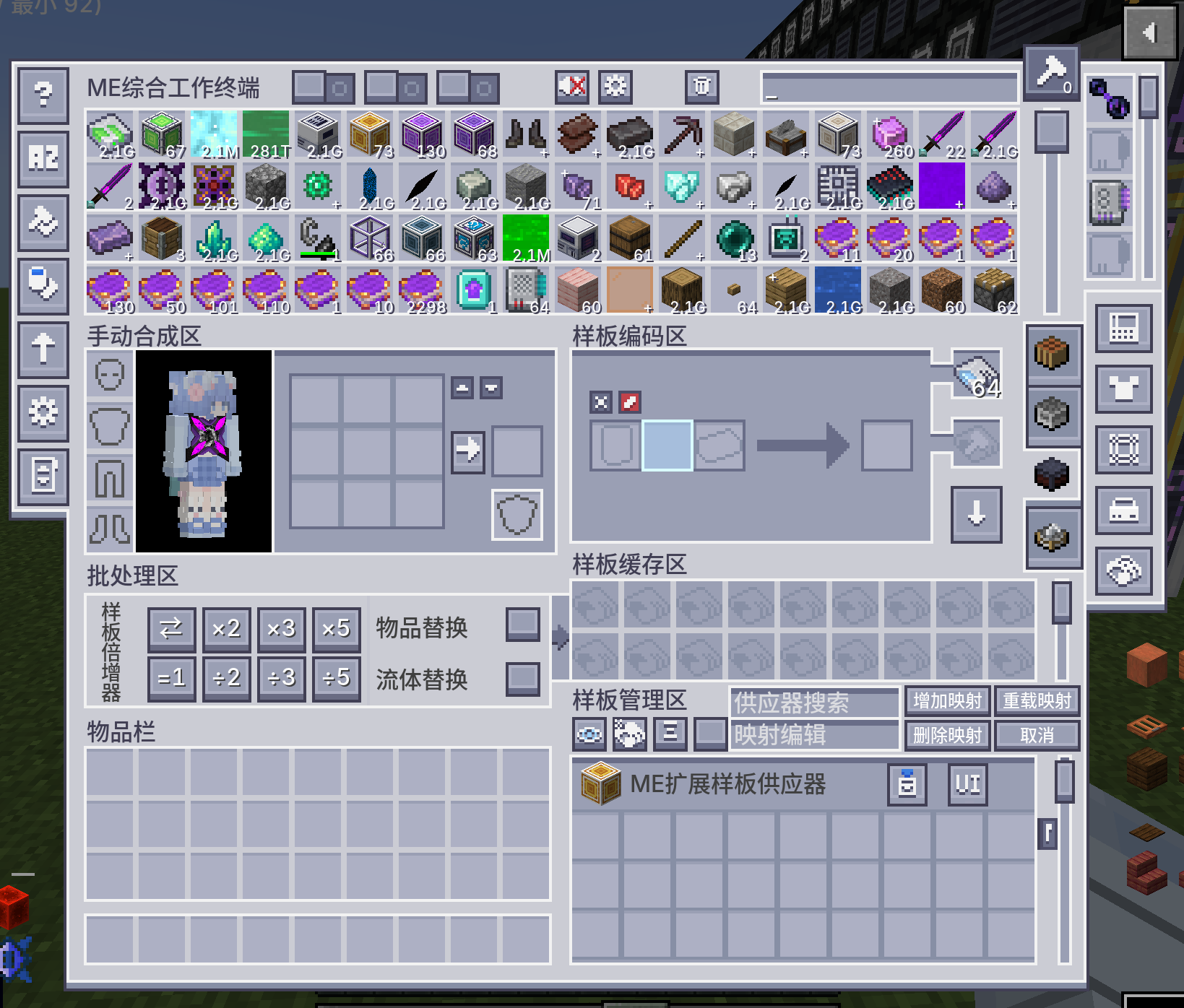
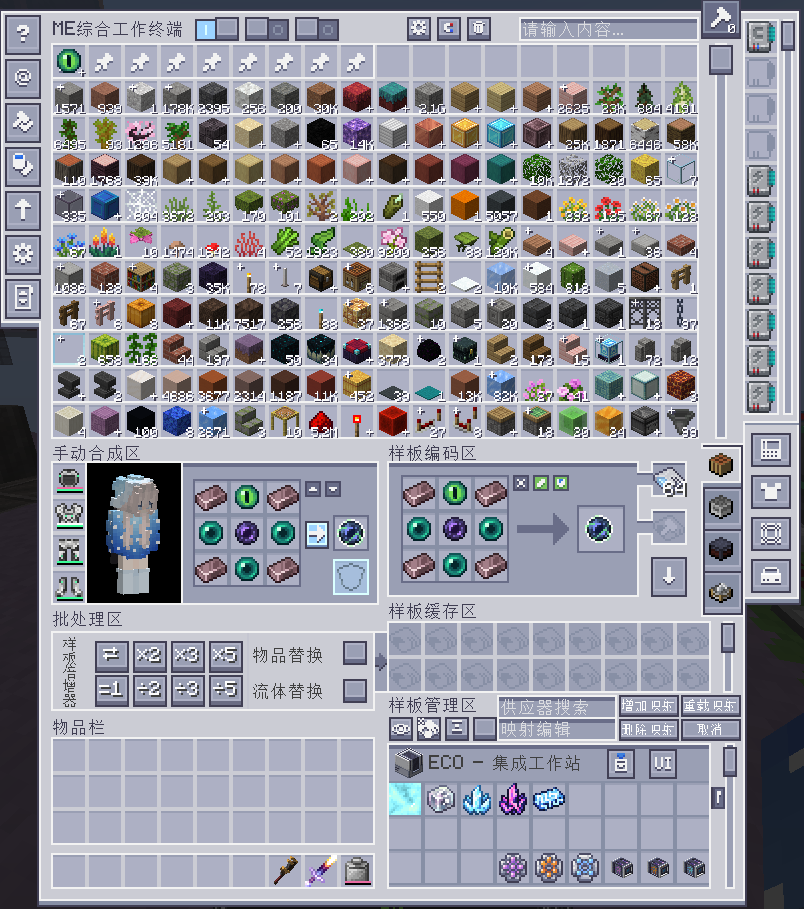
Instead of only providing a wireless crafting terminal, it aims to merge multiple commonly used AE2 addon workflows into a single terminal item and a single UI entry point.
Current version: v1.1.0
Overview
- 18-column main ME storage view
- Built-in pattern cache for temporary pattern storage and batch operations
- Supports crafting, processing, smithing table, and stonecutting patterns
- Extended UI system with multiple side panels
- Per-panel hotkeys
- Optional-mod integrations that appear dynamically when the related mod is installed
Requirements
Required
- NeoForge
1.21.1 - Applied Energistics 2
19.2.17 - AE2 Wireless Terminal Library
Optional integrations
- AdvancedAE
- ExtendedAE
- ExtendedAE Plus
- Curios
- Cosmetic Armor Reworked
- EMI
- JEI
- NeoECOAEExtension
- AE2 Crystal Science
- AE2 Lightning Tech
- Extreme Sound Muffler
Notes:
- Some buttons and panels are hidden automatically if their related optional mod is not installed.
AE2 WCWT 中文说明
AE2 WCWT(Wireless Comprehensive Work Terminal)是一个面向 Applied Energistics 2 / NeoForge 1.21.1 的综合型无线终端模组。
它的目标不是只做“无线合成终端”,而是把多个 AE2 生态附属模组中常用、常切换、常要开很多界面的功能,集中整合到一把无线终端里。
当前版本:v1.1.0
特性概览
- 18 列主仓库显示区,更大的无线物品查看面积
- 内置样板缓存区,便于批量编码、复制、替换、上传与整理
- 同时支持合成样板、处理样板、锻造台样板、切石机样板
- 集成高级编码、样板管理、工具包、卡槽箱等扩展 UI
- 支持快捷键直接打开不同扩展界面
- 支持多种可选模组联动,按已安装模组动态显示对应按钮或界面
依赖与兼容
必需依赖
- NeoForge
1.21.1 - Applied Energistics 2
19.2.17 - AE2 Wireless Terminal Library
已集成/兼容的可选模组
- AdvancedAE
- ExtendedAE
- ExtendedAE Plus
- Curios
- Cosmetic Armor Reworked
- EMI
- JEI
- Neo ECO AE Extension
- AE2 Crystal Science
- AE2 Lightning Tech
- Extreme Sound Muffler
说明:
- 部分功能在没有安装对应模组时会自动隐藏按钮,或保留基础逻辑但不显示扩展内容。
Ченджлог
1.3.8Бета1.21.1 · 20 августа 2026 г.
English
- Fixed automatic upload treating manually typed Provider Search text as an upload target.
- Added automatic crafting-pattern upload support for Lightning Tech's Tianshu Supercomputing Array.
- Assembler-matrix duplicate detection now uses PatternContainer APIs, and matrix upload calls ExtendedAE Plus's public upload method instead of reflection.
- Added a red border around JEI/EMI recipe-transfer buttons when the crafting grid is locked. This can be disabled in client config.
- Fixed pattern-provider list names showing in English on dedicated servers.
- Shift+left-clicking an EMI bookmarked or recipe-context stack now fills the full recipe into the terminal.
- Fixed EMI crafting transfers not following the recipe's on-screen ingredient order.
- Fixed duplicate tooltips on the EMI fill button when the crafting grid is locked.
中文
- 修复自动上传把供应器搜索框里手动输入的文本当作上传目标的问题。
- 新增合成样板自动上传兼容闪电科技天枢超算阵列。
- 装配矩阵查重改为 PatternContainer API,写入改为直接调用 ExtendedAE Plus 公开上传方法,不再使用反射。
- 新增合成网格锁定时,JEI/EMI 在转移物品按钮边框额外绘制红色边框。可在客户端配置中关闭。
- 修复样板供应器列表名称在专用服务器环境下显示英文名称的问题。
- 新增 Shift+左键 点击带配方上下文的 EMI 书签/物品会把整份配方填入终端。
- 修复 EMI 合成转移物品顺序与配方顺序不符的问题。
- 修复 EMI 锁定网格时填充按钮出现重复tooltip的问题。
1.20.1.10Бета1.20.1 · 15 августа 2026 г.
English
- Fixed duplicate patterns when uploading crafting patterns to the Neo ECO AE Extension matrix.
中文
- 修复上传合成样板至 Neo ECO AE Extension 矩阵时重复样板的问题。
1.3.7Бета1.21.1 · 15 августа 2026 г.
English
- Fixed WCWT not restoring the AE2 terminal search text when AE2's "Remember Last Search" option was enabled.
- Added client-configurable compact display for empty pattern-provider slots in the pattern management area.
- Added an option to open the ExtendedAE Plus provider selection screen when uploading to multiple providers with the same name.
- Added JEI support for encoding multiblock structure information pages without real recipe outputs as processing patterns.
- Added a top-right hidden-slot count and tooltip to compressed empty-slot summary cells.
- Added the missing Simplified Chinese translation for the pattern-management F-key search sync option.
- Simplified the wireless terminal's "Other Settings" section by removing four less frequently used checkboxes.
- Reworked the WCWT crafting recipe to inherit data from all four input wireless terminals; incompatible or excess upgrade cards are returned to the player's inventory, or dropped at the player's position when the inventory is full.
中文
- 修复 AE2 开启“记住上次搜索”后,重新打开 WCWT 终端搜索框仍被清空的问题。
- 新增客户端配置,可将样板管理区中每个供应器的空样板槽压缩为汇总槽显示。
- 新增配置选项,上传样板时遇到多个同名供应器可打开 ExtendedAE Plus 供应器选择界面。
- 新增 JEI 通用多方块结构样板编码,能够识别没有真实配方产物的多方块结构信息页,并编码为处理样板。
- 为压缩显示的空槽汇总格添加右上角未显示槽位数量和悬浮提示。
- 补充样板管理 F 键搜索同步配置的简体中文翻译。
- 精简无线终端“其他设置”分组,移除四个较少使用的复选框。
- 重做 WCWT 合成配方,合成时继承四个输入无线终端中的数据;不兼容或超出容量的升级卡会退回玩家物品栏,物品栏已满时掉落在玩家位置。
1.20.1.9-hotfixБета1.20.1 · 13 августа 2026 г.
English
- Fixed a production startup crash caused by the WUT terminal migration mixin failing to find AE2WTLib's obfuscated
ItemWUTinventory tick method.
中文
- 修复 WUT 终端迁移 Mixin 找不到 AE2WTLib 混淆后的
ItemWUT物品 tick 方法,导致生产环境启动崩溃的问题。
1.20.1.9Бета1.20.1 · 13 августа 2026 г.
English
- Integrated WCWT with AE2WTLib's Wireless Universal Terminal, using its official terminal hotkeys and cycle button.
- Removed the Wireless Comprehensive Non-Universal Terminal. Legacy terminals embedded in WCWT are returned to the player's inventory; overflow is safely dropped.
- Fixed WCWT clearing the terminal search field after reopening even when AE2's "Remember Last Search" option was enabled.
中文
- 将 WCWT 接入 AE2WTLib 无线通用终端,并使用其官方终端快捷键和循环按钮。
- 移除无线综合非通用终端,旧版合入的终端会返还至玩家背包;背包已满时会安全掉落。
- 修复开启 AE2“记住上次进行的搜索”后,重新打开 WCWT 仍会清空终端搜索框的问题。
1.3.6Бета1.21.1 · 12 августа 2026 г.
English
- Fixed WCWT causing some modpacks to crash or remain stuck on the startup screen due to duplicate registration of the main, magnet, and trash menu types.
中文
- 修复 WCWT 主菜单、磁力菜单和垃圾桶菜单类型重复注册,导致部分整合包启动崩溃或卡在启动界面的问题。
1.3.5Бета1.21.1 · 12 августа 2026 г.
English
- Integrated WCWT with AE2WTLib's Wireless Universal Terminal, including its official terminal selector and hotkey.
- Removed WCWT's legacy embedded-terminal merge, split, switching, recipes, and custom selector systems.
- The Network Tool Slot Pack Card now provides a persistent 3×3 upgrade inventory without requiring a physical Network Tool.
- Fixed the F-key search linkage and added an option to synchronize it with the pattern management search field.
中文
- 将 WCWT 接入 AE2WTLib 无线通用终端,并使用其官方终端选择器与快捷键。
- 移除 WCWT 旧有的内嵌终端合并、拆分、切换、配方及自定义选择器系统。
- 网络工具卡槽包卡现在无需实体网络工具即可提供可持久化的 3×3 升级槽。
- 修复 F 键搜索联动,并新增是否同步填充样板管理搜索框的配置。
1.20.1.8Бета1.20.1 · 10 августа 2026 г.
1.20.1.8
English
- Fixed Curios terminal pick-block synchronization and empty hotbar slot selection.
- Fixed GTCEu programmed circuit priority and magnet filter slot matching.
- Fixed duplicate provider titles not being grouped when multiple identical providers appear in the same pattern-management provider group.
- Added configurable empty-slot compaction grouped by provider.
- Added a configurable EAEP provider-selection screen when uploading patterns to multiple providers with the same name.
- Optimized tool ingredient matching for recipe transfer.
- Added the
maxSyncedSlotsPerProviderserver setting (default 1024) to cap synchronized non-empty pattern slots per provider and prevent oversized provider-list packets from disconnecting clients. - Fixed JEI/EMI transfers of recipes with extremely large quantities freezing the client due to per-item preview loops.
- Capped each pulled ingredient at its runtime maximum stack size, including stack-size changes from other mods, and removed the fixed 64-item transfer limit.
- Added generic JEI multiblock-structure pattern encoding for structure pages without real outputs, while retaining GTL hatch filtering.
- Fixed the 3×3 upgrade toolbox still requiring a carried Network Tool after installing the Network Tool Slot Pack Card.
- Added the
fillProviderSearchFromJeiBookmarkclient option to control whether pressing F over a JEI ingredient or bookmark also fills the pattern-management provider search field. - Fixed pressing F over a bookmark automatically filling the JEI search field.
中文
- 修复饰品栏终端中键取物设置同步和手上有物品时切换空快捷栏槽位的问题。
- 修复GTCEu 编程电路优先级和磁力过滤槽位匹配问题。
- 修复样板管理区供应器列表组内多个相同供应器标题不分组显示标题的问题。
- 新增按供应器合并的空槽压缩显示,可在配置文件中开启。
- 新增多个同名供应器上传样板时打开 EAEP 供应器选择界面,可在配置文件中开启。
- 优化配方转移时的工具类材料匹配。
- 新增服务端配置
maxSyncedSlotsPerProvider(默认 1024),限制每个供应器同步的非空样板槽位数量,避免过大的供应器列表数据包导致客户端断连。 - 修复 JEI/EMI 转移超大合成量配方时按单个物品循环预览导致客户端卡死的问题。
- 单项配方材料拉取数量改为不超过物品运行时最大堆叠数量,自动兼容其他模组对堆叠上限的修改,并移除固定 64 个的限制。
- 新增通用 JEI 多方块结构样板编码:识别没有真实产物的多方块结构信息页,保留 GTL 仓室过滤。
- 修复安装网络工具卡槽包卡后,仍需携带网络工具才显示 3×3 升级卡槽的问题。
- 新增客户端配置
fillProviderSearchFromJeiBookmark,用于控制对着 JEI 配料或书签按 F 键时是否同时填充样板管理区的供应器搜索框。 - 修复对着书签 F 键时会自动填充到 JEI 搜索框的问题。
Комментарии
Загружаем…