 Mineforgian
AdminWatchdog
AdminWatchdog lets you monitor what staff members do on your server. When an admin runs a command, changes gamemode, or takes items from creative mode, the plugin sends a message to your Discord channel. This helps server owners keep track of staff activit
- Загрузки
- 472
- Подписчики
- 4
- Обновлён
- 8 июля 2026 г.
- Лицензия
- PROPRIETARY-LICENSE
Опубликован 25 сентября 2025 г.
AdminWatchdog


See any player's last 50 admin actions with one command
The problem this solves
You gave three people OP. One of them is quietly spawning diamond blocks into their own ender chest at 3 AM. You'd have no way to know, short of reading raw chat logs line by line, until a player screenshots it and posts it in your Discord asking why the economy is broken.
AdminWatchdog watches for that instead of you. It sits on your server, tracks what OPs and permission-holders actually do, and tells your Discord channel the moment it happens. It also just started keeping a searchable record, so "what did this person do last week" has a real answer instead of a shrug.
What's new in 1.4.3
Run /adminwatchdog history <player> and you'll see their last 10 tracked actions: commands, gamemode changes, creative-inventory grabs, item drops and pickups, all with timestamps. Ask for more and get up to 50.
Custom alerts also got a rate limit. If a player finds a pattern that triggers one of your Discord alerts, they used to be able to flood your channel just by repeating it. Now each player is capped at 5 triggers per 60 seconds by default, and both numbers are yours to change.
Full history at the bottom, under Changelog.
What it actually does
- Posts to Discord the moment a monitored player runs a command, switches gamemode, or takes something from creative
- Keeps a local, queryable record of all of it, so you're not restricted to whatever's still in Discord's scrollback
- Lets you write custom alert rules for specific commands, down to matching individual arguments
- Only watches the players you tell it to: OPs, specific permissions, everyone, or no one
- Lets trusted staff opt out entirely with a bypass permission
Screenshots
Discord messages
Creative inventory tracking
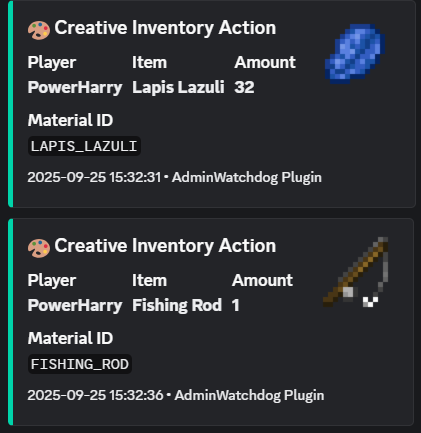
When someone takes items from creative mode, you get a Discord message showing exactly what they took:
Command alerts
Custom alerts
Set up special messages for important commands:
Gamemode changes
Features
Discord alerts
- Instant notifications in your Discord server
- Rich embeds with item pictures for creative-inventory events
- Ping specific roles for the commands you actually care about
- Works with any Discord channel through a plain webhook, no bot invite needed
Audit history (new in 1.4.3)
Every event AdminWatchdog tracks also gets written to a small local database. Pull it up any time with:
/adminwatchdog history Steve
/adminwatchdog history Steve 50
No Discord scrollback to dig through, no log file to grep. Old entries clean themselves up automatically after 30 days by default (configurable, or keep them forever).
What gets monitored
- Commands run by players
- Commands run from console
- Gamemode changes
- Items taken from creative inventory, dropped, or picked up by someone else
Who gets monitored
You choose:
- Only OPs
- Only players with specific permissions
- Everyone
- Nobody, until you decide otherwise
Trusted admins can get a bypass permission so they're left alone entirely.
Custom command alerts, with real pattern matching
Set up alerts for the commands you care about, matched down to specific arguments:
ban: matches any ban commandlp user: matches LuckPerms user subcommandslp user * permission set *: matches only when someone sets a permissiongive * * >=5: matches only gives of 5 or more items
Get pinged for the commands that matter and skip the ones that don't. And as of 1.4.3, a player can't flood your channel by spamming a command that matches one of these.
How to install
- Download the plugin from the Downloads tab
- Put the JAR file in your server's
pluginsfolder - Restart your server
- Edit
plugins/AdminWatchdog/config.yml - Add your Discord webhook URL
- Run
/adminwatchdog reload
Setting up Discord
- In Discord, go to your channel settings
- Click "Integrations" then "Webhooks"
- Create a new webhook
- Copy the webhook URL
- Paste it into
config.yml
Configuration
Basic setup
discord:
  webhook-url: "YOUR_WEBHOOK_URL_HERE"
  enabled: true
Custom alerts
custom-responses:
  enabled: true

  player:
    # Alert when someone uses /ban
    ban: "**BAN** - %player% banned someone at %time%"

    # Alert and ping a role when someone uses /op
    op: "**CRITICAL** - %player% used OP! <@&YOUR_ROLE_ID> at %time%"

    # Alert for specific LuckPerms commands
    "lp user * permission set *": "**PERMISSION** - %player% set permission: %command%"
Rate limiting custom alerts
custom-responses:
  rate-limit:
    enabled: true
    max-triggers: 5
    window-seconds: 60
Audit history retention
logging:
  database-logging: true
  database-retention-days: 30 # set to 0 to keep everything forever
What the placeholders mean
%player%: the player who ran the command%sender%: for console commands%command%: the full command they typed%time%: when it happened
Mentioning roles in Discord
To ping a role, you need the role ID. In Discord, type \@RoleName to get the ID, then use it like <@&123456789> in your config.
Commands
| Command | What it does |
|---|---|
/adminwatchdog or /aw |
Shows plugin info |
/adminwatchdog version |
Shows version number |
/adminwatchdog reload |
Reloads the config |
/adminwatchdog update |
Checks for updates |
/adminwatchdog history <player> [limit] |
Shows a player's recent tracked actions (default 10, max 50) |
Permissions
| Permission | What it does | Who has it |
|---|---|---|
adminwatchdog.reload |
Lets you reload config | OPs only |
adminwatchdog.monitor |
Makes you get monitored | OPs only |
adminwatchdog.history |
Lets you view player history | OPs only |
adminwatchdog.bypass.commands |
Stops your commands being logged | Nobody |
adminwatchdog.bypass.creative |
Stops creative inventory being logged | Nobody |
adminwatchdog.bypass.customresponses |
Stops custom alerts for you | Nobody |
adminwatchdog.bypass.gamemode |
Stops gamemode changes being logged | Nobody |
How to stop being monitored
Give yourself one of the bypass permissions. For example, if you don't want custom responses pinging you:
/lp user YourName permission set adminwatchdog.bypass.customresponses true
Questions people actually ask
Why not just read the server log?
You can, if you enjoy grepping timestamps out of a flat text file at midnight. /adminwatchdog history gives you one player's actions, sorted by time, without the rest of the noise.
Will this slow my server down? No part of it runs on the main thread. Webhook calls, file writes, and database queries all happen off-thread, on Paper and on Folia.
Does it work on Folia? Yes, since 1.4.2. It also still runs fine on regular Paper.
Is the audit data sent anywhere? No. It's a local SQLite file in your plugin's data folder. Nothing leaves your server except what you explicitly send to your own Discord webhook.
Can I turn off the database and just use Discord?
Yes. Set logging.database-logging: false and AdminWatchdog goes back to Discord-only, exactly like before 1.4.3.
Need help?
- Check if someone already asked about your problem in Issues
- Join the Discord server
- Open a new issue on GitHub
Requirements
- Paper or Folia server
- Minecraft 1.20 or newer
- Java 21 or newer
License
This plugin has a proprietary license. You can use it on your server, but you cannot modify the code or redistribute it.
Changelog
1.4.3
- Added a local audit history you can query with
/adminwatchdog history <player> [limit] - Added rate limiting for custom-response Discord alerts, so a spammed trigger command can't flood your webhook
- Old audit entries expire automatically after 30 days by default (configurable)
- Config auto-migrates, existing installs pick up the new options on next start with no manual edits needed
Full history in the GitHub changelog.
Made by TejasLamba2006
Ченджлог
1.4.3Релиз1.21.9, 1.21.10, 1.21.11 · 8 июля 2026 г.
[1.4.3] - 2026-07-09
The last few versions focused on Discord. This one focuses on the question that comes right after a Discord alert fires: "okay, but what has this person actually been doing?" Right now the honest answer is "scroll through commands.log and squint." Not anymore.
Added
- Audit history you can actually query. Every event AdminWatchdog already tracks (commands, gamemode changes, creative-inventory grabs, item drops and pickups) now also lands in a small local SQLite database. Run
/adminwatchdog history <player>and you get their last 10 actions with timestamps, right in chat. Add a number to see more, up to 50. No more digging through log files when someone asks "wait, what did Steve actually do?" - A brake on custom-response spam. If a monitored player finds a pattern that triggers your custom alerts and decides to mash it, your Discord channel used to mash right along with them. Each player (and the console) is now capped at 5 triggers per 60 seconds by default. Both numbers are yours to change in
config.yml.
Changed
- Old audit rows clean themselves up. Default retention is 30 days; set
logging.database-retention-days: 0if you'd rather keep everything forever. - Config auto-migrates like it always has. Update the jar, restart, and the new keys show up in your existing
config.ymlwithout you touching anything.
Under the hood
- Rewrote the Discord embed builder around Gson instead of hand-assembled JSON strings. Same messages, less code duplicated across the three embed types.
- Dropped a Guava cache that was caching something cheaper to just recompute. One less moving part.
Upgrade notes
- New config keys:
logging.database-logging,logging.database-retention-days,custom-responses.rate-limit.*. All optional, all have sane defaults, nothing breaks if you ignore them. - New permission:
adminwatchdog.history(defaults to op). - The jar is noticeably bigger this release because it now bundles sqlite-jdbc, native database drivers included, so you don't have to install anything extra on the server.
1.4.2Релиз1.21.9, 1.21.10, 1.21.11 · 13 апреля 2026 г.
[1.4.2] - 2026-04-13
This release adds native Folia support while preserving Paper compatibility.
Added
- Marked plugin metadata as Folia-supported so the plugin can load on Folia.
Changed
- Replaced Bukkit scheduler usage with Folia-compatible AsyncScheduler and GlobalRegionScheduler APIs.
- Updated update-notification delivery to use per-player entity schedulers.
- Made async command update responses scheduler-safe for both player and console senders.
- Updated docs/build instructions and Paper API baseline to current 1.21 Folia-compatible versions.
Notes
- The new scheduler usage works on both Paper and Folia.
1.4.1Релиз1.21.9, 1.21.10, 1.21.11 · 8 апреля 2026 г.
[1.4.1] - 2026-04-08
This update is mostly about clarity. The plugin behavior stays familiar, but the text around it should feel easier to read and edit when you are moving fast.
Added
- Creative material triggers for creative inventory, drop, and pickup events.
- New placeholders for material-trigger messages:
%matched_material%and%material_pattern%. - Dedicated update download message template for command output.
Changed
- Player-facing message rendering now uses MiniMessage.
config.ymlcomments and user-facing response strings were rewritten in a more natural tone.messages.ymlcomments and message strings were rewritten to be clearer and less robotic.- Legacy section-sign formatting in update logs was removed.
Notes
- Key names and configuration structure were not changed.
- If your existing custom messages still use legacy color codes, convert them to MiniMessage tags.
1.4.0Релиз1.21.9, 1.21.10, 1.21.11 · 18 марта 2026 г.
This release is focused on real-world moderation load: fewer duplicate pings, better abuse detection, and less webhook spam when people start command-flooding.
Added
- Threshold matching in custom responses. You can now match numeric arguments with
>=,<=,>,<, and==. - Repeat-time triggers for burst detection (for both player and console commands).
- Discord batching system to merge multiple logs into fewer webhook requests.
Changed
- Custom responses are now split cleanly into:
custom-responses.playercustom-responses.console
- Command blacklist is now split too:
monitoring.command-blacklist.playermonitoring.command-blacklist.console
- Added
custom-responses.suppress-normal-loggingso you can avoid duplicate log lines when a custom alert already fired. - Pattern matching now accepts config keys with or without leading
/.
Examples
Custom response for large gives only:
custom-responses:
 enabled: true
 player:
  "give * * >=5": "⚠️ Large give detected by %player%: %command%"
Burst detection for repeated /smg:
custom-responses:
 repeat-triggers:
  enabled: true
  player:
   - pattern: "smg"
    count: 3
    interval-seconds: 10
    response: "⚠️ %player% repeated /smg %count%x in %interval%s"
Separate console blacklist (useful for menu automation noise):
monitoring:
 command-blacklist:
  enabled: true
  player:
   - "msg"
  console:
   - "dm open"
Discord batching for spam-heavy servers:
discord:
 batching:
  enabled: true
  interval-ms: 1000
  max-messages: 10
  max-combined-length: 1800
Notes
- If you want only alert messages and no duplicate normal command logs, set:
custom-responses.suppress-normal-logging: true
- For key-give monitoring, pair threshold patterns with repeat triggers to catch both suspicious amount and suspicious frequency.
1.3Релиз1.21.9, 1.21.10, 1.21.11 · 13 февраля 2026 г.
Fixed
- Fixed wildcard pattern matching in custom command responses - Wildcard patterns like
ban * *now properly match commands with arguments - Fixed Discord mention support - Added
allowed_mentionsto webhook payload to enable role/user pings (use<@&ROLE_ID>for roles,<@USER_ID>for users) - Fixed pattern priority - More specific patterns (with more words) are now checked before simpler patterns, ensuring correct matching when both exist
Improvements
- Build system migrated from Gradle to Maven - Improved build performance and compatibility
- Update checker optimization - Now only checks for updates on server startup instead of every 60 minutes
- Added detailed debug logging for pattern matching (enable with
debug: truein config.yml)
Technical Changes
- Improved wildcard regex generation by properly escaping pattern parts
- Enhanced pattern sorting algorithm to prioritize longer, more specific patterns
- Removed unnecessary forward slash escaping in JSON payloads
1.2Релиз1.21.9, 1.21.10, 1.21.11 · 23 января 2026 г.
Changes implemented for v1.2:
bStats Integration (Plugin ID: 29010)
- Added metrics tracking for:
- Discord enabled/disabled
- Creative inventory monitoring enabled/disabled
- Custom responses enabled/disabled
- Item drop tracking enabled/disabled
- Added metrics tracking for:
Creative Item Drop Tracking (Feature Request #1)
- New
PlayerDropItemEventhandler tracks items dropped by creative mode players - New
EntityPickupItemEventhandler logs when another player picks up the dropped items - Uses
ConcurrentHashMapwith automatic cleanup for efficient tracking - Tracking duration configurable (default: 5 minutes)
- Same monitoring rules as creative inventory (respects bypass permissions, ops/permission settings)
- New
New Config Options in config.yml:
creative-item-drops:
  enabled: true
  track-pickup: true
  tracking-duration: 300
New Messages in messages.yml:
logging.creative-item-droplogging.creative-item-pickupdiscord.creative-item-dropdiscord.creative-item-pickup
Discord Integration:
- Rich embeds for item drops (📦 icon)
- Rich embeds for pickups (⚠️ icon, orange color for alert)
- Fallback to simple messages if embeds fail
Build Changes:
- Shadow plugin updated to
com.gradleup.shadow:9.0.0-beta12for Gradle 9 compatibility - bStats relocated to
com.github.tejaslamba2006.adminwatchdog.bstats
- Shadow plugin updated to
1.1Релиз1.21.9, 1.21.10, 1.21.11 · 23 января 2026 г.
Version 1.1 Changelog
Bug Fixes
- Fixed custom-responses triggering for all players regardless of monitoring permissions
- Fixed creative inventory logging everyone in creative mode instead of respecting monitoring settings
New Features
- Wildcard command pattern matching for custom-responses
- Exact match:
banmatches/ban - Prefix match:
lp usermatches/lp user Steve ... - Wildcard match:
lp user * permission set *matches specific argument patterns
- Exact match:
- Bypass permissions for trusted admins:
adminwatchdog.bypass.commands- bypass command loggingadminwatchdog.bypass.creative- bypass creative inventory loggingadminwatchdog.bypass.customresponses- bypass custom response triggersadminwatchdog.bypass.gamemode- bypass gamemode change logging
Performance Improvements
- Async file logging via CompletableFuture
- Async Discord webhook dispatch
- Guava cache for item data (512 entries, 30-min TTL)
- Converted ItemData to Java record
Code Quality
- Switch expressions in Commands.java
- Pattern matching instanceof
- Removed unused
oldVersionparameter in ConfigManager - Cleaner import organization
Compatibility
- Updated to Paper API 1.21.4
- api-version bumped to 1.21
1.0Релиз1.21.6, 1.21.7, 1.21.8 · 25 сентября 2025 г.
🚀 AdminWatchdog v1.0.0 - Initial Release
September 25, 2025
✨ New Features
🎯 Custom Command Responses
Configure custom Discord alerts for specific commands with role mentions:
custom-responses:
  enabled: true
  op: "🔐 **CRITICAL** - %player% used OP! <@&ROLE_ID> %time%"
  "/stop": "🛑 **SHUTDOWN** - Console stopping server! %time%"
🔧 Smart Config Updates
- Automatic config migration preserves your settings
- New options added automatically without losing customizations
- Version tracking with
config-version: 1
💻 Console Command Monitoring
- Track console commands with custom responses
- Use
%sender%placeholder for console actions - Monitor critical server operations
🛡️ Production Ready
- Removed all development comments
- Enhanced error handling and performance
- Improved security and input validation
- Custom proprietary license for code protection
🎨 Core Features
- Discord Webhooks - Rich embeds with item images
- Creative Inventory Tracking - Monitor items taken from creative
- Command Monitoring - Track admin commands with permissions
- File Logging - Local logs with rotation
- Auto-Updates - Built-in update checker
📦 Installation
- Download the plugin JAR
- Place in your
pluginsfolder - Configure Discord webhook in
config.yml - Restart and enjoy!
🔧 Requirements
- Java 17+
- Minecraft 1.20+
- Paper/Spigot server
Download: Latest Release | Support: Discord | Sponsor: GitHub
Комментарии
Загружаем…