 Mineforgian
AcryliCraft
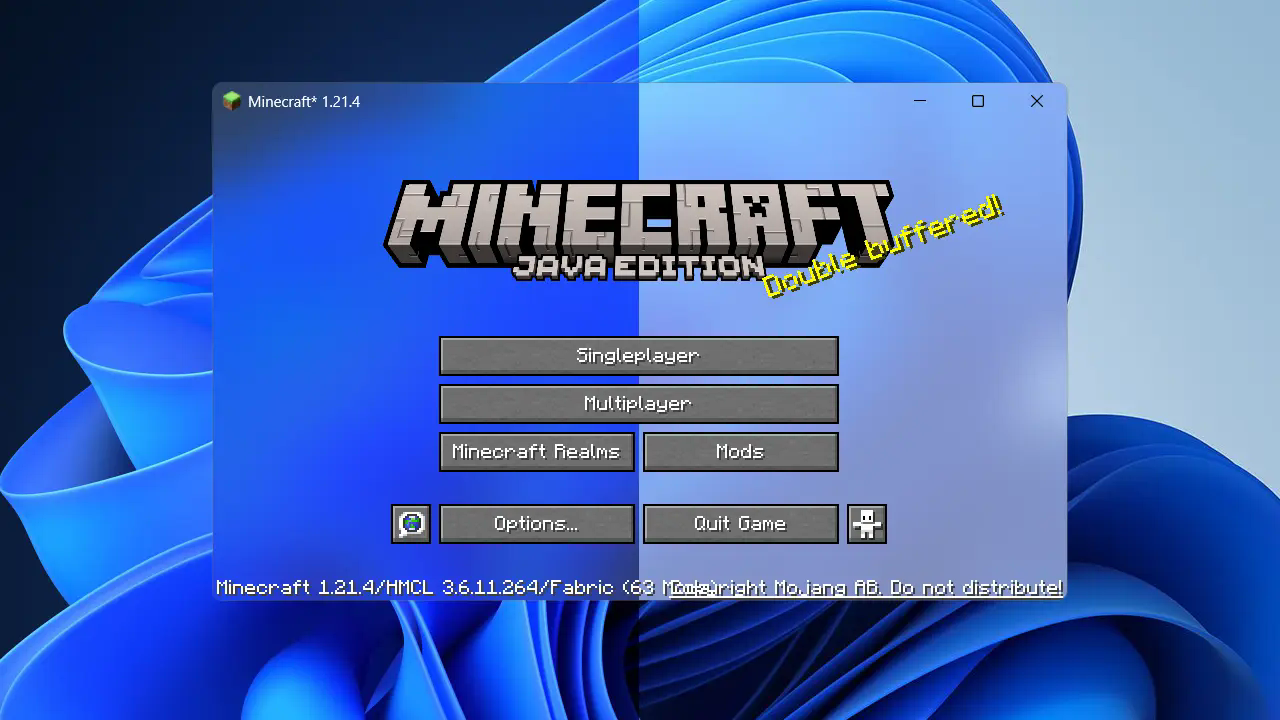
Apply Windows 11 Fluent Design materials to Minecraft window.
- Загрузки
- 25K
- Подписчики
- 99
- Обновлён
- 4 июля 2026 г.
- Лицензия
- MIT
Опубликован 16 марта 2024 г.
AcryliCraft
Apply Fluent Design materials to Minecraft window.
System Requirement
Fluent design materials, dark mode and border customization are exclusive to Windows 11 Version 22H2 (OS build 22621) or above. However, you can still utilize this mod on other operating systems to get the window background transparent, and then use other tools(e.g. Blur My Shell for GNOME) for further customizations.
Mod Dependencies
Acrylic depends on YetAnotherConfigLib as its configuration library. Additionally, you will need Mod Menu placed in your mods folder to access mod config if using Fabric.
IMPORTANT! For Forge/NeoForge 1.20 and above, it is also necessary to disable FML splash screen for the translucent game window to be properly initialized. This can be done by setting earlyWindowControl in .minecraft\config\fml.toml to false. Note that this MIGHT lead to malfunction for some rendering mods which leverages advanced OpenGL features, so proceed at your own risk.
Known Issues
Some NVIDIA graphics cards don't render translucency properly for Minecraft's window (or any other GLFW window), in which case the window background would appear black. This is likely an issue with their drivers and is unfortunately not solveable on my end. Switching to another graphics card should make it work, if you happen to have one installed on your machine.
For Minecraft 26.2+, there is a known issue with window transparency when using Vulkan backend on Linux. This is due to Minecraft defaulting to X11(and XWayland for Wayland) for GLFW. The mod solves this issue by forcing Wayland initialization hint when it is available, and this fix seems to work so far. That said, it is not a guaranteed fix for everyone. If you encounter any problem, feel free to report it on the Github page.
Credits
This mod was inspired by some other open source projects. Here's a list of them:
- Mica: Minecraft Mod / Enable Mica, Acrylic on Windows 11 21H2 22000 or later.
- jSystemThemeDetector: Java library for detecting that the (desktop) operating system uses dark UI theme or not
Ченджлог
1.8.6Релиз26.2 · 4 июля 2026 г.
Added a toggle for preferring GLFW Wayland backend when it is available. Try turning it off if you have a Wayland problem.
1.8.6Релиз26.2 · 4 июля 2026 г.
Added a toggle for preferring GLFW Wayland backend when it is available. Try turning it off if you have a Wayland problem.
1.8.5Релиз26.2 · 24 июня 2026 г.
For Minecraft 26.2+, there is a known issue with window transparency when using Vulkan backend on Linux. This is due to Minecraft defaulting to X11(and XWayland for Wayland) for GLFW. The mod solves this issue by forcing Wayland initialization hint when it is available, and this fix seems to work so far. That said, it is not a guaranteed fix for everyone. If you encounter any problem, feel free to report it on the Github page.
1.8.5Релиз26.2 · 24 июня 2026 г.
For Minecraft 26.2+, there is a known issue with window transparency when using Vulkan backend on Linux. This is due to Minecraft defaulting to X11(and XWayland for Wayland) for GLFW. The mod solves this issue by forcing Wayland initialization hint when it is available, and this fix seems to work so far. That said, it is not a guaranteed fix for everyone. If you encounter any problem, feel free to report it on the Github page.
1.8.1Релиз26.1, 26.1.1, 26.1.2 · 6 мая 2026 г.
- Add custom colored background config(with transparency)
1.8.1Релиз26.1, 26.1.1, 26.1.2 · 6 мая 2026 г.
- Add custom colored background config(with transparency)
1.7.0Релиз1.21.6, 1.21.7, 1.21.8 · 4 июля 2025 г.
- First release for MC 1.21.6-1.21.8
- May contain glitches
1.7.0Релиз1.21.9, 1.21.10, 1.21.11 · 4 июля 2025 г.
- First release for MC 1.21.6-1.21.11
- May contain glitches
Комментарии
Загружаем…