 Mineforgian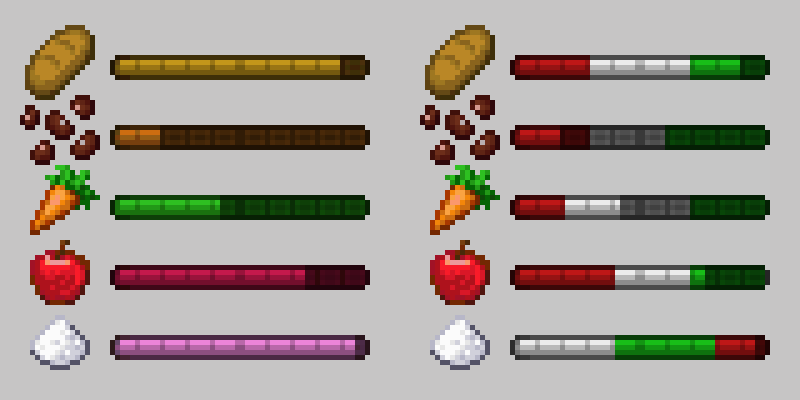
A Balanced Diet
A customizable food group-based nutrition and diet system, forked from the Diet mod.
- Загрузки
- 12K
- Подписчики
- 4
- Обновлён
- 18 мая 2026 г.
- Лицензия
- LGPL-3.0-or-later
Опубликован 6 мая 2026 г.
About
A Balanced Diet is a fork of the Diet, which facilitates the creation and management of dietary food groups in Minecraft. Diet comes with a default configuration that creates five classical food groups (fruits, grains, vegetables, proteins, and sugars). The mod is highly configurable; users and modpack developers can define their own food groups, classifications, diet effects, notifications, etc.
This fork was created to add some additional clarity, balance, and quality of life features. These would have been made as a PR to the original mod, but the author stated the mod is not likely to have any further 1.20.1 updates. These new features are almost entirely optional and data-driven, and include a notification system for crossing specified thresholds, quality overlays to the diet bars that show what thresholds start providing positive or negative effects, and per-food nutrition definition. For more information about these new features see the 3.0 Changelog.
Downloads


Features
Food Groups

Food groups are custom dietary groups that represent the types of food that you have eaten. Each group has a value ranging between 0% and 100% depending on how much of that particular category that a player has eaten. These values increase depending on what types of food a player eats and every group gradually decays when the player uses up their hunger bar.
By default, Diet comes with five classical food groups: Fruits, Grains, Proteins, Vegetables, and Sugars. Nutrition values are typically determined by tags. However, if enabled in the config, they can be set per-food based on datapack files at /diet/food_values.
By editing the diet-groups.toml configuration file in the world save's serverconfig folder, users and modpack developers can create their own custom food groups. Configurable options include:
- Name
- Item Icon
- Hexcode Color
- Ordering
- Default Value
- Gain Multiplier
- Decay Multiplier
Please refer to the wiki for more detailed information. For information about 3.0+ features (like quality indicators, per-food nutrition, and notifications), see the 3.0 Changelog.
Dietary Effects

Dietary effects are custom rewards or penalties applied to players based on certain, configurable food group values. These effects can be configured through the diet-effects.toml file in the world save's serverconfig folder.
Possible effects can include any registered potion effect, vanilla and modded, as well as modifying attributes directly (i.e. increasing maximum health by an arbitrary value). The conditions for these effects are highly configurable, including checking specific values, checking only subsets of groups, applying effects cumulatively for each matching test, and much more.
Please refer to the wiki for more detailed information. For information about 3.0+ features (like quality indicators, per-food nutrition, and notifications), see the 3.0 Changelog.
Commands
Diet registers a few commands to help aid debugging and server management.
/dietget <player> <group>set <player> <group> <value>add <player> <group> <value>subtract <player> <group> <value>reset <player>pause <player>resume <player>export <filter> <argument>notify <target> <notification_id>notifications listnotifications allnotifications group <group_id>notifications set <set_id>notifications message <message_id>notifications options <message_id>notifications reset
Support
Please report all bugs, issues, and feature requests using the issue tracker on the mod's GitHub page. Please do not make issues on the original mod's GitHub page for features only present in this fork.
If preferred, I will respond to any pings in the Discord server for my current modpack, Desolate Planet. Feel free to reach out to me there as well.
License
All source code and assets are licensed under LGPL 3.0.
Donations
Donations to the original mod's author can be sent through Ko-fi.
All proceeds from the ad revenue on this project will be donated to GiveWell.
Compatibility
The standard "five food groups" tag system supports many mods, which can be viewed here, in the original mod's description.
A smaller subset of mods are supported by the custom food values system. A list of these mods can be found in the mod's default datapack. These default values assume a decreased drain rate for fruits and vegetables, and greatly increased drain rates for sugars.
If you would like to request additional support for this system, please open an issue or open a pull request to contribute directly.
Ченджлог
3.0.2+1.20.1Релиз1.20.4, 1.20.5, 1.20.6 · 18 мая 2026 г.
The format is based on Keep a Changelog and this project adheres to Semantic Versioning.
This is a copy of the changelog for the most recent version. For the full version history, go here.
[3.0.2+1.20.1] - 2026.05.18
This is a bugfix update to fix a problem from the previous major update. See the 3.0 Changelog for details about the new features.
Fixed
- Fixed a command permission registration issue that stopped clients from joining servers
3.0.2+1.20.1Релиз1.20.4, 1.20.5, 1.20.6 · 18 мая 2026 г.
The format is based on Keep a Changelog and this project adheres to Semantic Versioning.
This is a copy of the changelog for the most recent version. For the full version history, go here.
[3.0.2+1.20.1] - 2026.05.18
This is a bugfix update to fix a problem from the previous major update. See the 3.0 Changelog for details about the new features.
Fixed
- Fixed a command permission registration issue that stopped clients from joining servers
3.0.1+1.20.1Релиз1.20.4, 1.20.5, 1.20.6 · 8 мая 2026 г.
The format is based on Keep a Changelog and this project adheres to Semantic Versioning.
This is a copy of the changelog for the most recent version. For the full version history, go here.
[3.0.1+1.20.1] - 2026.05.07
This is a minor update to fix a few problems from the previous major update. See the 3.0 Changelog for details about the new features.
Added
- Drinks and other non-food edible items can now provide nutrition if present in the
food_valuesconfig. Items must use the eating or drinking animation to be considered edible. - Milk buckets now provide protein when data-driven food values are enabled in the config.
Fixed
- Fixed some foods having the wrong
food_values- Vanilla beetroot soup
- Farmer's Delight tomato sauce
- Farmer's Delight cabbage
- Fixed some typos in the default
food_valuesthat prevented some modded foods from registering nutrition properly- 10 food items from Corn Delight
- 5 food items from Vegan Delight
- 2 food items from Cultural Delights
3.0.1+1.20.1Релиз1.20.4, 1.20.5, 1.20.6 · 8 мая 2026 г.
The format is based on Keep a Changelog and this project adheres to Semantic Versioning.
This is a copy of the changelog for the most recent version. For the full version history, go here.
[3.0.1+1.20.1] - 2026.05.07
This is a minor update to fix a few problems from the previous major update. See the 3.0 Changelog for details about the new features.
Added
- Drinks and other non-food edible items can now provide nutrition if present in the
food_valuesconfig. Items must use the eating or drinking animation to be considered edible. - Milk buckets now provide protein when data-driven food values are enabled in the config.
Fixed
- Fixed some foods having the wrong
food_values- Vanilla beetroot soup
- Farmer's Delight tomato sauce
- Farmer's Delight cabbage
- Fixed some typos in the default
food_valuesthat prevented some modded foods from registering nutrition properly- 10 food items from Corn Delight
- 5 food items from Vegan Delight
- 2 food items from Cultural Delights
3.0.0+1.20.1Релиз1.20.4, 1.20.5, 1.20.6 · 6 мая 2026 г.
The format is based on Keep a Changelog and this project adheres to Semantic Versioning.
This is a copy of the changelog for the most recent version. For the full version history, go here.
[3.0.0+1.20.1] - 2026.05.05
This update was made by Pawjwp to add some clarity, balance, and quality of life features. This will be published on a fork of the Diet mod.
Added
- Tooltips
- Each diet group now has a tooltip showing the effects that come from it, in addition to the aggregate tooltip at the top of the screen
- Quality view (optional, data-driven)
- Adds a system to show the “quality” of a food group to indicate to players what thresholds will provide positive or negative effects.
- The quality display can be configured to appear upon hovering over a group bar, by clicking a button in the corner of the Diet screen, both, or neither.
- Quality values can be defined for any effect in a diet suite using the
qualityfield, which is set to a string containing a hex color code (ex:"#3FDF3F"). This value is drawn over that region of the bar whenever the quality view is visible.
- Per-food nutrient control (optional, data-driven)
- Added a config option that allows nutrition values to be set per-food rather than generated based on tags. When enabled, Diet will reference datapack files at
/diet/food_valuesto get food values on a per-food basis. These are used in place of the tag-based ones. - The default datapack has default values configured for ~20 mods, more may be added in the future or upon request. These default values assume decreased drain rate for fruits and vegetables, and greatly increased drain rates for sugars.
- Added a config option that allows nutrition values to be set per-food rather than generated based on tags. When enabled, Diet will reference datapack files at
- Notification system (optional, data-driven)
- Adds an optional notification system, customizable from within a diet suite. This is handled through a notification object that can be added to each effect block in the suite.
- Fields:
notification_id(required)message, uses translation keys and %s will be replaced by diet group name (required)notification_sets, an array of strings used for bulk-mutingtrigger, what change causes the notification to appear, can be one of:enter, when the player enters the specified threshold (default if omitted)rise_into, when the player enters the specified threshold from belowfall_into, when the player enters the specified threshold from aboverise_through, when the player enters or passes through the specified threshold from belowfall_through, when the player enters or passes through the specified threshold from aboveexit, when the player leaves the specified thresholdrise_out, when the player leaves the specified thresholdfall_out, when the player leaves the specified thresholdall, when the player enters or exits the specified threshold
default_frequency, how many times the notification will appear. A config option sets the default values for whendefault_frequencyis omitted.always, notification will appear every time its trigger is metonce, notification will appear once and then set itself tonevernever, notification will not appear unless triggered by testing commands
- Effects can declare a notification without declaring any attributes or status effects
- Fields:
- Notifications appear in chat based on their triggers and frequency. If a notification’s frequency is set to
once, it will set itself toneverafter being triggered the first time. If a notification’s frequency is set toalways, it will provide a prompt for the player to mute it (set its frequency tonever). When clicked, the mute menu opens in chat with the following options:- Mute this, which mutes this specific notification ID
- Mute set, which mutes all of the notifications that are part of the selected set
- Mute group, which mutes all notifications with the same food group as the current notification
- Mute all, which mutes all diet notifications
- Clicking one of these buttons runs the new
/diet notificationscommand with the appropriate parameters, but these commands can be run by the player to manually adjust their notification settings. The options for the command are:/diet notifications list, which will list the notification defaults and current settings for each individual message ID/diet notifications all, which will change notification frequency for all notifications/diet notifications group <group_id>, which will change notification frequency for everything with the specified group ID/diet notifications set <set_id>, which will change notification frequency for everything with specified set ID/diet notifications message <message_id>, which will change notification frequency for the specified message ID/diet notifications options <message_id>, which will show the mute menu for the specified message ID/diet notifications reset, which will reset all notifications to their configured defaults (this will causeoncenotifications to re-trigger)
- An additional new command has been added to manually test notifications.
/diet notify <target> <notification_id>will trigger the notification with the specified ID. - New config options have been added to the server config:
notificationsEnabled, to enable or disable the entire notification systemnotificationsDefaultFrequency, to set the frequency if thedefault_frequencyfield is omitted from a notification block in the diet suite
- The default diet suite has been updated to include notifications for entering each of its three effects, and a new localization file was created under the “example” namespace to register the messages.
- Adds an optional notification system, customizable from within a diet suite. This is handled through a notification object that can be added to each effect block in the suite.
3.0.0+1.20.1Релиз1.20.4, 1.20.5, 1.20.6 · 6 мая 2026 г.
The format is based on Keep a Changelog and this project adheres to Semantic Versioning.
This is a copy of the changelog for the most recent version. For the full version history, go here.
[3.0.0+1.20.1] - 2026.05.05
This update was made by Pawjwp to add some clarity, balance, and quality of life features. This will be published on a fork of the Diet mod.
Added
- Tooltips
- Each diet group now has a tooltip showing the effects that come from it, in addition to the aggregate tooltip at the top of the screen
- Quality view (optional, data-driven)
- Adds a system to show the “quality” of a food group to indicate to players what thresholds will provide positive or negative effects.
- The quality display can be configured to appear upon hovering over a group bar, by clicking a button in the corner of the Diet screen, both, or neither.
- Quality values can be defined for any effect in a diet suite using the
qualityfield, which is set to a string containing a hex color code (ex:"#3FDF3F"). This value is drawn over that region of the bar whenever the quality view is visible.
- Per-food nutrient control (optional, data-driven)
- Added a config option that allows nutrition values to be set per-food rather than generated based on tags. When enabled, Diet will reference datapack files at
/diet/food_valuesto get food values on a per-food basis. These are used in place of the tag-based ones. - The default datapack has default values configured for ~20 mods, more may be added in the future or upon request. These default values assume decreased drain rate for fruits and vegetables, and greatly increased drain rates for sugars.
- Added a config option that allows nutrition values to be set per-food rather than generated based on tags. When enabled, Diet will reference datapack files at
- Notification system (optional, data-driven)
- Adds an optional notification system, customizable from within a diet suite. This is handled through a notification object that can be added to each effect block in the suite.
- Fields:
notification_id(required)message, uses translation keys and %s will be replaced by diet group name (required)notification_sets, an array of strings used for bulk-mutingtrigger, what change causes the notification to appear, can be one of:enter, when the player enters the specified threshold (default if omitted)rise_into, when the player enters the specified threshold from belowfall_into, when the player enters the specified threshold from aboverise_through, when the player enters or passes through the specified threshold from belowfall_through, when the player enters or passes through the specified threshold from aboveexit, when the player leaves the specified thresholdrise_out, when the player leaves the specified thresholdfall_out, when the player leaves the specified thresholdall, when the player enters or exits the specified threshold
default_frequency, how many times the notification will appear. A config option sets the default values for whendefault_frequencyis omitted.always, notification will appear every time its trigger is metonce, notification will appear once and then set itself tonevernever, notification will not appear unless triggered by testing commands
- Effects can declare a notification without declaring any attributes or status effects
- Fields:
- Notifications appear in chat based on their triggers and frequency. If a notification’s frequency is set to
once, it will set itself toneverafter being triggered the first time. If a notification’s frequency is set toalways, it will provide a prompt for the player to mute it (set its frequency tonever). When clicked, the mute menu opens in chat with the following options:- Mute this, which mutes this specific notification ID
- Mute set, which mutes all of the notifications that are part of the selected set
- Mute group, which mutes all notifications with the same food group as the current notification
- Mute all, which mutes all diet notifications
- Clicking one of these buttons runs the new
/diet notificationscommand with the appropriate parameters, but these commands can be run by the player to manually adjust their notification settings. The options for the command are:/diet notifications list, which will list the notification defaults and current settings for each individual message ID/diet notifications all, which will change notification frequency for all notifications/diet notifications group <group_id>, which will change notification frequency for everything with the specified group ID/diet notifications set <set_id>, which will change notification frequency for everything with specified set ID/diet notifications message <message_id>, which will change notification frequency for the specified message ID/diet notifications options <message_id>, which will show the mute menu for the specified message ID/diet notifications reset, which will reset all notifications to their configured defaults (this will causeoncenotifications to re-trigger)
- An additional new command has been added to manually test notifications.
/diet notify <target> <notification_id>will trigger the notification with the specified ID. - New config options have been added to the server config:
notificationsEnabled, to enable or disable the entire notification systemnotificationsDefaultFrequency, to set the frequency if thedefault_frequencyfield is omitted from a notification block in the diet suite
- The default diet suite has been updated to include notifications for entering each of its three effects, and a new localization file was created under the “example” namespace to register the messages.
- Adds an optional notification system, customizable from within a diet suite. This is handled through a notification object that can be added to each effect block in the suite.
Комментарии
Загружаем…