 Mineforgian
Universal Font Tester
Instantly preview and test any Minecraft font with easy in-game commands — ideal for creators, resource-pack artists, and modpack designers.
- Загрузки
- 162
- Подписчики
- 0
- Обновлён
- 16 марта 2026 г.
- Лицензия
- All-Rights-Reserved
Опубликован 2 декабря 2025 г.





Universal Font Tester
Instantly preview and test any Minecraft font with easy in-game commands — ideal for all players, creators, and resource-pack artists. This lightweight datapack lets you display entire character sets (Latin, Greek, Cyrillic, and symbols) directly in your world with one simple command.
🧩 What It Does
The Universal Font Tester datapack allows you to visualize and test fonts in real time, right inside Minecraft. It’s especially useful when:
- Installing a new resource pack that changes the font
- Testing readability for menus, chat, quests, or GUIs
- Creating your own custom typeface and wanting to check spacing and accents
- Or simply exploring Minecraft’s text rendering with a fun visual showcase
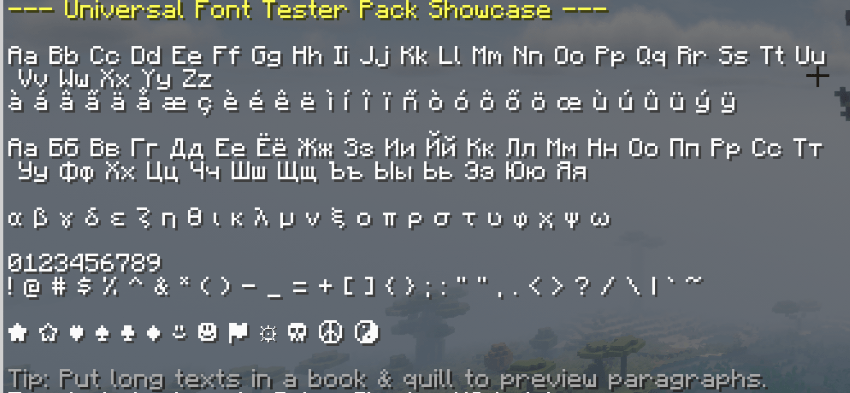
You can instantly display full alphabets, numbers, and special characters, all formatted in neat chat previews.
⚙️ How To Use
After installing the datapack in your world, run:
/reload
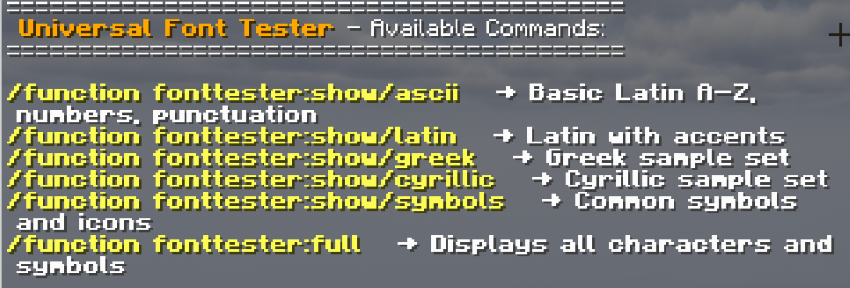
/function fonttester:help
You’ll receive a clickable in-game help menu with all available showcase commands.
✨ Available Commands
Each command instantly prints a font sample directly in your chat.
| Command | Description |
|---|---|
/function fonttester:help |
Displays the clickable help menu with all commands |
/function fonttester:show/ascii |
Basic Latin (A–Z, numbers, punctuation) |
/function fonttester:show/latin |
Extended Latin and accented characters |
/function fonttester:show/greek |
Greek alphabet |
/function fonttester:show/cyrillic |
Cyrillic alphabet |
/function fonttester:show/symbols |
Common symbols and icons |
/function fonttester:full |
Displays all characters and symbols in one view |
💡 Tip: Place your font resource pack at the top of your list to ensure your custom font is used during testing.
🎯 Why Use It?
✅ No setup required — works instantly after install ✅ Great for creators who design GUIs, menus, or RPG-style interfaces ✅ Supports all modern Minecraft versions ✅ Lightweight and multiplayer-friendly ✅ 100% client-side compatible (safe to use in any world)
🧱 Compatibility
| Minecraft Version | Compatibility |
|---|---|
| 1.21.x | ✅ Fully compatible |
| 1.20.x | ✅ Fully compatible |
| 1.19.x | ✅ Compatible |
| 1.18.x | ✅ Compatible |
| 1.17.x | ✅ Compatible |
| 1.16.x | ✅ Compatible |
🤝 Credits & Links
Created by LevelsFR
Part of the Our Story Collection
Hosted with ❤️ by BisectHosting
Support the development on Patreon — early access, sneak peeks, and exclusive resources!
🪶 License
Free to use and include in your own projects with credit.
© 2025 Our Story Collection — All rights reserved.
Ченджлог
3Релиз1.21.9, 1.21.10, 1.21.11 · 16 марта 2026 г.
Universal Font Tester - Universal Changelog
v3
- Reworked the in-game help menu with clearer clickable previews.
- Added a width test for narrow, wide, and easily-confused glyphs.
- Added a UI test for buttons, HUD labels, counters, percentages, and timers.
- Expanded the preview coverage for Latin, Greek, Cyrillic, and symbols.
- Refactored the full preview to call each section instead of duplicating text blocks.
- Improved the reload message and refreshed the pack presentation.
- Removed the written book feature after compatibility issues on Java Edition 1.21.1.
- Prepared split release archives for the different Java Edition 1.21.x datapack formats.
2.1Релиз1.21.8, 1.21.9, 1.21.10 · 2 декабря 2025 г.
Universal Font Tester – v2.1 Update
🆕 Overview
The v2.1 update refines the usability of the Universal Font Tester by improving command accessibility and completing the help menu integration introduced in v2.
This version focuses on small but important quality-of-life improvements to make the datapack smoother and more intuitive to use in-game.
✨ Improvements
✅ New Help Menu Integration
- The
/function fonttester:fullcommand is now properly included in the in-game help menu. - Players can now click directly on the command name from the help chat message to execute it instantly — no need to type it manually.
Just run:
/function fonttester:help
and all available font test commands, including the full character showcase, will appear as clickable options.
⚙️ Commands Overview
| Command | Description |
|---|---|
/function fonttester:help |
Displays the clickable help menu with all commands |
/function fonttester:show/ascii |
Basic Latin (A–Z, numbers, punctuation) |
/function fonttester:show/latin |
Extended Latin and accented characters |
/function fonttester:show/greek |
Greek alphabet |
/function fonttester:show/cyrillic |
Cyrillic alphabet |
/function fonttester:show/symbols |
Common symbols and icons |
/function fonttester:full |
Displays all characters and symbols in one view |
🧱 Compatibility
| Minecraft Version | Status |
|---|---|
| 1.16 – 1.20.x | ✅ Fully compatible |
| 1.21.x | ✅ Fully compatible |
Both versions include this improvement.
💡 Notes
- The datapack still only displays text; it does not modify fonts.
- Font rendering depends on your active resource pack.
- Place your resource pack at the top of the list to ensure correct display.
🤝 Credits
Created by LevelsFR
Part of the Our Story Collection 🌿
Hosted with ❤️ by BisectHosting
✨ A cleaner, more accessible Universal Font Tester experience — now fully interactive.
Комментарии
Загружаем…