 Mineforgian
Revised Glass
Enhance your Minecraft experience with the Revised Glass data pack, which provides a simple and user-friendly way to recolor your existing colored glass.
- Загрузки
- 588
- Подписчики
- 7
- Обновлён
- 18 августа 2024 г.
- Лицензия
- All-Rights-Reserved
Опубликован 7 ноября 2023 г.
——————————————
Summary
Enhance your Minecraft experience with the Revised Glass data pack, which provides a simple and user-friendly way to recolor your existing colored glass.
How To Craft
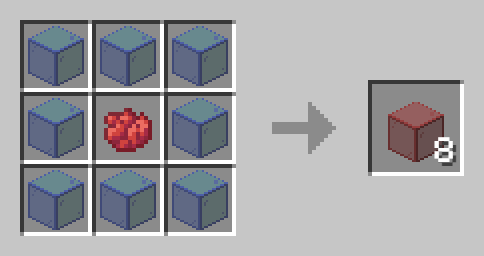
Simply open a crafting table and place your chosen dye color in the center slot. Then, surround the dye with eight pieces of colored glass. The crafting table will transform these materials into your newly recolored glass, allowing you to customize your glass blocks and panes with the desired color.
Installation
Installing the Revised Glass data pack on your server is straightforward. First, locate the data packs folder within your server files. Once found, simply drag the Revised Glass data pack, which should be in a .zip file format, into that folder. Afterward, restart your server, and you're all set to enjoy the changes.
——————————————
Have any questions or concerns please contact sunny223#0 on Discord.
Ченджлог
1.1+modРелиз1.21 · 18 августа 2024 г.
Revised Glass has undergone a complete overhaul. All previous versions have been removed due to multiple bugs and compatibility issues with certain versions.
- Added support for Minecraft 1.21
- Fixed numerous bugs
- Included a datapack icon
1.1Релиз1.21 · 18 августа 2024 г.
Revised Glass has undergone a complete overhaul. All previous versions have been removed due to multiple bugs and compatibility issues with certain versions.
- Added support for Minecraft 1.21
- Fixed numerous bugs
- Included a datapack icon
Комментарии
Загружаем…