 Mineforgian
Liminal Paintings
DyoudiM!'s liminal-vibe artwork added to Minecraft as paintings!
- Загрузки
- 254
- Подписчики
- 5
- Обновлён
- 27 августа 2025 г.
- Лицензия
- CC-BY-SA-4.0
Опубликован 25 августа 2025 г.
Warning/Note
If you download the datapack version, a resourcepack is required! If you are planning to use the datapack version, please manually go into the versions tab, choose the version you want, and download BOTH of the TWO attached files! The main one will be the datapack itself, and the "additional" one is the resourcepack required! If you do not do this, all paintings will have no defined texture and turn into pink and black checkerboard patterns!
All links in the sidebar are DyoudiM!'s links, and are not related to me in any way.
DyoudiM!'s liminal-vibe artwork added to Minecraft as paintings!
Currently there are 69 paintings added. (That number is NOT intentional, it is a coincidence)
For datapack versions below 1.2.30:
To check credits in-game, you can use /function tbdlp:credits.
To give yourself ALL the paintings, use /function tbdlp:all.
For datapack versions 1.2.30 or over:
To check credits in-game, you can use /function liminalpaintings:credits.
To give yourself ALL the paintings, use /function liminalpaintings:all.
All credits for the artworks go to DyoudiM!.
Versions
- Datapack version: Includes a Datapack & a Resourcepack.
- Custom Paintings version: Includes a Custom Paintings pack that requires the Custom Paintings mod.
Modloader will say Datapack, although it's not. It does not have a resourcepack option as the first uploaded version was a datapack.
Installation
To install the datapack version, first go into the versions tab, choose your version (must be labeled with "Datapack") and download both files attached, one is the datapack, the other (labeled "Resources" and is "additional") is a resourcepack. Put the resourcepack in your resourcepack folder like normal. Put the datapack in the "datapacks" folder in your already-existing world, or if it's a new world, add it during world creation.
To install the custom paintings version, first go into the versions tab, choose your version (Must be labled with "Custom Paintings") and download the file. Next make sure you have the Custom Paintings mod installed. If not, download it at https://modrinth.com/mod/custom-paintings-mod.
To add the custom paintings pack to your world, you can follow the tutorial in the page's description (https://modrinth.com/mod/custom-paintings-mod).
Simply press U or whatever key you have set for opening the Custom Painting's mod menu while in a world. Then choose to manage packs, open the folder, and put the file into the folder. You can now close the folder, return to the game and choose to reload packs, ensure that the pack is listed, and done!
Permission:
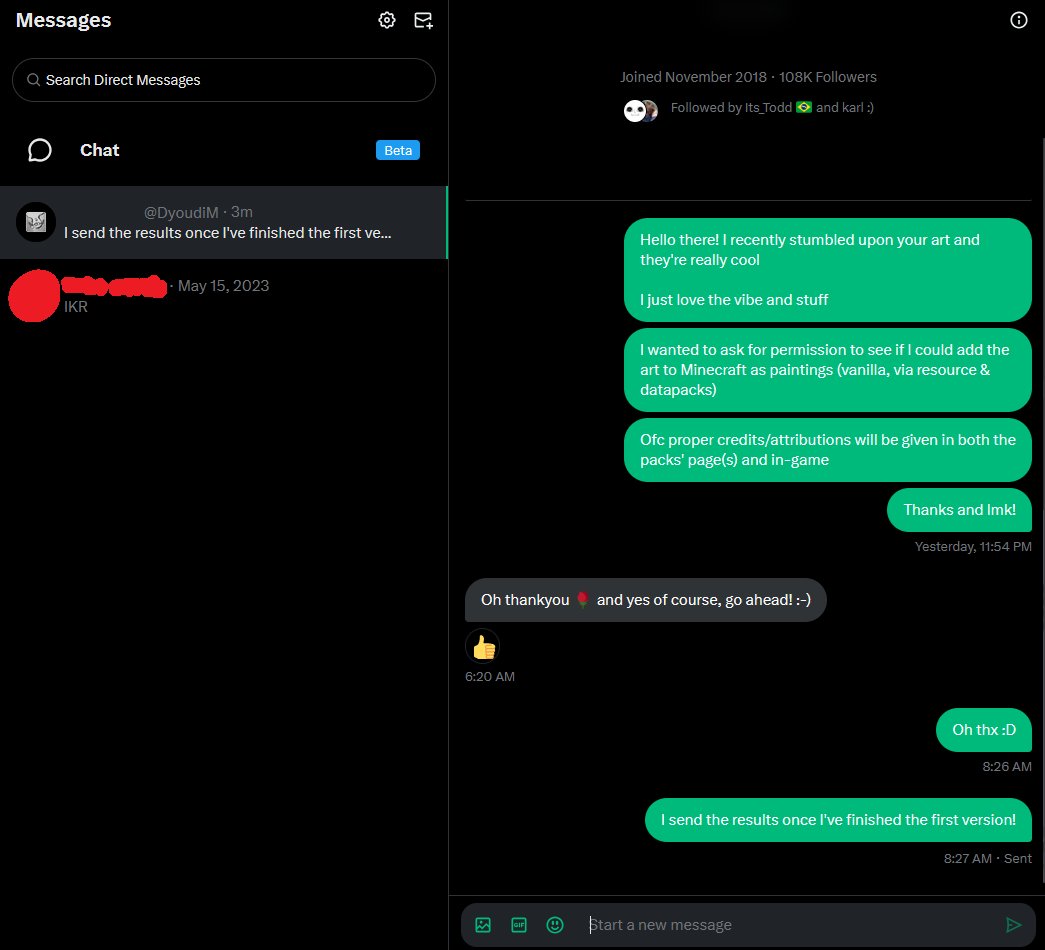 (Source: https://x.com/error_dev_xt/status/1959745434240655396)
Ченджлог
1.3.20-DatapackРелиз1.21.7, 1.21.8, 25w34b · 27 августа 2025 г.
Patch Notes
↑ Added support for 25w34b.
- Fixed error (see below).
⇌ Changed namespace from tbdlp to liminalpaintings.
Error Log
[ServerMain/ERROR]: Couldn't read tag list minecraft:placeable from minecraft:tags/paintingvariant/placeable.json in data pack file/diyoudiM! liminal paintings).zip
java.lang.IllegalStateException: Failed to parse either. First: Not a valid resource location: tbdlp:MINECRAFT Non [a-z0-9/.-] character in path of location: tbdlp:MINECRAFT; Second: Not a JSON object: "tbdlp:MINECRAFT"
    at com.mojang.serialization.DataResult$Error.getOrThrow(DataResult.java:287) ~[datafixerupper-8.0.16.jar:?]
    at com.mojang.serialization.DataResult.getOrThrow(DataResult.java:81) ~[datafixerupper-8.0.16.jar:?]
    at bdf.a(SourceFile:61) ~[server-25w35a.jar:?]
    at bdf.a(SourceFile:150) ~[server-25w35a.jar:?]
    at amr.a(SourceFile:325) ~[server-25w35a.jar:?]
    at amr$a.a(SourceFile:117) ~[server-25w35a.jar:?]
    at amr.a(SourceFile:193) ~[server-25w35a.jar:?]
    at amr.a(SourceFile:212) ~[server-25w35a.jar:?]
    at java.base/java.lang.Iterable.forEach(Iterable.java:75) ~[?:?]
    at amr.a(SourceFile:212) ~[server-25w35a.jar:?]
    at amr.a(SourceFile:193) ~[server-25w35a.jar:?]
    at anu.a(SourceFile:41) ~[server-25w35a.jar:?]
    at net.minecraft.server.Main.a(SourceFile:185) ~[server-25w35a.jar:?]
    at ag.a(SourceFile:1098) ~[server-25w35a.jar:?]
    at ag.c(SourceFile:1092) ~[server-25w35a.jar:?]
    at net.minecraft.server.Main.main(SourceFile:183) ~[server-25w35a.jar:?]
    at net.minecraft.bundler.Main.lambda$run$0(Main.java:54) ~[?:?]
    at java.base/java.lang.Thread.run(Thread.java:1583) [?:?]
Thanks to "KEIDESTEEN" for finding this error!
Datapack version. The additional file Liminal Paintings Resources is the resourcepack REQUIRED for this datapack.
All paintings can be found in the creative tab, and but cannot be obtained in survival mode with no cheats.
BETA labels are applied to all versions that are for snapshots, demos/w.i.p./pre-releases are all labeled ALPHA.
1.3.19-DatapackБета1.21.7, 1.21.8, 25w34b · 27 августа 2025 г.
Patch Notes
↑ Updated to 25w34b.
Datapack version. The additional file Liminal Paintings Resources is the resourcepack REQUIRED for this datapack.
All paintings can be found in the creative tab, and but cannot be obtained in survival mode with no cheats.
BETA labels are applied to all versions that are for snapshots, demos/w.i.p./pre-releases are all labeled ALPHA.
1.3.2-Custom-PaintingsРелиз1.21.7, 1.21.8 · 27 августа 2025 г.
Patch Notes
⇌ Fixed author name showing as "DiyoudiM!" instead of "DyoudiM!"
⇌ Fixed resource pack being labeled as "made for a newer version".
(Ignore the loader saying datapack, it wouldn't let me choose Fabric/Quilt (the Custom Painting's mod requirements) and there is no resourcepack option)
All paintings can be found in the creative tab, and can be obtained in survival mode with no cheats.
Demos/w.i.p./pre-releases are all labeled ALPHA.
1.3.18-DatapackРелиз1.21.7, 1.21.8 · 27 августа 2025 г.
Patch Notes
⇌ Fixed author name showing as "DiyoudiM!" instead of "DyoudiM!"
⇌ Fixed resource pack being labeled as "made for a newer version".
Datapack version. The additional file Liminal Paintings Resources is the resourcepack REQUIRED for this datapack.
All paintings can be found in the creative tab, and but cannot be obtained in survival mode with no cheats.
BETA labels are applied to all versions that are for snapshots, demos/w.i.p./pre-releases are all labeled ALPHA.
Комментарии
Загружаем…